学习python日记(进阶篇)
终于学到函数了,决定重新开启一篇随笔,之前的随笔以介绍基本的变量为主,大家可以看看
函数
先看一下如何定义函数
#简单的函数
def mylove():
    for i in range(3):
        print("I love Gaoban")

mylove()
I love Gaoban
I love Gaoban
I love Gaoban
#有形参的函数
def mylove(name,times):
    for i in range(times):
        print(f"I love {name}")

mylove("Gaoban",4)
I love Gaoban
I love Gaoban
I love Gaoban
I love Gaoban
再看一下有返回值的函数
def div(x,y):
    if y == 0:
        return "除数不能为0"
    else:
        return x/y
但当函数执行return之后,就不再执行后面的语句,所以上面的代码可以进行优化
def div(x,y):
    if y == 0:
        return "除数不能为0"
    return x/y
div(4,2)
Out[10]: 2.0
div(4,0)
Out[11]: '除数不能为0'
当函数没写返回值时,返回None
def hhhh():
    pass
print(hhhh())
None
接下来再来介绍一下形参
位置形参
def myfunc(a,b,c):
    return "".join([c,b,a])
myfunc("我","爱","Gaoban")
Out[74]: 'Gaoban爱我'
我们需要记住形参的位置来使用函数,不免麻烦,python提供了一种关键字方法(如下),但要求位置形参在前,否则会报错
myfunc(c="Gaoban",a="我",b='爱')
Out[81]: 'Gaoban爱我'
但是位置形参和关键字形参混合使用时,则较为容易犯错,最好还是能分清位置形参比较好
#这个是对b重复赋值
myfunc("我","Gaoban",b="爱")
Traceback (most recent call last):
  File "D:\anaconda\lib\site-packages\IPython\core\interactiveshell.py", line 3460, in run_code
    exec(code_obj, self.user_global_ns, self.user_ns)
  File "<ipython-input-75-c3e7667522ff>", line 1, in <module>
    myfunc("我","Gaoban",b="爱")
TypeError: myfunc() got multiple values for argument 'b'
#这个是关键字形参要在位置形参之后
myfunc(b="爱","我","Gaoban")
  Cell In[76], line 1
    myfunc(b="爱","我","Gaoban")
                             ^
SyntaxError: positional argument follows keyword argument
此外还有默认参数的函数
def myfunc(a,b,c="Gaoban"):
    return "".join([c,b,a])
myfunc("我","爱")
Out[83]: 'Gaoban爱我'
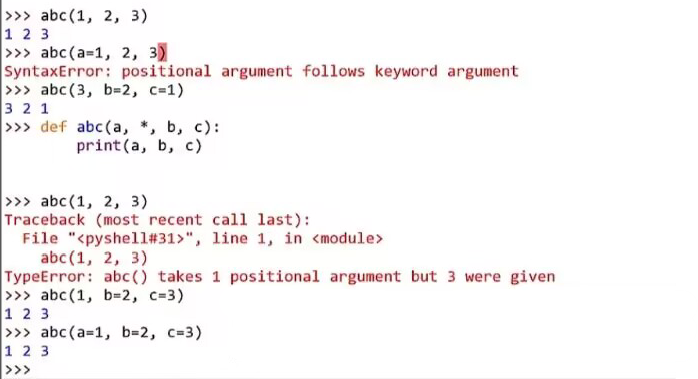
此外小甲鱼还介绍了一个冷门的知识,简单来说就是,在定义函数时,当形参里有“/”或者“*”时,则会出现有点参数只能用关键字定义,有的只能用位置定义,由于这个知识点对于我而言暂时意义不大,就不花精力撰写了,读着可以靠下面的视频截图读懂