requests高级用法 代理池搭建 爬取某视频网站
目录
- 1 requests高级用法
- 1.1 自动携带cookie 的session对象
- 1.2 响应Response
- 下载照片和视频
- 1.0 解析json
- 1.1 ssl认证(了解)
- 1.2 使用代理(重要)
- 1.3 超时设置
- 1.4 异常处理
- 1.5 上传文件
- 2 代理池搭建
- 2.1 django后端获取客户端的ip
- 3 爬取某视频网站
1 requests高级用法
1.1 自动携带cookie 的session对象
# session对象----》已经模拟登录上了一些网站---》单独把cookie 取出来
import requests

header = {
    'Referer': 'http://www.aa7a.cn/user.php?&ref=http%3A%2F%2Fwww.aa7a.cn%2F',
    'User-Agent': 'Mozilla/5.0 (Windows NT 10.0; Win64; x64) AppleWebKit/537.36 (KHTML, like Gecko) Chrome/114.0.0.0 Safari/537.36'
}

data = {
    'username': '616564099@qq.com',
    'password': 'lqz123',
    'captcha': 'xxxx',
    'remember': 1,
    'ref': ' http://www.aa7a.cn/',
    'act': 'act_login'
}
session=requests.session()

res = session.post('http://www.aa7a.cn/user.php', data=data, headers=header)
# cookie = res.cookies.get_dict()
# print(type(cookie))
res1 = session.get('http://www.aa7a.cn/')
print('616564099@qq.com' in res1.text)
1.2 响应Response
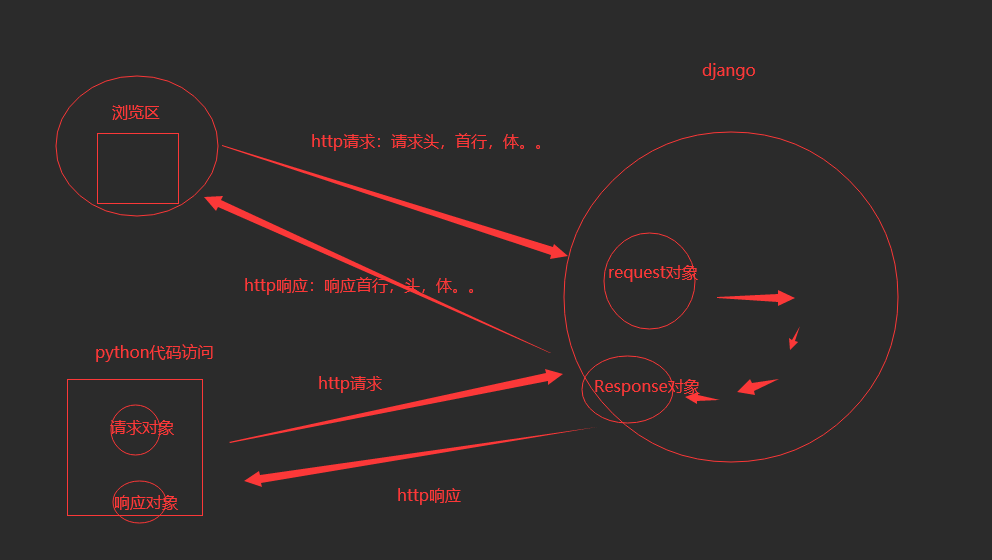
# http的响应,就是res对象,所有http响应的东西,都在这个对象中
respone = requests.get('http://www.aa7a.cn/')
print(type(respone))
from requests.models import Response
print(respone.text)   # 响应体转成字符串,默认使用utf-8编码----》以后打印出来可能会乱码
print(respone.content) #响应体的bytes格式
print(respone.status_code)#响应状态码
print(respone.headers)  # 响应头
print(respone.cookies)  # cookie
print(respone.cookies.get_dict()) # cookie 转成字典
print(respone.cookies.items()) #键值对的形式
print(respone.url)    # 请求地址
print(respone.history) # 访问一个地址,如果重定向了,requests会自动重定向过去,放着之前没重定向之前的地址,列表
print(respone.encoding)  #网页编码

# 关闭:response.close()
# respone.iter_content()  # 一点一点取,用来下载图片视频之类的
下载照片和视频
res = requests.get('https://img1.baidu.com/it/u=3410523613,2628462258&fm=253&fmt=auto&app=138&f=JPEG?w=500&h=666')
with open('iu.png', 'wb') as f:
    f.write(res.content)

res = requests.get('https://baikevideo.cdn.bcebos.com/media/mda-O9RdT0kPaBN7yOxV/31d4e448e2fc50081846d0284f6f9cfe.mp4')
with open('iu.mp4', 'wb') as f:
    for line in res.iter_content(chunk_size=1024):
        f.write(line)


#  编码问题
# 直接打印res.text 字符串形式-----》从网络过来是二进制----》转成字符串涉及到编码---》默认以utf-8,---》现在会自动识别页面的编码,自动转成对应的
# res.encoding='gbk' # 手动指定编码
print(res.text)
1.0 解析json
res=requests.post('http://www.kfc.com.cn/kfccda/ashx/GetStoreList.ashx?op=keyword',data='cname=&pid=&keyword=%E5%91%A8%E6%B5%A6&pageIndex=1&pageSize=10',headers={
    'Content-Type':'application/x-www-form-urlencoded; charset=UTF-8'
})

print(res)

res = requests.post('http://www.kfc.com.cn/kfccda/ashx/GetStoreList.ashx?op=keyword', data={
    'cname': '',
    'pid': '',
    'keyword': '周浦',
    'pageIndex': 1,
    'pageSize': 10,
})

for item in res.json()['Table1']:
    print('餐厅名字:%s,餐厅地址:%s'%(item['storeName'],item['addressDetail']))
1.1 ssl认证(了解)
补充:http和https的区别 :https://zhuanlan.zhihu.com/p/561907474
1.2 使用代理(重要)
## 7 使用代理 ---》访问某些网站,频率过高,就会被封ip===》使用代理ip访问---》封的是代理ip
#  代理:免费,收费    公司会花钱买的
#
# import requests
# proxies = {
#     'http': '104.193.88.77:80',
# }
# respone=requests.get('http://127.0.0.1:8000/',proxies=proxies)
# print(respone)

# 验证是否走了代理,咱们写个django后端,运行在公网上,使用requests访问
1.3 超时设置
# import requests
# respone=requests.get('https://www.baidu.com',timeout=1)
# print(respone)
1.4 异常处理
# 异常处理
import requests
from requests.exceptions import * #可以查看requests.exceptions获取异常类型
try:
    r=requests.get('http://www.baidu.com',timeout=0.00001)
 except ReadTimeout:
    print('===')
except RequestException:
    print('Error')
except Exception as e:
    print(e)
1.5 上传文件
import requests

 files = {'myfile': open('性感.png', 'rb')}
 respone = requests.post('http://127.0.0.1:8000/upload/', files=files)
 print(respone.status_code)
2 代理池搭建
import requests
proxies = {
    'http': '104.193.88.77:80',
}
respone=requests.get('http://127.0.0.1:8000/',proxies=proxies)
print(respone)


# 搭建一个代理池---》每次可以从池中随机取出一个代理---》发送请求
# 公司内部要用,会花钱买
# 咱们自己用,基于网上的开源软件,自己搭建


##  开源的代理池核心原理:https://github.com/jhao104/proxy_pool
	-1 使用爬虫技术,爬取网上免费的代理
    -2 爬完回来做验证,如果能用,存到redis中
    # 启动调度程序,爬代理,验证,存到redis中
	python proxyPool.py schedule


    -3 使用flask启动服务,对外开放了几个接口,向某个接口发请求,就能随机获取一个代理
    # 启动webApi服务
	python proxyPool.py server

#搭建步骤:
	 1 从git拉去开源代码
    	git clone https://github.com/jhao104/proxy_pool.git
    2 使用pycharm打开,创建虚拟环境
    	mkvirtualenv -p python3 pool
    3 配置项目使用虚拟环境
    4 修改项目配置文件
    	DB_CONN = 'redis://127.0.0.1:6379/2'
		HTTP_URL = "http://www.baidu.com"
		HTTPS_URL = "https://www.baidu.com"

    5 启动调度程序---》爬取网站,验证,存到redis
    	python proxyPool.py schedule

    6 启动web程序(flask写的)
    	python proxyPool.py server

    7 向http://192.168.1.252:5010/get/?type=http 地址发送请求就可以随机获取代理ip
2.1 django后端获取客户端的ip
import requests
res = requests.get('http://192.168.1.252:5010/get/?type=http').json()['proxy']
proxies = {
    'http': res,
}
print(proxies)
# 我们是http 要使用http的代理
respone = requests.get('http://139.155.203.196:8080/', proxies=proxies)
print(respone.text)
3 爬取某视频网站
# https://www.pearvideo.com/

#  加载下一页的地址
https://www.pearvideo.com/category_loading.jsp?reqType=5&categoryId=1&start=0
import requests
import re

res = requests.get('https://www.pearvideo.com/category_loading.jsp?reqType=5&categoryId=1&start=0')

video_list = re.findall('<a href="(.*?)" class="vervideo-lilink actplay">', res.text)
print(video_list)
for video in video_list:
    url = 'https://www.pearvideo.com/' + video
    header = {
        'Referer': url
    }

    video_id = video.split('_')[-1]
    video_url = 'https://www.pearvideo.com/videoStatus.jsp?contId=%s&mrd=0.8273125965736401' % video_id
    res1 = requests.get(video_url, headers=header).json()  # 真正能拿到视频的地址发送请求
    real_mp4_url = res1['videoInfo']['videos']['srcUrl']

    real_mp4_url = real_mp4_url.replace(real_mp4_url.split('/')[-1].split('-')[0], 'cont-%s' % video_id)
    print(real_mp4_url)
    res2 = requests.get(real_mp4_url)
    with open('./video/%s.mp4' % video, 'wb') as f:
        for line in res2.iter_content():
            f.write(line)


# ajax 请求拿回来的视频地址是:
# 能播放的地址:
# https://video.pearvideo.com/mp4/adshort/20181106/     1688703103822    -13189302_adpkg-ad_hd.mp4  # 不能的
# https://video.pearvideo.com/mp4/adshort/20181106/      cont-1470647     -13189302_adpkg-ad_hd.mp4 #能的

# url = 'https://video.pearvideo.com/mp4/adshort/20181106/1688703103822-13189302_adpkg-ad_hd.mp4'