python笔记
python官方文档
6.6的代码:
from maix import camera,mjpg,display
import socket

#host_name='192.168.4.1'
shuzu=bytearray(57600)#bytes是不能被修改的

#s = socket.socket(socket.AF_INET,socket.SOCK_STREAM)
#地址簇 : AF_INET (IPv4)类型: SOCK_STREAM (使用 TCP 传输控制协议)
#s.connect((host_name,3333))

img=camera.capture()
img_2=img.tobytes()
print(shuzu[2])
for i in range(172799):
   if (i%3)==0:
       shuzu[int(i/3)]=img_2[i]

#display.show(img)

#message=input("输入东西:")
#s.send(message.encode())

#uppermassage=s.recv(172800).decode()
print("结果是:")
print(shuzu.hex())
#print(img.tobytes().hex()[2])

#s.close()

#while True:
bytes打印成hex
在一些时候,我们会读取一些bytes类型的数据,我们可能想输出的他的16进制,当用print(bytes)的时候,就会直接打印出对应的字符,这不符合要求。看下官方怎么说:
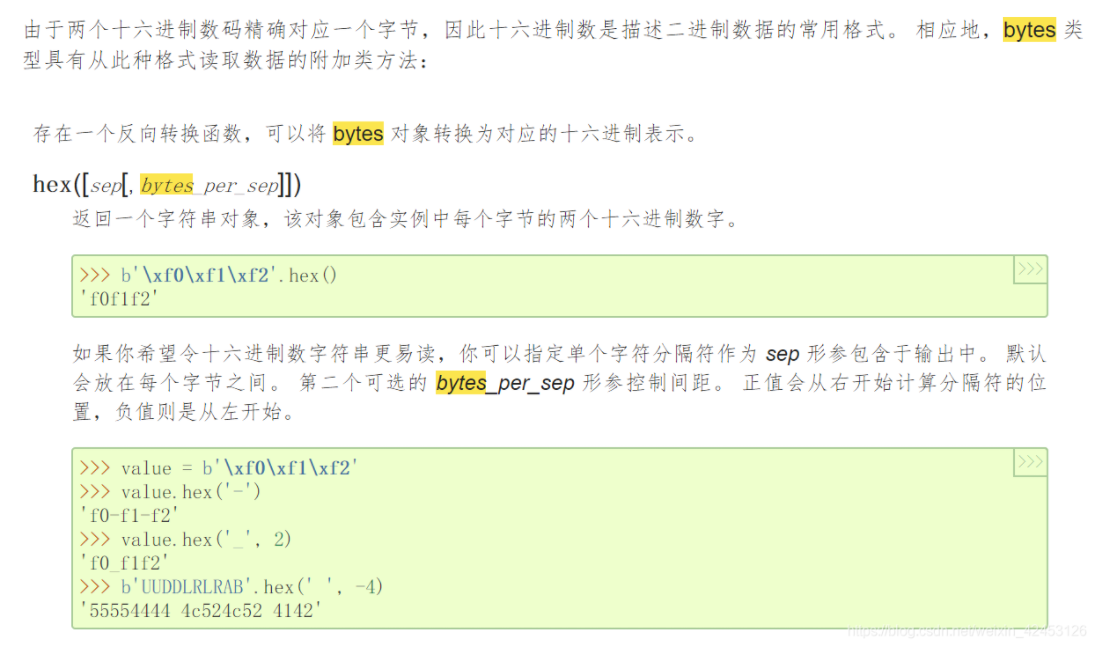
即,对于bytes类型,官方已经给出了相应的操作函数,不需要再写什么循环了。
可以使用print(value.hex())来输出value的16进制数
bytes与bytearray
bytes
>>> type(b'xxxxx')
<class 'bytes'>

>>> type('xxxxx')
<class 'str'>
bytes是byte的序列,而str是unicode的序列。
1、str 转换成 bytes 用 encode() 方法:(注意:这有个坑,str1.encode不加括号和加括号是不一样的,自己试试,初学貌似2.0不影响,3.0变了,不加括号开发环境语法不报错)
str = '人生苦短,我用Python!'
bytes = str.encode()
print(bytes)
输出:
b'\xe4\xba\xba\xe7\x94\x9f\xe8\x8b\xa6\xe7\x9f\xad\xef\xbc\x8c\xe6\x88\x91\xe7\x94\xa8Python!'
2、好了,反转换 decode() :
bytes = b'\xe4\xba\xba\xe7\x94\x9f\xe8\x8b\xa6\xe7\x9f\xad\xef\xbc\x8c\xe6\x88\x91\xe7\x94\xa8Python!'
str = bytes.decode()
print(str)
输出:
人生苦短,我用Python!
bytearray
1、bytearray和bytes不一样的地方在于,bytearray是可变的。
str = '人生苦短,我用Python!'
bytes = bytearray(str.encode())
bytes = bytearray(b'\xe4\xba\xba\xe7\x94\x9f\xe8\x8b\xa6\xe7\x9f\xad\xef\xbc\x8c\xe6\x88\x91\xe7\x94\xa8Python!')
str = bytes.decode()
print(str)
输出:
'人生苦短,我用Python!'
2、改变bytearray
bytes[:6] = bytearray('生命'.encode())
bytes = bytearray(b'\xe7\x94\x9f\xe5\x91\xbd\xe8\x8b\xa6\xe7\x9f\xad\xef\xbc\x8c\xe6\x88\x91\xe7\x94\xa8Python!')
str = bytes.decode()
print(str)
输出:
生命苦短,我用Python!