华为高斯数据库openGauss_5.0.2 企业版部署学习
系统环境及软件包下载
欧拉系统官方下载链接
openEuler-22.03-LTS-SP4-x86_64-dvd.iso
https://mirrors.tuna.tsinghua.edu.cn/openeuler/openEuler-22.03-LTS-SP4/ISO/x86_64/openEuler-22.03-LTS-SP4-x86_64-dvd.iso
openEuler下载 | openEuler ISO镜像 | openEuler社区官网
数据库安装包下载
https://opengauss.org/zh/download/

系统安装选择最小化安装此处省去安装步骤
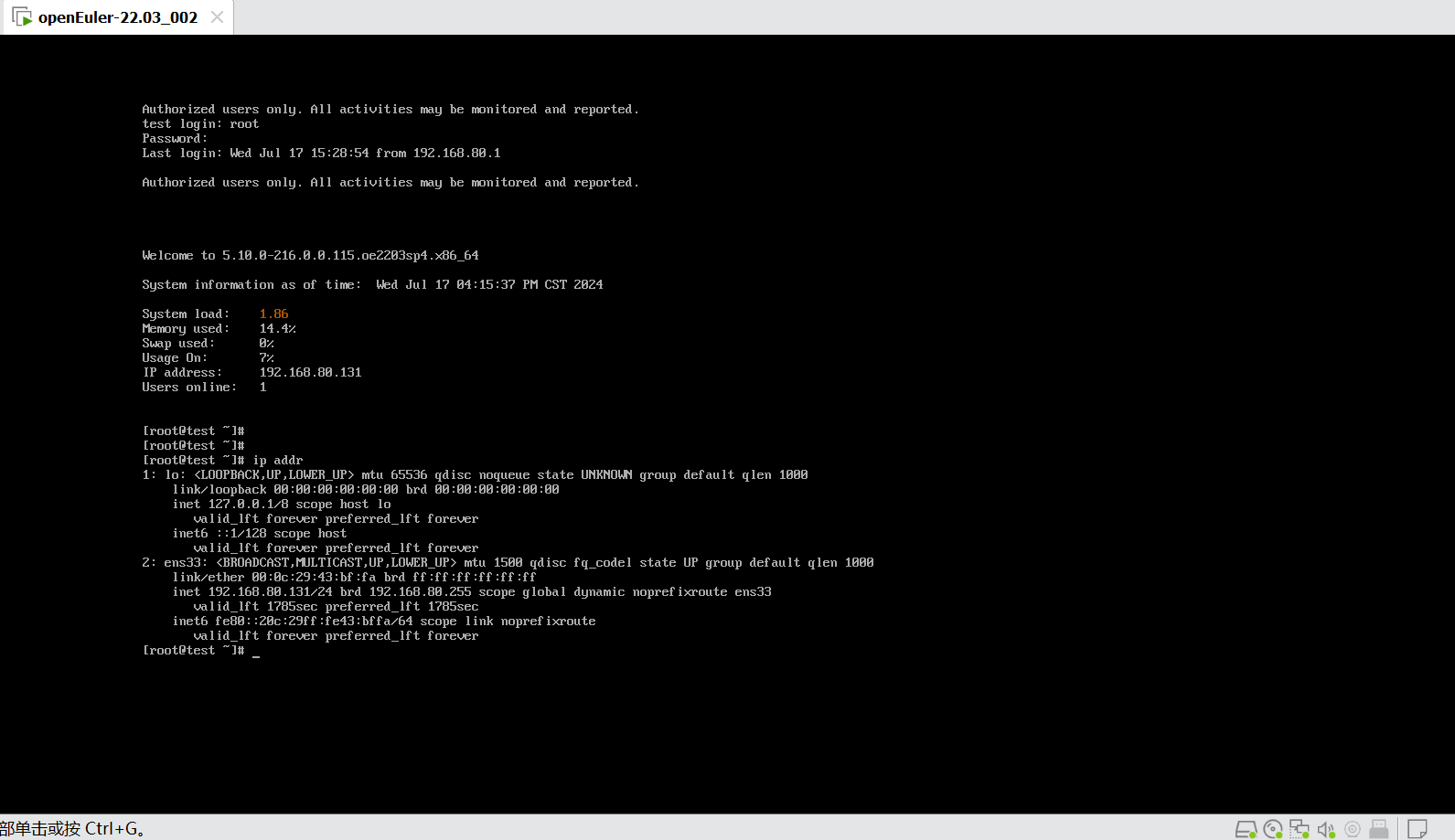
测试环境为vmware虚拟机,安装截图如下:

软件环境配置
参考官方链接,联网环境可以使用yum进行软件包配置如下
yum安装依赖, 参考官方文档的依赖如下图,
yum install libaio-devel readline-devel expect Python

详细步骤参考官方手册文档:
准备软硬件安装环境 (osinfra.cn)

创建用户和组
创建用户组dbgroup。

groupadd dbgroup

创建用户组dbgroup下的普通用户omm,并设置密码为omm

useradd -g dbgrp -m omm -d /home/omm

passwd omm

passwd Admin@2024
xml配置文件参考:
创建 Xml配置文件 (osinfra.cn)
手工创建xml配置文件参考如下:
<?xml version="1.0" encoding="UTF-8"?>
<ROOT>
  <!-- 整体信息 -->
  <CLUSTER>
  <!-- 数据库名称 -->
    <PARAM name="clusterName" value="Cluster_template" />
  <!-- 数据库节点名称(hostname) -->
    <PARAM name="nodeNames" value="node1_hostname,node2_hostname" />
  <!-- 数据库安装目录-->
    <PARAM name="gaussdbAppPath" value="/opt/huawei/install/app" />
  <!-- 日志目录-->
    <PARAM name="gaussdbLogPath" value="/var/log/omm" />
  <!-- 临时文件目录-->
    <PARAM name="tmpMppdbPath" value="/opt/huawei/tmp" />
  <!--数据库工具目录-->
    <PARAM name="gaussdbToolPath" value="/opt/huawei/install/om" />
  <!--数据库core文件目录-->
    <PARAM name="corePath" value="/opt/huawei/corefile"/>
  <!-- 节点IP,与nodeNames一一对应 -->
    <PARAM name="backIp1s" value="192.168.0.1,192.168.0.2"/>
    <!-- 是否开启数据库节点自选主 -->
    <PARAM name="enable_dcf" value="on"/>
    <!-- 开启开关后对应的节点IP、PORT和角色信息 -->
    <PARAM name="dcf_config" value="[{"stream_id":1,"node_id":1,"ip":"8.92.1.85","port":16683,"role":"LEADER"},{"stream_id":1,"node_id":2,"ip":"8.92.1.86","port":16683,"role":"FOLLOWER"},{"stream_id":1,"node_id":3,"ip":"8.92.1.87","port":16683,"role":"FOLLOWER"}]"/>
    <!-- 资源池化模式开关 -->
    <PARAM name="enable_dss" value="on"/>
    <!-- dss实例目录 -->
    <PARAM name="dss_home" value="/opt/huawei/install/data/dss"/>
    <!-- dss共享卷名 -->
    <PARAM name="ss_dss_vg_name" value="data"/>
    <!-- dss挂载卷组名和卷组信息,包含共享卷 -->
    <PARAM name="dss_vg_info" value="data:/dev/sdb,p0:/dev/sdc,p1:/dev/sdd"/>
    <!-- cm投票卷 -->
    <PARAM name="votingDiskPath" value="/dev/sde"/>
    <!-- cm共享卷 -->
    <PARAM name="shareDiskDir" value="/dev/sdf"/>
    <!-- dss开启ssl认证开关 -->
    <PARAM name="dss_ssl_enable" value="on"/>
    <!-- mes通信协议类型  -->
    <PARAM name="ss_interconnect_type" value="TCP"/>
    <!-- rdma绑定cpu序列  -->
    <PARAM name="ss_rdma_work_config" value="1 7"/>

    <!-- VIP信息  -->
    <PARAM name="floatIp1" value="10.10.10.100"/>
    <PARAM name="floatIp2" value="20.20.20.100"/>
    <PARAM name="floatIp3" value="30.30.30.100"/>

  </CLUSTER>
修改其中的网络参数和主机名
初始化安装环境:
参考官方:
初始化安装环境 (osinfra.cn)
部署脚本执行结果
[root@test script]# ./gs_preinstall -U omm -G dbgrp -L -X /opt/software/openGauss/cluster_config.xml
Parsing the configuration file.
Successfully parsed the configuration file.
Installing the tools on the local node.
Successfully installed the tools on the local node.
Setting host ip env
Successfully set host ip env.
Preparing SSH service.
Successfully prepared SSH service.
Checking OS software.
Successfully check os software.
Checking OS version.
Successfully checked OS version.
Creating cluster's path.
Successfully created cluster's path.
Set and check OS parameter.
Setting OS parameters.
Successfully set OS parameters.
Warning: Installation environment contains some warning messages.
Please get more details by "/opt/software/openGauss/script/gs_checkos -i A -h test --detail".
Set and check OS parameter completed.
Preparing CRON service.
Successfully prepared CRON service.
Setting user environmental variables.
Successfully set user environmental variables.
Setting the dynamic link library.
Successfully set the dynamic link library.
Setting Core file
Successfully set core path.
Setting pssh path
Successfully set pssh path.
Setting Cgroup.
Successfully set Cgroup.
Set ARM Optimization.
No need to set ARM Optimization.
Fixing server package owner.
Setting finish flag.
Successfully set finish flag.
Preinstallation succeeded.
[root@test script]#
执行安装
安装参考官方例子:
执行安装 (osinfra.cn)
切换omm用户执行安装
[root@test script]# chmod -R 775 /opt/
[root@test script]# ls -l /opt/
total 8
drwxrwxr-x 5 omm  dbgrp 4096 Jul 17 15:32 huawei
drwxrwxr-x 3 root root  4096 Jul 17 15:09 software
[root@test script]# su - omm
Last login: Wed Jul 17 15:36:36 CST 2024 on pts/0


Welcome to 5.10.0-216.0.0.115.oe2203sp4.x86_64

System information as of time:  Wed Jul 17 03:39:25 PM CST 2024

System load:    0.09
Memory used:    14.4%
Swap used:      0%
Usage On:       5%
IP address:     192.168.80.131
Users online:   1
To run a command as administrator(user "root"),use "sudo <command>".
[omm@test ~]$ gs_install -X /opt/software/openGauss/cluster_config.xml
Parsing the configuration file.
Check preinstall on every node.
Successfully checked preinstall on every node.
Creating the backup directory.
Successfully created the backup directory.
begin deploy..
Installing the cluster.
begin prepare Install Cluster..
Checking the installation environment on all nodes.
begin install Cluster..
Installing applications on all nodes.
Successfully installed APP.
begin init Instance..
encrypt cipher and rand files for database.
Please enter password for database:
Please repeat for database:
begin to create CA cert files
The sslcert will be generated in /opt/huawei/install/app/share/sslcert/om
NO cm_server instance, no need to create CA for CM.
Non-dss_ssl_enable, no need to create CA for DSS
Cluster installation is completed.
Configuring.
Deleting instances from all nodes.
Successfully deleted instances from all nodes.
Checking node configuration on all nodes.
Initializing instances on all nodes.
Updating instance configuration on all nodes.
Check consistence of memCheck and coresCheck on database nodes.
Configuring pg_hba on all nodes.
Configuration is completed.
The cluster status is Normal.
Successfully started cluster.
Successfully installed application.
end deploy..
[omm@test ~]$
安装完毕验证
检查安装目录和数据库状态如下脚本示例
[omm@test ~]$ ls -lh /opt/huawei/
total 12K
drwxrwxr-x 2 omm dbgrp 4.0K Jul 17 15:32 corefile
drwxrwxr-x 5 omm dbgrp 4.0K Jul 17 15:39 install
drwx------ 2 omm dbgrp 4.0K Jul 17 15:41 tmp
[omm@test ~]$ gs_om -t status
-----------------------------------------------------------------------

cluster_name    : dbCluster
cluster_state   : Normal
redistributing  : No

-----------------------------------------------------------------------
[omm@test ~]$ gsql -d postgres -p 15400
gsql ((openGauss 5.0.2 build 48a25b11) compiled at 2024-05-14 10:26:01 commit 0 last mr  )
Non-SSL connection (SSL connection is recommended when requiring high-security)
Type "help" for help.

openGauss=#
启动停止数据文档参考
启停open Gauss (osinfra.cn)

示例脚本如下:
[omm@test ~]$ gs_om -t stop
Stopping cluster.
=========================================
Successfully stopped cluster.
=========================================
End stop cluster.
[omm@test ~]$ gs_om -t start
Starting cluster.
=========================================
[SUCCESS] test
2024-07-17 16:27:55.248 6697808b.1 [unknown] 140068131946560 [unknown] 0 dn_6001 01000  0 [BACKEND] WARNING:  could not create any HA TCP/IP sockets
2024-07-17 16:27:55.248 6697808b.1 [unknown] 140068131946560 [unknown] 0 dn_6001 01000  0 [BACKEND] WARNING:  could not create any HA TCP/IP sockets
2024-07-17 16:27:55.250 6697808b.1 [unknown] 140068131946560 [unknown] 0 dn_6001 01000  0 [BACKEND] WARNING:  Failed to initialize the memory protect for g_instance.attr.attr_storage.cstore_buffers (1024 Mbytes) or shared memory (2174 Mbytes) is larger.
=========================================
Successfully started.
[omm@test ~]$ gs_om -t status
-----------------------------------------------------------------------

cluster_name    : dbCluster
cluster_state   : Normal
redistributing  : No

-----------------------------------------------------------------------
[omm@test ~]$ gsql -d postgres -p 15400
gsql ((openGauss 5.0.2 build 48a25b11) compiled at 2024-05-14 10:26:01 commit 0 last mr  )
Non-SSL connection (SSL connection is recommended when requiring high-security)
Type "help" for help.

openGauss=#
创建数据库
[omm@test ~]$  gsql -d postgres -p 15400
gsql ((openGauss 5.0.2 build 48a25b11) compiled at 2024-05-14 10:26:01 commit 0 last mr  )
Non-SSL connection (SSL connection is recommended when requiring high-security)
Type "help" for help.

openGauss=#openGauss=# CREATE DATABASE mydb WITH ENCODING 'GBK' template = template0;
CREATE DATABASE
openGauss=# \l
                          List of databases
   Name    | Owner | Encoding  | Collate | Ctype | Access privileges
-----------+-------+-----------+---------+-------+-------------------
 mydb      | omm   | GBK       | C       | C     |
 postgres  | omm   | SQL_ASCII | C       | C     |
 template0 | omm   | SQL_ASCII | C       | C     | =c/omm           +
           |       |           |         |       | omm=CTc/omm
 template1 | omm   | SQL_ASCII | C       | C     | =c/omm           +
           |       |           |         |       | omm=CTc/omm
(4 rows)

openGauss=#
官方文档参考:
创建数据库 (osinfra.cn)
数据库DataStudio_win_64链接工具配置
软件链接及文档下:
用户手册 (myhuaweicloud.com)
windows 64位置下载链接:
https://opengauss.obs.cn-south-1.myhuaweicloud.com/5.0.0/tools/DataStudio_win_64.zip

java环境配置安装
按照文档操作下载java环境,安装jdk11,官方链接如下
https://download.oracle.com/otn/java/jdk/11.0.23%2B7/9bd8d305c900ee4fa3e613b59e6f42de/jdk-11.0.23_windows-x64_bin.exe

安装完检查java版本

配置客户端远程接入
官方文档参考:
配置客户端接入认证 (osinfra.cn)
创建用户设置密码
[omm@test ~]$ gsql -d postgres -p 15400
gsql ((openGauss 5.0.2 build 48a25b11) compiled at 2024-05-14 10:26:01 commit 0 last mr  )
Non-SSL connection (SSL connection is recommended when requiring high-security)
Type "help" for help.

openGauss=#
openGauss=#
openGauss=# CREATE USER jack PASSWORD 'Test@123';
CREATE ROLE
openGauss=# \q
[omm@test ~]$
[omm@test ~]$ gs_guc set -N all -I all -h "host all jack 192.168.80.131/24 sha256"
The gs_guc run with the following arguments: [gs_guc -N all -I all -h host all jack 192.168.80.131/24 sha256 set ].
Begin to perform the total nodes: 1.
Popen count is 1, Popen success count is 1, Popen failure count is 0.
Begin to perform gs_guc for datanodes.
Command count is 1, Command success count is 1, Command failure count is 0.

Total instances: 1. Failed instances: 0.
ALL: Success to perform gs_guc!


[omm@test ~]$
重启数据库:
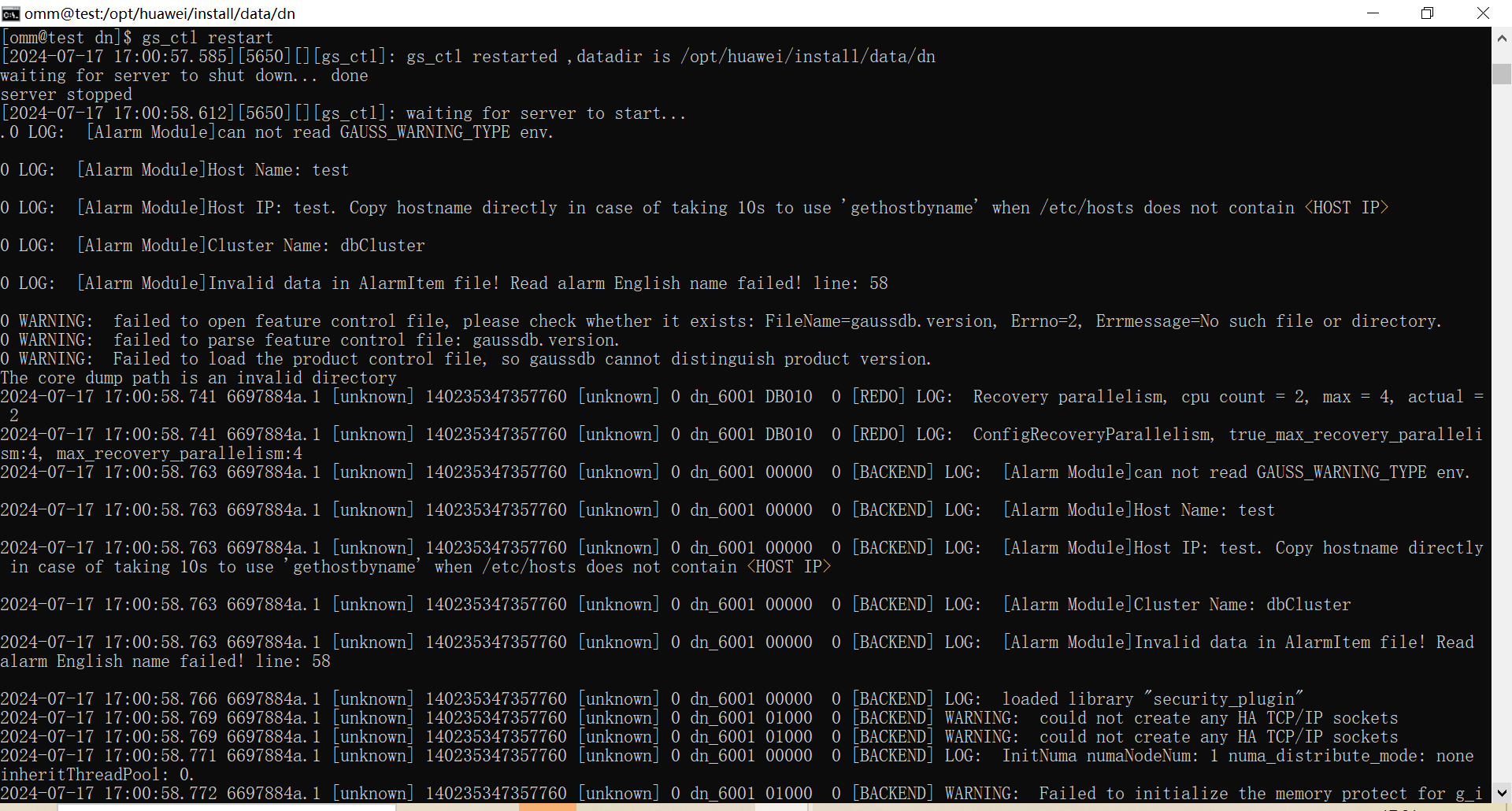
执行 :gs_ctl restart,运行如下图参考

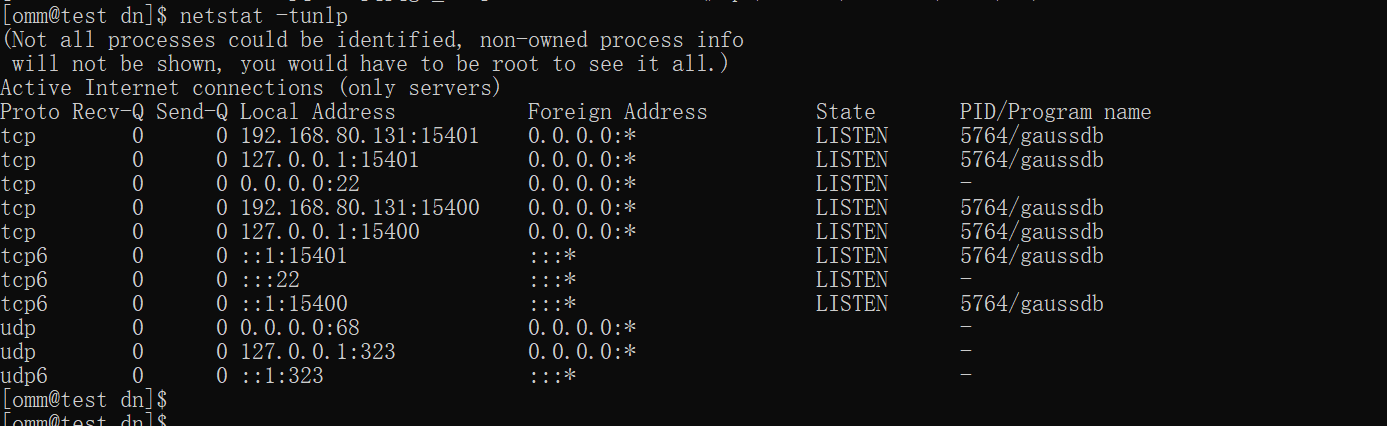
查看端口情况
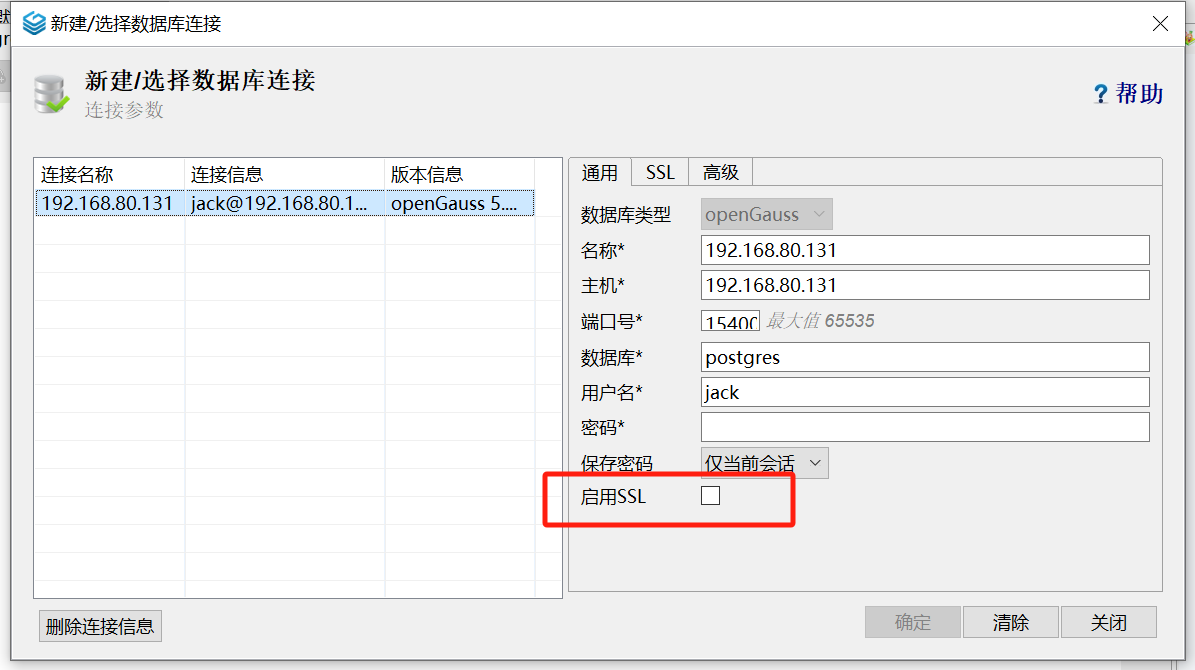
客户端链接:
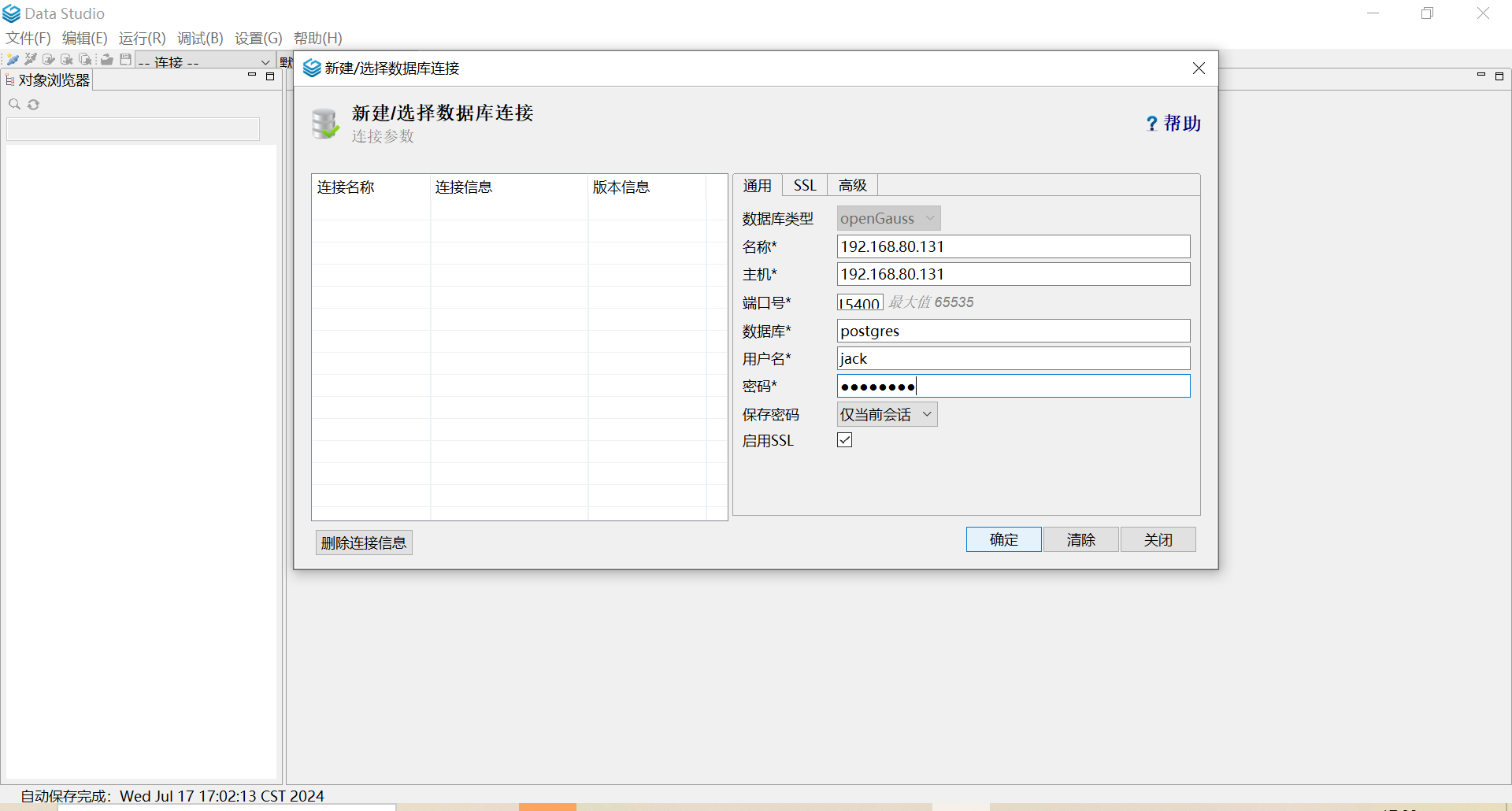

去掉勾选启用ssl
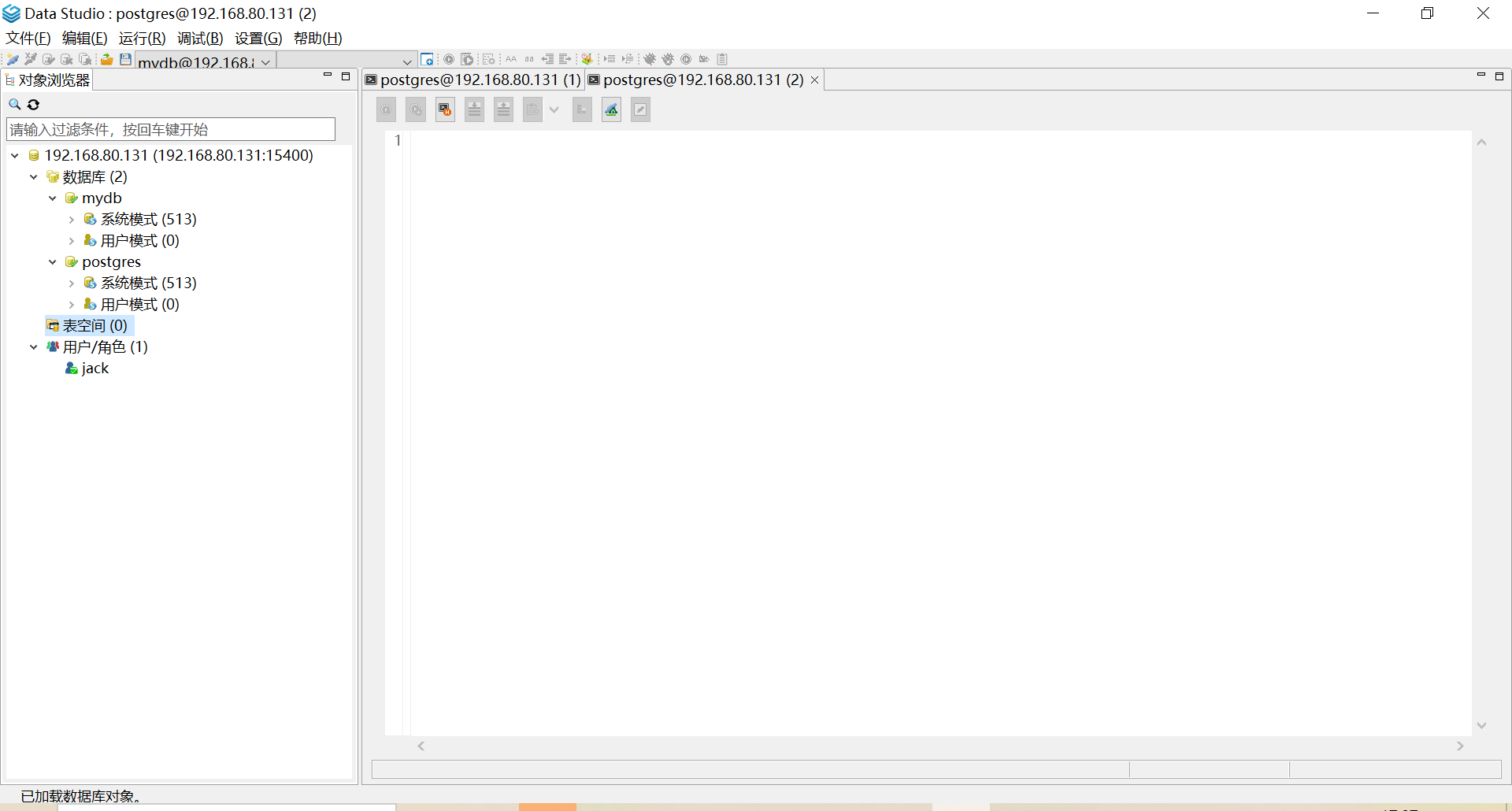
连接成功

完毕。。