第六章字符串及正则表达式
字符串的常用操作
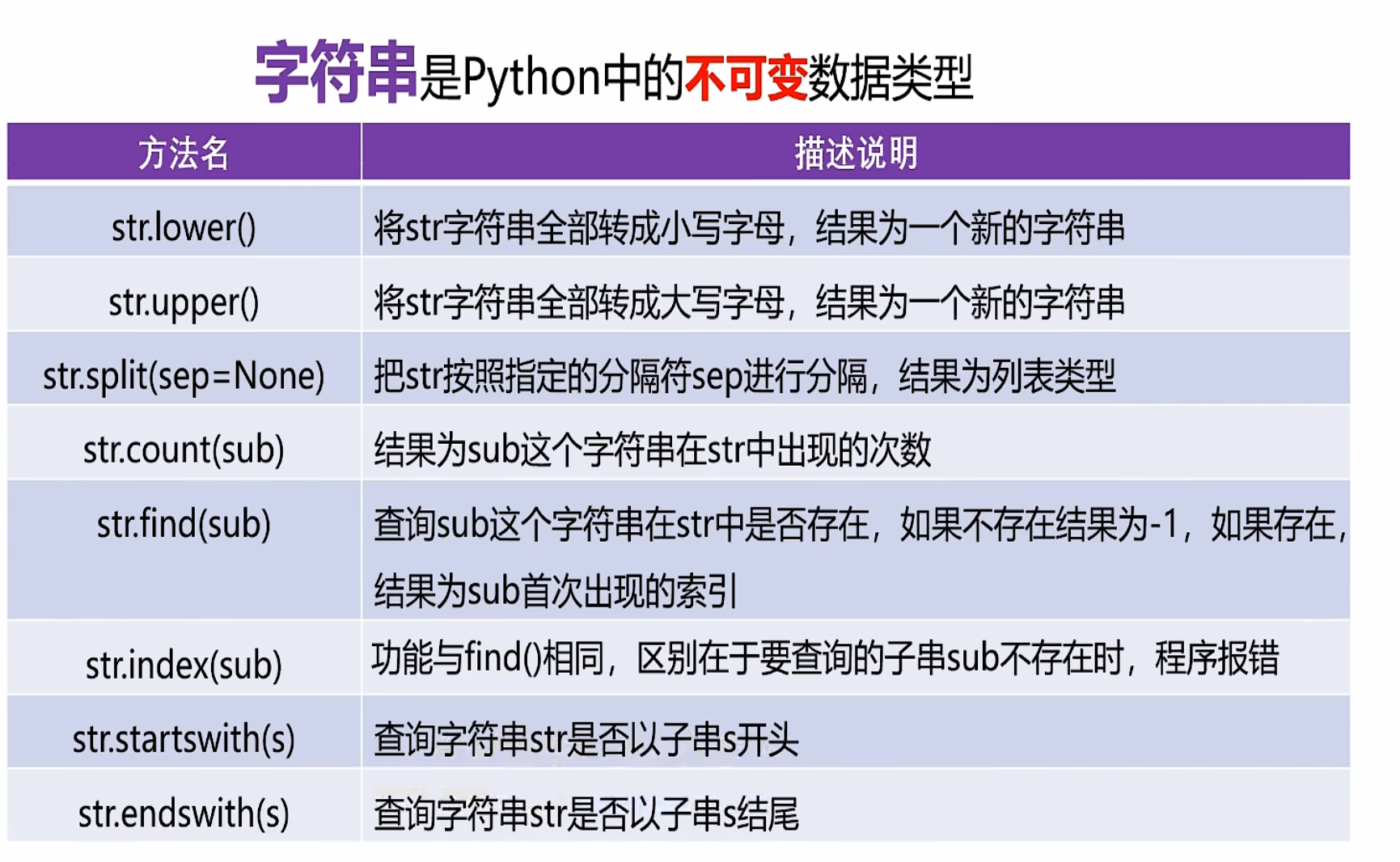
点击查看代码
示例6-1字符串的相关操作1
#大小写转换
s1='HELLOWORLD'
new_s2=s1.lower()
print(s1,new_s2)

new_s3=s1.upper()
print(new_s3)

#字符串的分隔
e_mail='ysj@126.com'
lst=e_mail.split('@')
print('邮箱名:',lst[0],'邮箱服务器:',lst[1])

#字符串出现次数
print(s1.count('o'))#o在字符串s1中出现2次

#字符串查找操作
print(s1.find('O'))#o在字符s1中第一次出现的位置
print(s1.find('P'))#-1,没有找到

print(s1.index('O'))
#print(s1.index('p'))#ValueError: substring not found

#判断前缀和后缀
print(s1.startswith('H'))#True
print(s1.startswith('P'))#Flase

print('demo.py'.endswith('.py'))#True
print('text.txt'.endswith('.txt'))#True
点击查看代码
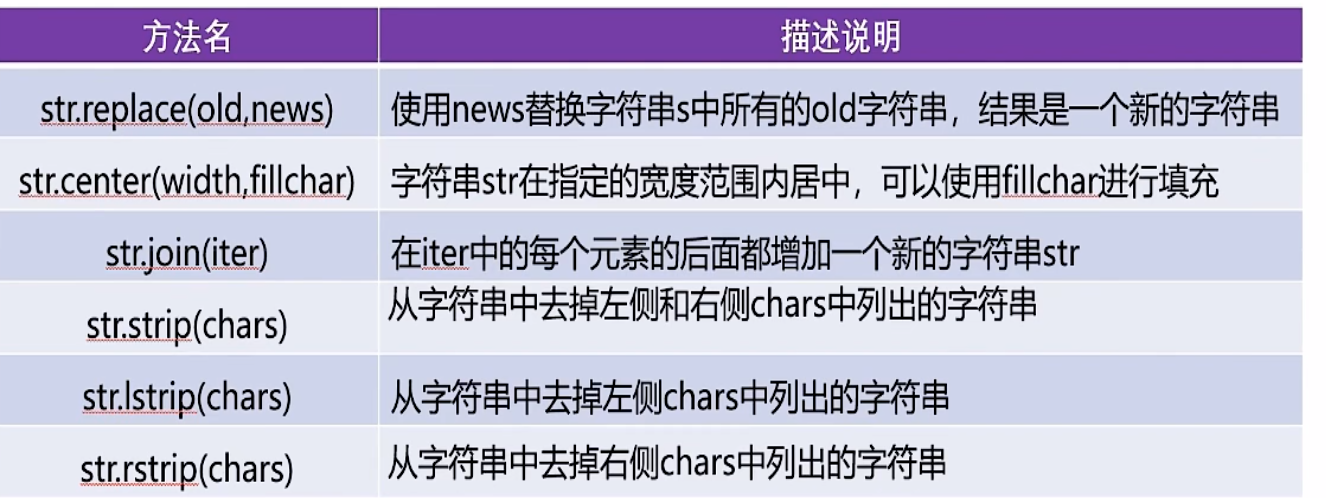
示例6-2字符串的相关操作2
s='HelloWorld'
#字符串的替换
new_s=s.replace('o','你好',1)#最后一个参数为替换次数,默认全部替换
print(new_s)

#字符串在指定宽度范围内居中
print(s.center(20))
print(s.center(20,'*'))

#去掉字符串左右两边的空格
s='    Hello    World    '
print(s.strip())
print(s.lstrip())#去除字符串左侧的空格
print(s.rstrip())#去除字符串右侧的空格

#去掉指定字符
s3='dl-Helloworld'
print(s3.strip('ld'))#与顺序无关
print(s3.lstrip('ld'))
print(s3.rstrip('ld'))
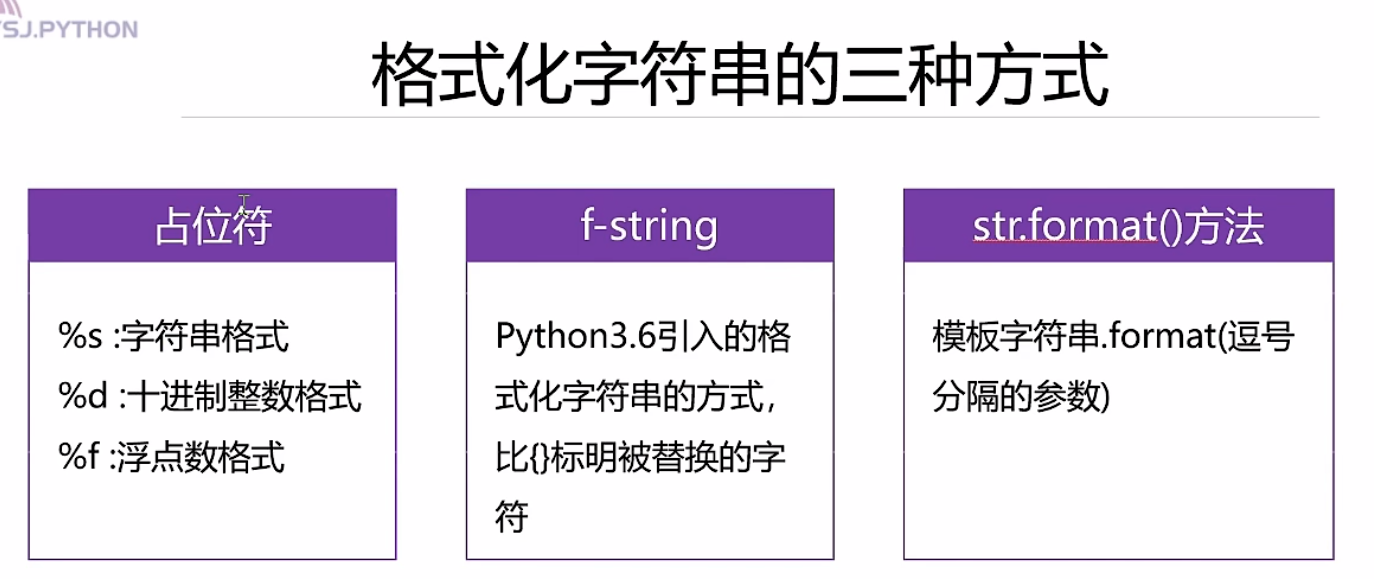
格式化字符串的三种方式
用于连接不同类型数据
点击查看代码
示例6-3格式化字符串
#(1)使用占位符进行格式化
name='马冬梅'
age=18
score=98.5
print('姓名:%s,年龄:%d,成绩:%f'%(name,age,score))
print('姓名:%s,年龄:%d,成绩:%.1f'%(name,age,score))

#(2)f-string
print(f'姓名:{name},年龄:{age},成绩:{score}')

#(3)使用字符串formate方法
print('姓名:{0},年龄:{1},成绩:{2}'.format(name,age,score))
print('姓名:{2},年龄:{0},成绩:{1}'.format(age,score,name))
格式化字符串的详细格式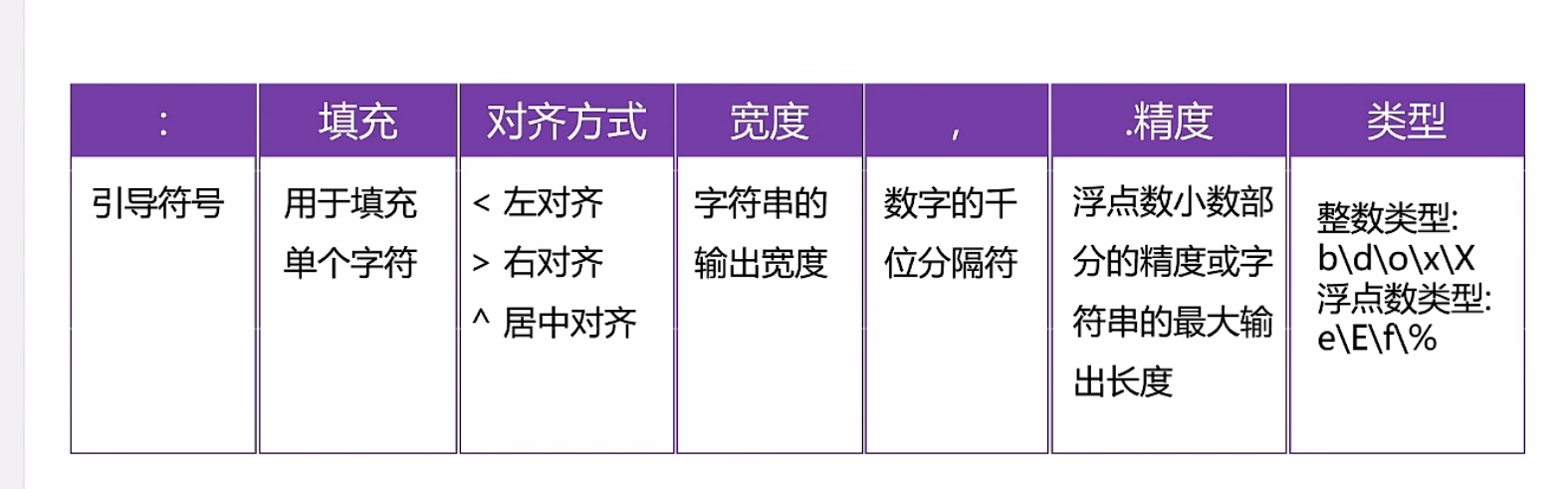
点击查看代码
示例6-4format的格式控制
s=('helloworld')
print('{0:*<20}'.format(s))#字符串的显示宽度为20,左对齐,空白部分使用*填充
print('{0:*>20}'.format(s))
print('{0:*^20}'.format(s))

#居中对齐
print(s.center(20,'*'))

#千位分隔符(只适用于整数和浮点数)
print('{0:,}'.format(987654321))
print('{0:,}'.format(987654321.7865))

#浮点数小数部分的精度
print('{0:.2f}'.format(3.1415926))

#字符串类型,表示是最大的显示长度
print('{0:.5}'.format('helloworld'))#hello

#整数类型
a=425
print('二进制:{0:b},十进制:{0:d},八进制:{0:o},十六进制:{0:x}'.format(a))

#浮点数类型
b=3.1415926
print('{0:.2f},{0:.2E},{0:2e},{0:.2%}'.format(b))
字符串的解码与编码
字符串的编码
将str转换为bytes类型,需要使用到字符串的encode()方法
str.encode(encoding='utf-8',errors='strict/ignore/replace')
字符串的解码
将bytes类型转换为str类型,需要使用到bytes的decode()方法
bytes.decode(encoding='utf-8',erros='strict/ignore/replace')
点击查看代码
示例6-5字符串的编码与解码
s='伟大的中国梦'
#编码str-->bytes
scode=s.encode(errors='replace') #默认utf-8,因为utf-8中文占3个字节
print(scode)

scode_gbk=s.encode('gbk',errors='replace')#gbk中中文占2个字节
print(scode_gbk)

#编码中出错问题
s2='耶✌'
scode_error=s2.encode('gbk',errors='replace')
print(scode_error)

#解码过程bytes->str
print(bytes.decode(scode_gbk,'gbk'))
print(bytes.decode(scode,'utf-8'))
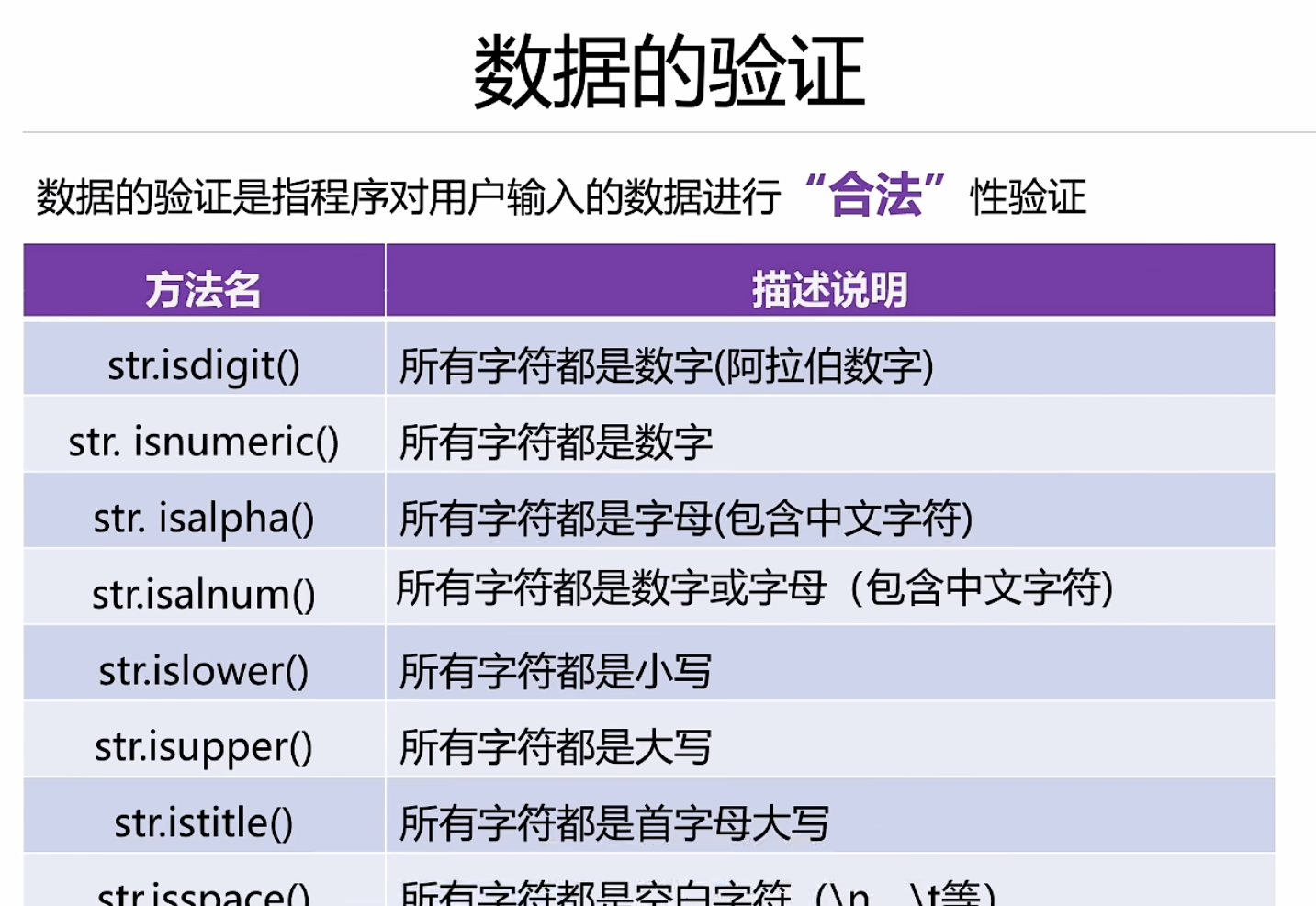
数据的验证
点击查看代码
示例6-6数据的验证
#isdigit()只识别十进制阿拉伯数字
print('123'.isdigit())#True
print('一二三'.isdigit())#Flase
print('0b1010'.isdigit())#False
print('ⅢⅢⅢ'.isdigit())#False
print('-'*50)

#所有的字符都是数字
print('123'.isnumeric())#True
print('一二三'.isnumeric())#True
print('0b1010'.isnumeric())#Flase
print('ⅢⅢⅢ'.isdigit())#True
print('壹贰叁'.isnumeric())#True
print('-'*50)

#所有的字符都是字母(包括中文字符)
print('hello你好'.isalpha())#True
print('hello你好123'.isalpha())#Flase
print('hello你好一二三'.isalpha())#True
print('hello你好ⅢⅢⅢ'.isalpha())#False
print('hello你好壹贰叁'.isalpha())#True
print('-'*50)

#所有字符都是数字或字母
print('hello你好'.isalnum())#True
print('hello你好123'.isalnum())#True
print('hello你好一二三'.isalnum())#True
print('hello你好ⅢⅢⅢ'.isalnum())#True
print('-'*50)

#判断字符的大小写
print('helloworld'.islower())#True
print('HelloWorld'.islower())#False
print('hello你好'.islower())#True

print('-'*50)
print('helloworld'.isupper())#False
print('HELLOWORLD'.isupper())#True
print('HELLO你好'.isupper())#True

print('-'*50)
#所有字符首字母大写
print('Hello'.istitle())#True
print('HelloWorld'.istitle())#False
print('Helloworld'.istitle())#True
print('Helloworld'.istitle())#False


#判断是否都是空白字符
print('-'*50)
print('\t'.isspace())#True
print(' '.isspace())#True
print('\n'.isspace())#True
数据的处理
字符串的拼接
1、使用str.join()方法进行拼接
2、直接拼接
3、使用格式化字符串进行拼接
点击查看代码
示例6-7字符串的拼接操作
s1='hello'
s2='world'
#(1)使用+进行拼接
print(s1+s2)

#(2)使用str.join()进行拼接
print(''.join([s1,s2]))#使用空字符串进行拼接
print('*'.join(['hello','world','python','java','php']))
print('你好'.join(['hello','world','python','java','php']))

#(3)直接拼接
print('hello','world')

#(4)使用格式化字符串进行拼接
print('%s%s'%(s1,s2))
print(f'{s1}{s2}')
print('{0}{1}'.format(s1,s2))
字符串的去重
点击查看代码
示例6-8字符串的去重操作
s='helloworldhelloworldadfdfdeoodllffe'
#(1)字符串的拼接及not in
new_s=''
for item in s:
    if item not in new_s:
        new_s+=item
print(new_s)

#(2)使用索引+not in
new_s2=''
for i in range(len(s)):
    if s[i] not in new_s2:
        new_s2+=s[i]
print(new_s2)

#(3)通过集合去去重+列表的排序操作
new_s3=set(s)
lst=list(new_s3)
lst.sort(key=s.index)
print(''.join(lst))
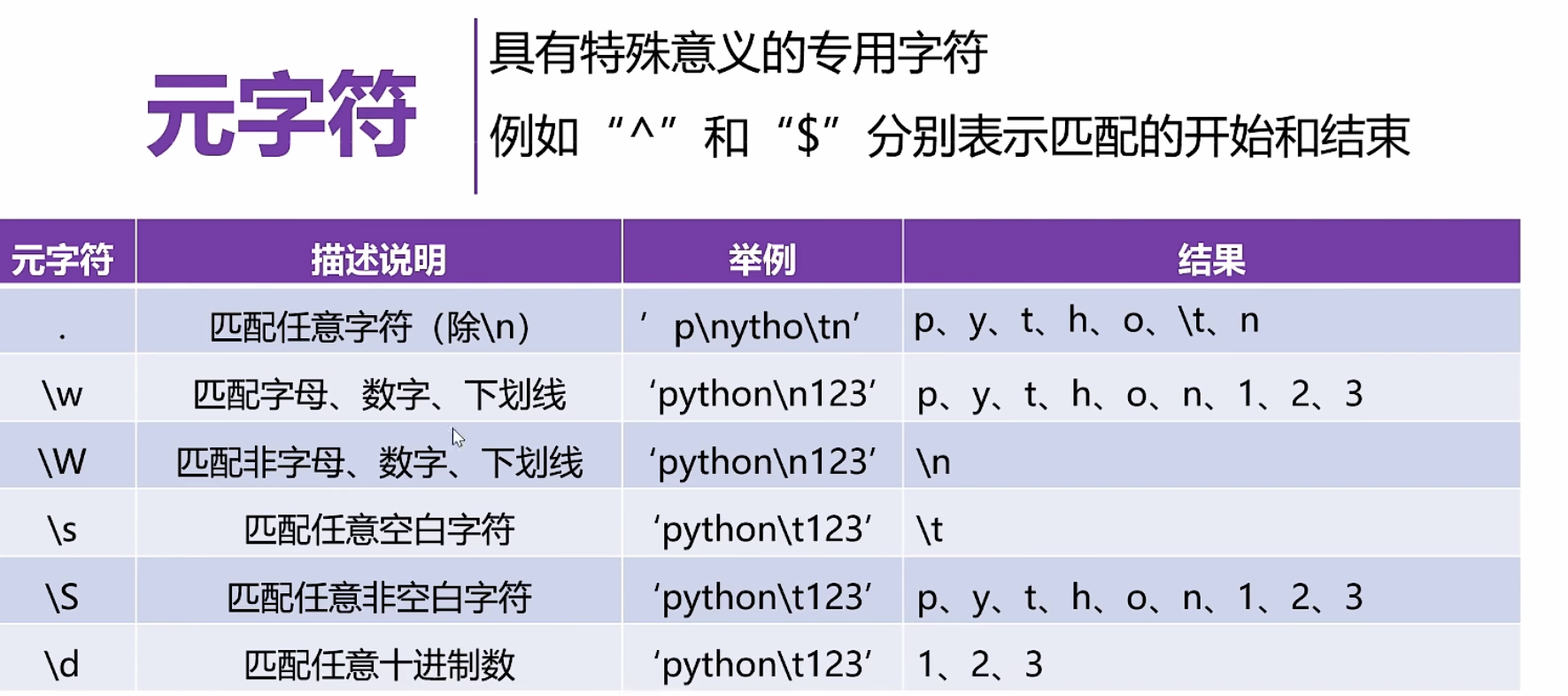
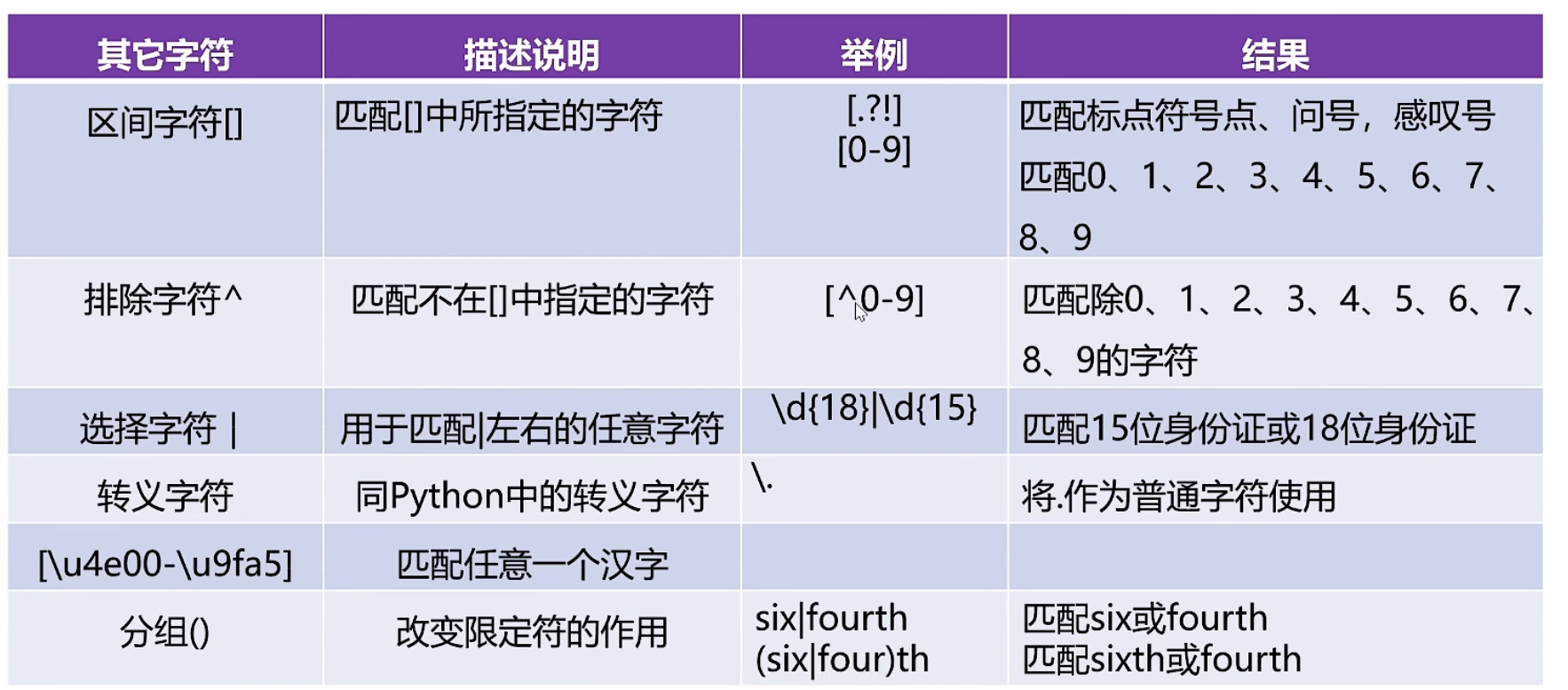
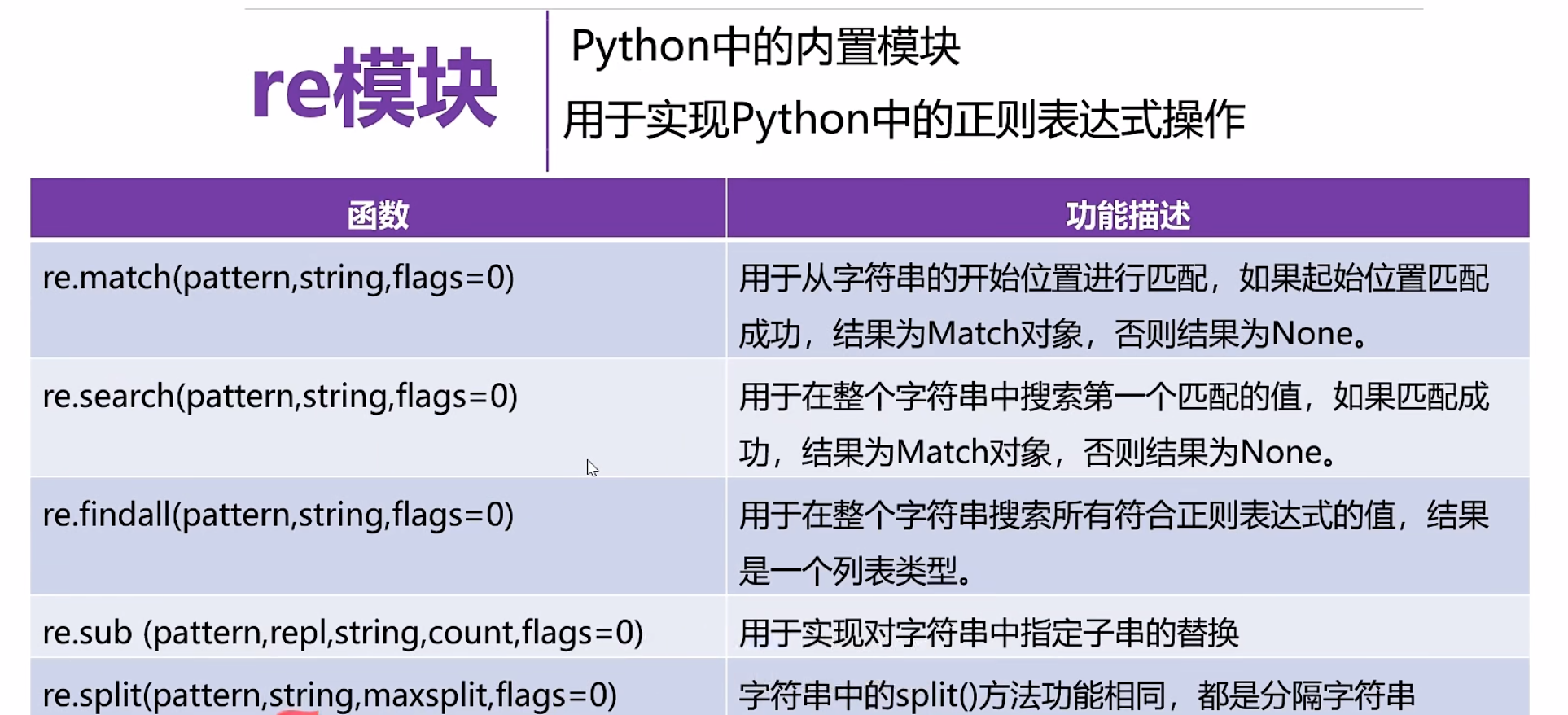
正则表达式

点击查看代码
示例6-9match函数的使用
import re #导入
pattern='\d\.\d+'#+限定符,\d 0-9数字出现1次或多次
s='I study Pathon 3.11 every day'#待匹配字符串
match=re.match(pattern,s,re.I)
print(match) #None


s2='3.11Pathon I study every day'
match2=re.match(pattern,s2)
print(match2) #<re.Match object; span=(0, 4), match='3.11'>

print('匹配值的起始位置:',match2.start())
print('匹配值的结束位置:',match2.end())
print('匹配区间位置的元素:',match2.span())
print('待匹配的字符串:',match2.string)
print('匹配的数据:',match2.group())

示例6-10search函数的使用
import re #导入
pattern='\d\.\d+'#+限定符,\d 0-9数字出现1次或多次
s='I study Python3.11 every day Pathon2.7 I love you'
match=re.search(pattern,s)

s2='4.10 Python I study every day '
s3='I study every day '
match2=re.search(pattern,s2)
match3=re.search(pattern,s3)
print(match)
print(match2)
print(match3)

print(match.group())
print(match2.group())

示例6-11findall函数的使用
import re #导入
pattern='\d\.\d+'#+限定符,\d 0-9数字出现1次或多次
s='I study Python3.11 every day Pathon2.7 I love you'
s2='4.10 Python I study every day '
s3='I study every day '
lst=re.findall(pattern,s)
lst2=re.findall(pattern,s2)
lst3=re.findall(pattern,s3)
print(lst)
print(lst2)
print(lst3)

示例6-12sub函数与split函数的使用
import re #导入
pattern='黑客|破解|反爬'
s='我想学习Pathon,想破解一些VIP视频,Pathon可以实现无底线反爬吗?'
new_s=re.sub(pattern,'XXX',s)
print(new_s)

s2='https://www.baidu.com/s?wd=ysj&rsv_spt=1'
pattern2='[?|&]'
lst=re.split(pattern2,s2)
print(lst)