OCA/base_report_to_printer 配置Odoo云打印
系统结构
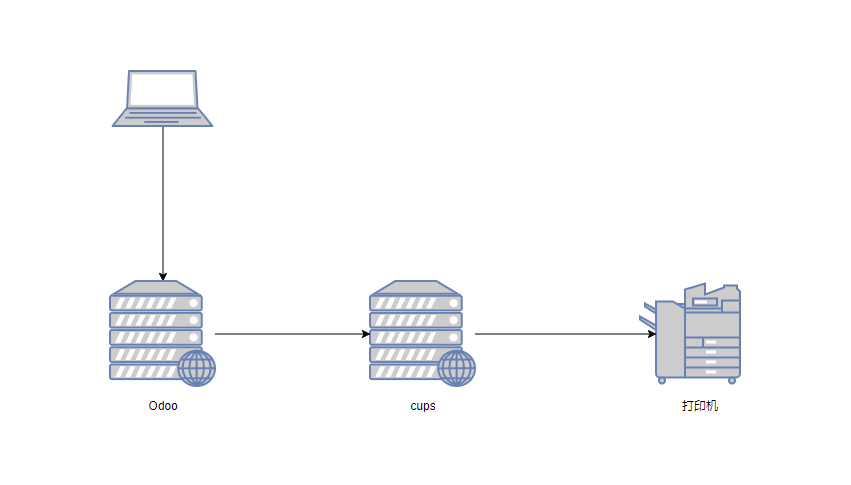
安装部署
Odoo
安装模块依赖
apt install libcups2-dev,python3-dev
pip3 install pycups
安装OCA模块report-print-send/base_report_to_printer
cups
cups简介
CUPS(Common UNIX Printing System)是一个开源的打印系统,用于在 Unix-like 操作系统上管理打印任务。它提供了打印机驱动程序、打印队列管理、打印作业控制等功能,使得用户可以轻松地添加和管理打印机,以及打印文档。
CUPS 最初由 Easy Software Products 开发,后来由 Apple 接手并开源,现在由开源社区维护。它是一个符合 IPP(Internet Printing Protocol)标准的打印系统,这意味着它支持网络打印和打印机共享。
CUPS 的主要特点包括:
- IPP 支持:CUPS 支持 IPP,这是一个用于网络打印的标准协议,允许客户端通过网络发送打印作业给打印服务器。
- 打印队列管理:CUPS 允许用户创建和管理打印队列,每个打印队列可以对应一个或多个打印机。
- 打印机驱动支持:CUPS 支持多种打印机驱动,包括 PostScript 和 PCL 等。它还支持将打印机映射到其他网络打印机上。
- 打印机共享:CUPS 允许用户共享打印机,使得网络上的其他用户可以访问和打印。
- 认证和权限控制:CUPS 支持用户认证和权限控制,可以限制哪些用户可以访问特定的打印机。
- 兼容性:CUPS 设计为与现有的打印系统(如 LPD、LPRng、BSD 打印系统等)兼容,同时提供了更好的打印管理功能。
以上内容由AI生成
cups的安装方式比较灵活,安装在能够连接到打印机的环境中即可(物理机,虚拟机,容器,树霉派等均可)
我们选择使用容器来部署运行
docker-compose.yml
version: "3"

services:
  # The admin user/password for the Cups server is print/print
  cupsd:
    image: olbat/cupsd
    container_name: cupsd
    ports:
      - "631:631"
    volumes:
      - /var/run/dbus:/var/run/dbus
      - ./cupsd.conf:/etc/cups/cupsd.conf
cupsd.conf
#
# Configuration file for the CUPS scheduler.  See "man cupsd.conf" for a
# complete description of this file.
#

# Log general information in error_log - change "warn" to "debug"
# for troubleshooting...
LogLevel warn
PageLogFormat

# Specifies the maximum size of the log files before they are rotated.  The value "0" disables log rotation.
MaxLogSize 0

# Default error policy for printers
ErrorPolicy retry-job

# Allow remote access
Listen *:631

# Show shared printers on the local network.
Browsing Yes
BrowseLocalProtocols dnssd

# Default authentication type, when authentication is required...
DefaultAuthType Basic
DefaultEncryption IfRequested

# Web interface setting...
WebInterface Yes

# Timeout after cupsd exits if idle (applied only if cupsd runs on-demand - with -l)
IdleExitTimeout 60

# Restrict access to the server...
<Location />
  Order allow,deny
  Allow all
</Location>

# Restrict access to the admin pages...
<Location /admin>
  Order allow,deny
  Allow all
</Location>

# Restrict access to configuration files...
<Location /admin/conf>
  AuthType Default
  Require user @SYSTEM
  Order allow,deny
  Allow all
</Location>

# Restrict access to log files...
<Location /admin/log>
  AuthType Default
  Require user @SYSTEM
  Order allow,deny
  Allow all
</Location>

# Set the default printer/job policies...
<Policy default>
  # Job/subscription privacy...
  JobPrivateAccess default
  JobPrivateValues default
  SubscriptionPrivateAccess default
  SubscriptionPrivateValues default

  # Job-related operations must be done by the owner or an administrator...
  <Limit Create-Job Print-Job Print-URI Validate-Job>
    Order deny,allow
  </Limit>

  <Limit Send-Document Send-URI Hold-Job Release-Job Restart-Job Purge-Jobs Set-Job-Attributes Create-Job-Subscription Renew-Subscription Cancel-Subscription Get-Notifications Reprocess-Job Cancel-Current-Job Suspend-Current-Job Resume-Job Cancel-My-Jobs Close-Job CUPS-Move-Job CUPS-Get-Document>
    Require user @OWNER @SYSTEM
    Order deny,allow
  </Limit>

  # All administration operations require an administrator to authenticate...
  <Limit CUPS-Add-Modify-Printer CUPS-Delete-Printer CUPS-Add-Modify-Class CUPS-Delete-Class CUPS-Set-Default CUPS-Get-Devices>
    AuthType Default
    Require user @SYSTEM
    Order deny,allow
  </Limit>

  # All printer operations require a printer operator to authenticate...
  <Limit Pause-Printer Resume-Printer Enable-Printer Disable-Printer Pause-Printer-After-Current-Job Hold-New-Jobs Release-Held-New-Jobs Deactivate-Printer Activate-Printer Restart-Printer Shutdown-Printer Startup-Printer Promote-Job Schedule-Job-After Cancel-Jobs CUPS-Accept-Jobs CUPS-Reject-Jobs>
    AuthType Default
    Require user @SYSTEM
    Order deny,allow
  </Limit>

  # Only the owner or an administrator can cancel or authenticate a job...
  <Limit Cancel-Job CUPS-Authenticate-Job>
    Require user @OWNER @SYSTEM
    Order deny,allow
  </Limit>

  <Limit All>
    Order deny,allow
  </Limit>
</Policy>

# Set the authenticated printer/job policies...
<Policy authenticated>
  # Job/subscription privacy...
  JobPrivateAccess default
  JobPrivateValues default
  SubscriptionPrivateAccess default
  SubscriptionPrivateValues default

  # Job-related operations must be done by the owner or an administrator...
  <Limit Create-Job Print-Job Print-URI Validate-Job>
    AuthType Default
    Order deny,allow
  </Limit>

  <Limit Send-Document Send-URI Hold-Job Release-Job Restart-Job Purge-Jobs Set-Job-Attributes Create-Job-Subscription Renew-Subscription Cancel-Subscription Get-Notifications Reprocess-Job Cancel-Current-Job Suspend-Current-Job Resume-Job Cancel-My-Jobs Close-Job CUPS-Move-Job CUPS-Get-Document>
    AuthType Default
    Require user @OWNER @SYSTEM
    Order deny,allow
  </Limit>

  # All administration operations require an administrator to authenticate...
  <Limit CUPS-Add-Modify-Printer CUPS-Delete-Printer CUPS-Add-Modify-Class CUPS-Delete-Class CUPS-Set-Default>
    AuthType Default
    Require user @SYSTEM
    Order deny,allow
  </Limit>

  # All printer operations require a printer operator to authenticate...
  <Limit Pause-Printer Resume-Printer Enable-Printer Disable-Printer Pause-Printer-After-Current-Job Hold-New-Jobs Release-Held-New-Jobs Deactivate-Printer Activate-Printer Restart-Printer Shutdown-Printer Startup-Printer Promote-Job Schedule-Job-After Cancel-Jobs CUPS-Accept-Jobs CUPS-Reject-Jobs>
    AuthType Default
    Require user @SYSTEM
    Order deny,allow
  </Limit>

  # Only the owner or an administrator can cancel or authenticate a job...
  <Limit Cancel-Job CUPS-Authenticate-Job>
    AuthType Default
    Require user @OWNER @SYSTEM
    Order deny,allow
  </Limit>

  <Limit All>
    Order deny,allow
  </Limit>
</Policy>

# Set the kerberized printer/job policies...
<Policy kerberos>
  # Job/subscription privacy...
  JobPrivateAccess default
  JobPrivateValues default
  SubscriptionPrivateAccess default
  SubscriptionPrivateValues default

  # Job-related operations must be done by the owner or an administrator...
  <Limit Create-Job Print-Job Print-URI Validate-Job>
    AuthType Negotiate
    Order deny,allow
  </Limit>

  <Limit Send-Document Send-URI Hold-Job Release-Job Restart-Job Purge-Jobs Set-Job-Attributes Create-Job-Subscription Renew-Subscription Cancel-Subscription Get-Notifications Reprocess-Job Cancel-Current-Job Suspend-Current-Job Resume-Job Cancel-My-Jobs Close-Job CUPS-Move-Job CUPS-Get-Document>
    AuthType Negotiate
    Require user @OWNER @SYSTEM
    Order deny,allow
  </Limit>

  # All administration operations require an administrator to authenticate...
  <Limit CUPS-Add-Modify-Printer CUPS-Delete-Printer CUPS-Add-Modify-Class CUPS-Delete-Class CUPS-Set-Default>
    AuthType Default
    Require user @SYSTEM
    Order deny,allow
  </Limit>

  # All printer operations require a printer operator to authenticate...
  <Limit Pause-Printer Resume-Printer Enable-Printer Disable-Printer Pause-Printer-After-Current-Job Hold-New-Jobs Release-Held-New-Jobs Deactivate-Printer Activate-Printer Restart-Printer Shutdown-Printer Startup-Printer Promote-Job Schedule-Job-After Cancel-Jobs CUPS-Accept-Jobs CUPS-Reject-Jobs>
    AuthType Default
    Require user @SYSTEM
    Order deny,allow
  </Limit>

  # Only the owner or an administrator can cancel or authenticate a job...
  <Limit Cancel-Job CUPS-Authenticate-Job>
    AuthType Negotiate
    Require user @OWNER @SYSTEM
    Order deny,allow
  </Limit>

  <Limit All>
    Order deny,allow
  </Limit>
</Policy>
配置
cups
在浏览器输入http://cups-ip:631/进入cups管理页面
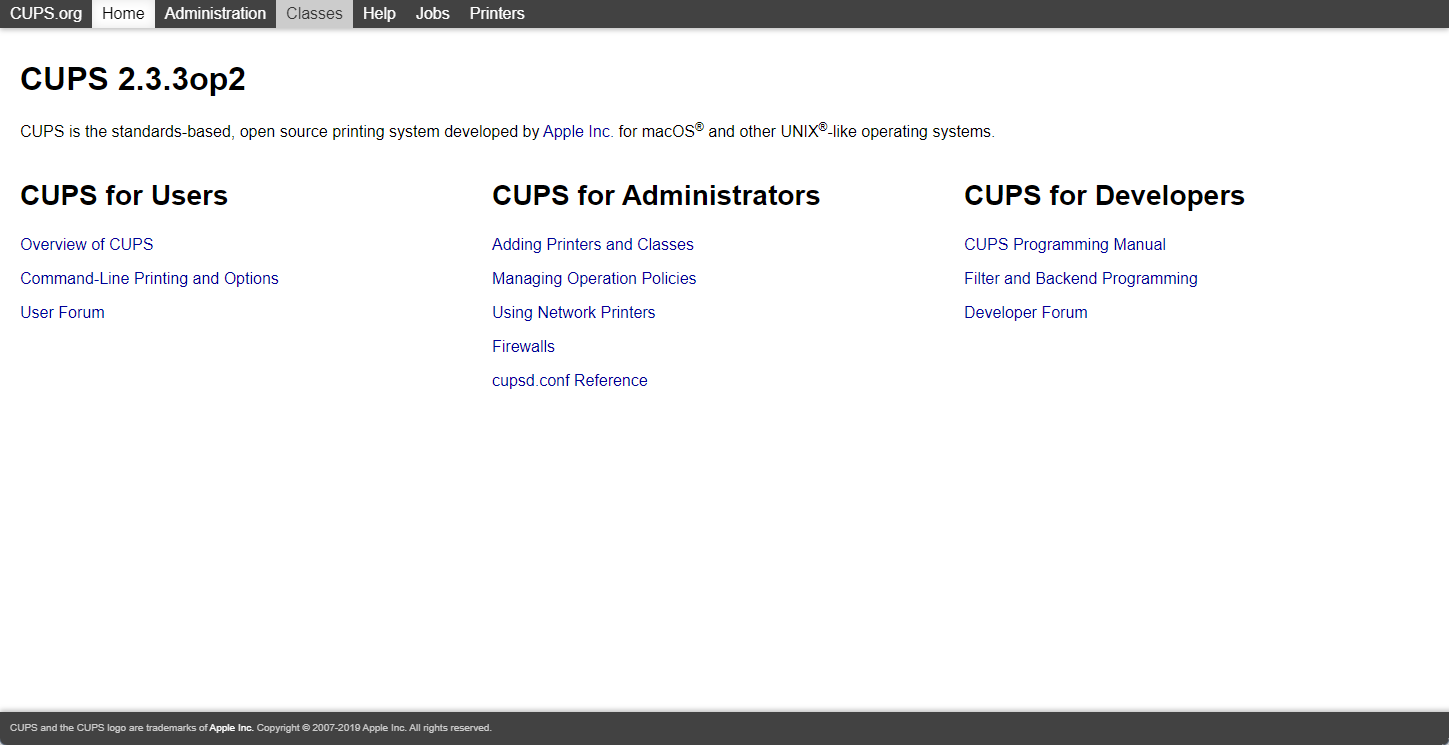
进入Administration页面根据提示添加打印机,这里可能会碰到各种不同品牌打印机驱动的问题,需要多方尝试与搜索解决。
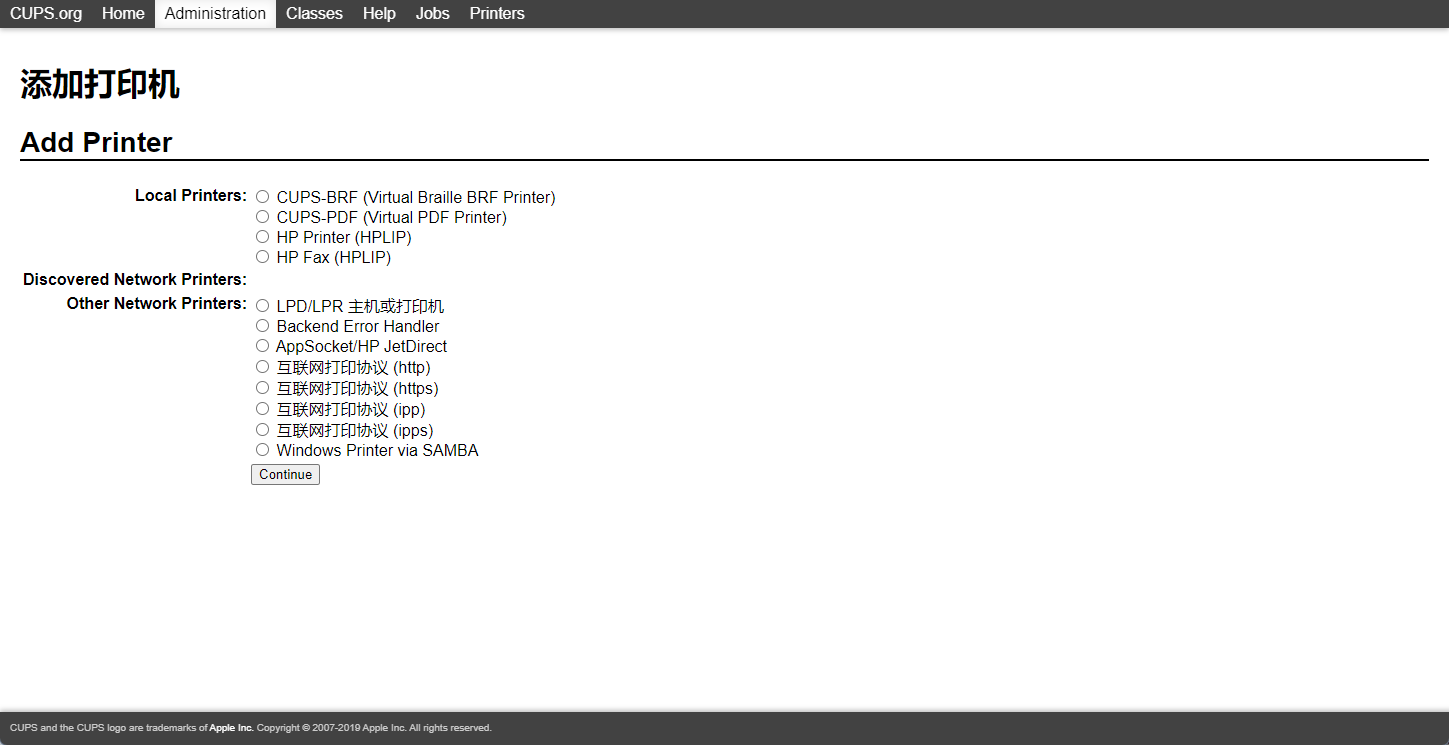
过程中有一个Sharing的选项一定要勾选上,否则后面在Odoo中会搜索不到这个打印机

Odoo
安装base_report_to_printer模块之后,系统设置中会增加Printing菜单
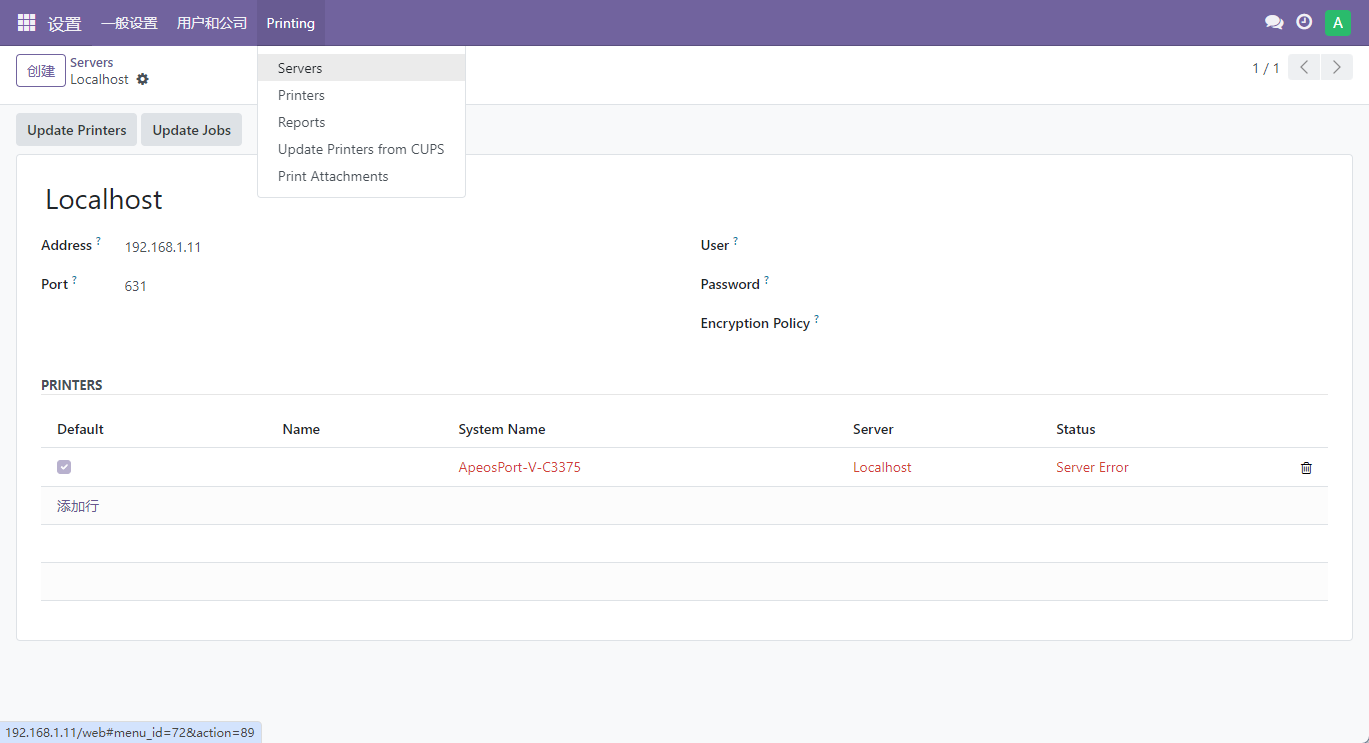
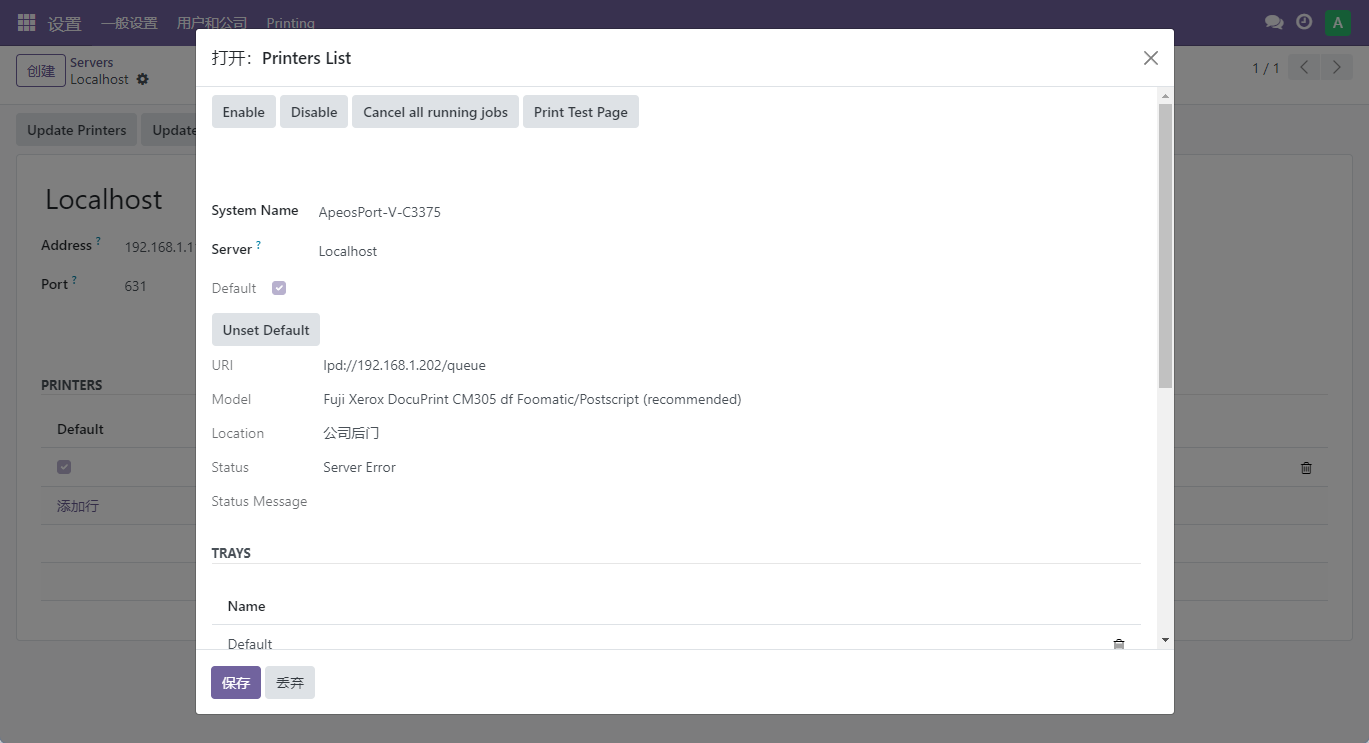
在Servers菜单下添加打印服务器,地址与端口均为cups服务相应的配置;
配置好服务器信息后点击Update Printers更新打印机列表。
以上操作如无异常,服务器下方会出来打印机列表,可点开一个打印机进行打印页测试。
参考
https://github.com/OCA/report-print-send/tree/17.0