Django不显示CSS的效果(基于Django模板的静态资源配置问题)
在搞毕设过程中,习惯起见我直接在网上找了现成的前端设计页面,如图:
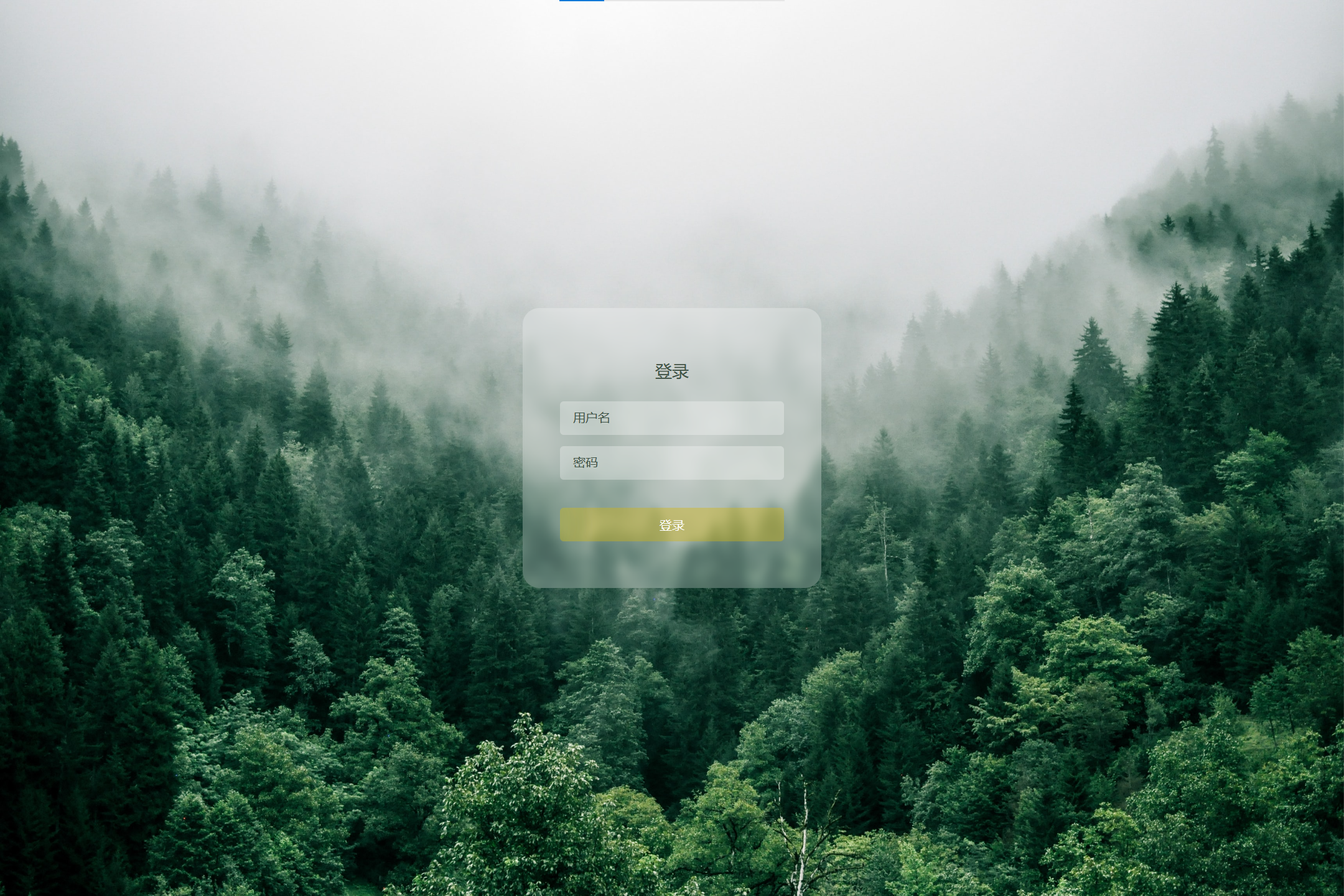
这种前端项目的结构一般是一个login.html、一个style.css、一个背景图片即可搞定的,直接点击html,浏览器中打开的就是上图所示的界面效果。
但是:当我把前端所有文件扔进Django App的templates文件夹后,运行项目的效果却是:
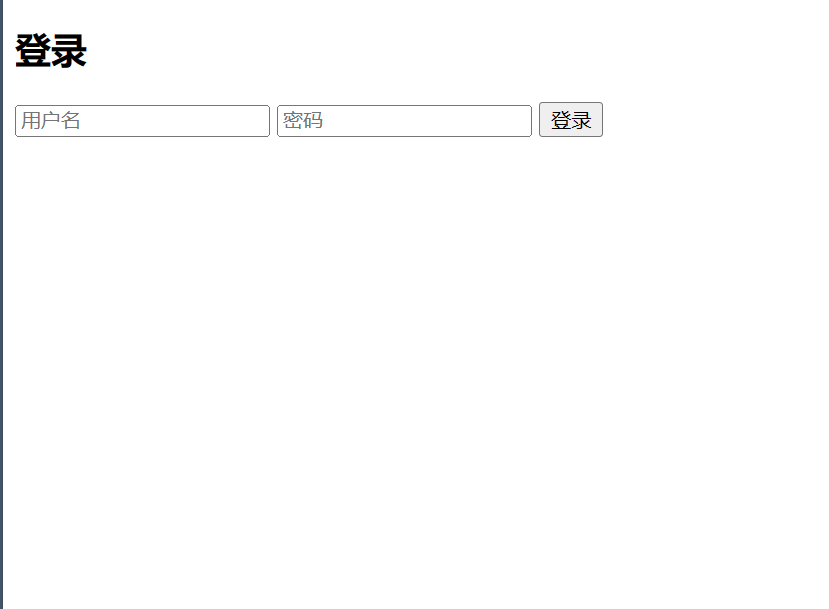
很显然CSS效果不能正常显示,这是因为Django找不着css文件(尽管把html和css都放到templates文件夹下了,可它就是找不着...)
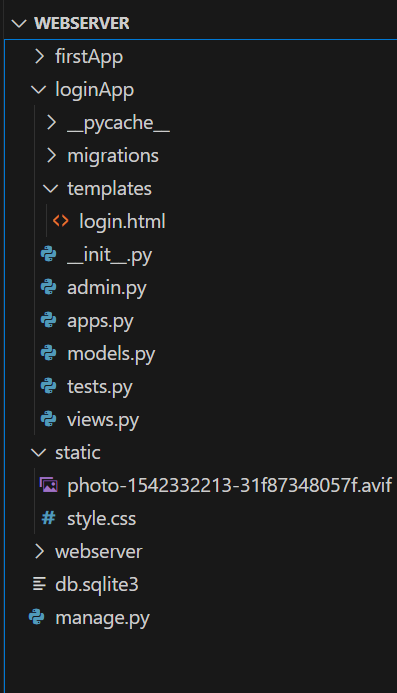
这是因为django的模板机制比较...那啥,css文件要单独放到一个文件夹里,做如下修改:
html文件还是放在templates里,这个不用移动位置。
在django项目的根目录下创建一个文件夹static,将css文件扔进static里。
打开django的settings.py文件,确保里面有如下几行:
STATIC_URL = '/static/'

STATICFILES_DIRS = [
    os.path.join(BASE_DIR, 'static'),
]
接下来修改原来的login.html文件(只需关注下面代码的第一行和第九行):
{% load staticfiles %}
<!DOCTYPE html>
<html lang="en">
<head>
  <meta charset="UTF-8">
  <title>登录系统</title>
  <meta http-equiv="X-UA-Compatible" content="IE=edge">
  <meta name="viewport" content="width=device-width, initial-scale=1.0">
  <link rel="stylesheet" href="{% static 'style.css'%}"/>
</head>
<body>
  <div class="container">
    <form action="#" class="login-form">
      <h2>登录</h2>
      <input type="text" name="username" placeholder="用户名">
      <input type="password" name="password" placeholder="密码">
      <button type="submit">登录</button>
    </form>
  </div>
</body>
</html>在首行添加了:{% load staticfiles %},第九行,使用css时的引用格式改为:href="{% static 'style.css'%}"这种形式。
接下来重新启动,打开后的效果为:

很接近成功了,但是却不显示背景图片,接下来需要将背景图片也扔进static文件夹里,style.css文件为(直接使用背景图片了,因为背景图片与css都在static下):
html,body{
  margin: 0;
  font-family: "PingFang SC","Microsoft Yahei",sans-serif;
}

.container{
  width: 100vw;
  height: 100vh;
  display: flex;
  align-items: center;
  justify-content: center;
  background: url(photo-1542332213-31f87348057f.avif) fixed no-repeat;
  background-size: cover;
}

.login-form{
  width: 240px;
  height: 220px;
  display: flex;
  flex-direction: column;
  padding: 40px;
  text-align: center;
  position:relative;
  z-index: 100;
  background: inherit;
  border-radius: 18px;
  overflow: hidden;
}

.login-form::before{
  content: "";
  width: calc(100% + 20px);
  height: calc(100% + 20px);
  position: absolute;
  top: -10px;
  left: -10px;
  overflow: hidden;
  background: inherit;
  box-shadow: inset 0 0 0 200px rgba(255, 255, 255, 0.25);
  filter: blur(5px);
  z-index: -1;
}

.login-form h2{
  font-size: 18px;
  font-weight: 400;
  color: #3d5245;
}

.login-form input,
.login-form button{
  margin: 6px 0;
  height: 36px;
  border: none;
  background-color: rgba(255, 255, 255, 0.3);
  border-radius: 4px;
  padding: 0 14px;
  color: #3d5245;
}
.login-form input::placeholder{
  color: #3d5245;
}
.login-form button:focus,
.login-form input:focus{
  outline: 0;
}

.login-form button{
  margin-top:24px;
  background-color: rgba(209, 179, 9, 0.4);
  color: white;
  position: relative;
  overflow: hidden;
  cursor: pointer;
  transition: 0.4s;
}

.login-form button:hover{
  background-color: rgba(209, 179, 9 , 0.7);
}

.login-form button::before,
.login-form button::after{
  content: "";
  display: block;
  width: 80px;
  height: 100%;
  background: rgba(179, 255, 210, 0.5);
  opacity: 0.5;
  position: absolute;
  top: 0;
  left: 0;
  transform: skewX(-15deg);
  filter: blur(30px);
  overflow: hidden;
  transform: translateX(-100px);
}

.login-form button:hover::after{
  width: 40px;
  background: rgba(179, 255, 210, 0.3);
  left: 60px;
  opacity: 0;
  filter: blur(5px);
}
.login-form button:hover::before{
transition: 1s;
transform: translateX(320px);
opacity: 0.7s;
}
.login-form button:hover::after{
  transition: 1s;
  transform: translateX(320px);
  opacity: 1;
}
重新启动后正常显示前端页面。
总体的文件结构就长下面这样: