Python3 使用 pysqlcipher3来增强本地数据的安全性,包括编译安装 sqlcipher
编译安装 pysqlcipher3 来增强本地数据的安全性(替换SQLite)
本文是基于 系列文章 PyQt5+SQLAlchemy做登录注册页 的补充,并不单独放在系列文中,主要讲的是,使用 sqlcipher 来保存本地密码,这比直接使用 SQLite 更安全
关于 sqlcipher,官方介绍原文如下:
SQLCipher is a standalone fork of the SQLite database library that adds 256 bit AES encryption of database files and other security features like:
- on-the-fly encryption
- tamper detection
- memory sanitization
- strong key derivation
安装环境
- windows 10 x64
- Python 3.8.10 64bit
注意,如果是 32位的Python ,就需要用 OpenSSL x32 来编译
安装pysqlcipher3,安装比较繁琐与麻烦,安装编译主要参考了 StackOverFlow 这篇回答,点击前往
第1步,编译准备
-
安装 ActiveTcl 8.6,需要用到其中的
tclsh.exe
安装后,需要添加到系统环境变量:path=C:\ActiveTcl\bin

-
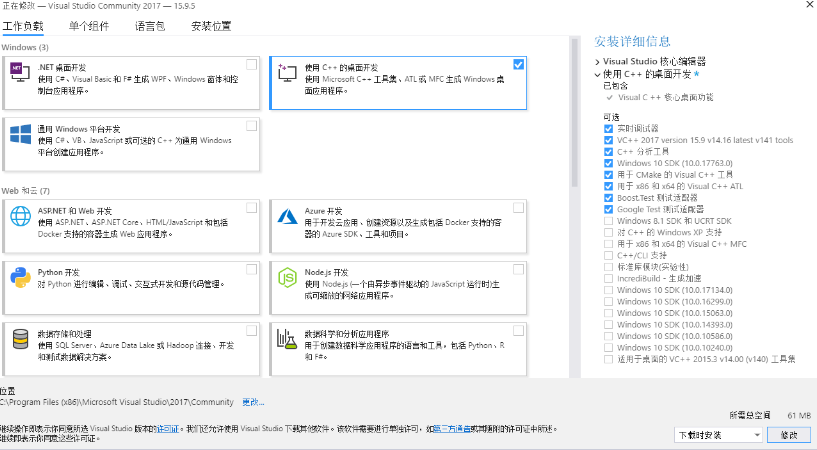
安装Microsoft Visual Studio 2017 只安装 C++ 桌面开发
-
安装 Win64 OpenSSL v1.1.1w 除了安装路径,其他都选项不做修改
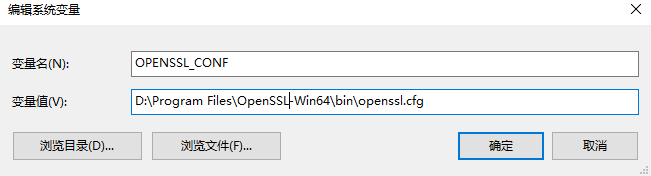
安装后需要添加系统环境变量:
x64添加OPENSSL_CONF=D:\Program Files\OpenSSL-Win64\bin\openssl.cfg
x32添加OPENSSL_CONF=D:\Program Files(x86)\OpenSSL-Win32\bin\openssl.cfg
-
对安装的
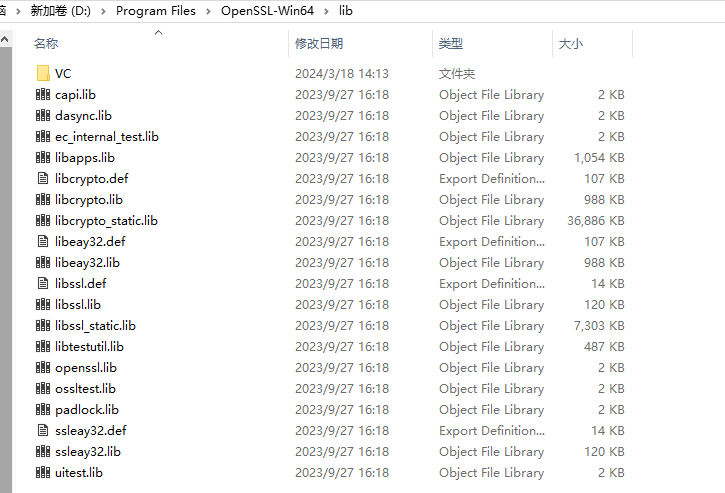
OpenSSL做一些修改,下面操作全在文件夹D:\Program Files\OpenSSL-Win64\lib中执行
复制libcrypto.def和libcrypto.lib为副本,并修改副本名称为libeay32.def和libeay32.lib
复制libssl.def和libssl.lib为副本,并修改副本名称为ssleay32.def和ssleay32.lib
-
复制文件夹
D:\Program Files\OpenSSL-Win64\include\openssl到D:\Program Files\Microsoft Visual Studio\2022\Community\VC\Tools\MSVC\14.39.33519\include,前一个路径是OpenSSL安装路径,后一个路径是Visual Studio 2017安装路径
第2步,安装sqlcipher x64
-
下载 sqlcipher,可直接克隆,或者下载压缩包
-
修改
sqlcipher的编译文件Makefile.msc,修改内容如下第1句,修改下面这句:
TCC = $(TCC) -DSQLITE_TEMP_STORE=1修改为下面,其中的路径为
OpenSSL安装路径:TCC = $(TCC) -DSQLITE_TEMP_STORE=2 -DSQLITE_HAS_CODEC -I"D:\Program Files\OpenSSL-Win64\include"第2句,修改下面这里:
# If ICU support is enabled, add the linker options for it.
#
!IF $(USE_ICU)!=0
LTLIBPATHS = $(LTLIBPATHS) /LIBPATH:$(ICULIBDIR)
LTLIBS = $(LTLIBS) $(LIBICU)
!ENDIF
# <</mark>>
# You should not have to change anything below this line
修改为下面,其中的路径为
OpenSSL安装路径:# If ICU support is enabled, add the linker options for it. # !IF $(USE_ICU)!=0 LTLIBPATHS = $(LTLIBPATHS) /LIBPATH:$(ICULIBDIR) LTLIBS = $(LTLIBS) $(LIBICU) !ENDIF # <</mark>> LTLIBPATHS = $(LTLIBPATHS) /LIBPATH:"D:\Program Files\OpenSSL-Win64\lib\VC\static" LTLIBS = $(LTLIBS) libcrypto64MT.lib libssl64MT.lib ws2_32.lib shell32.lib advapi32.lib gdi32.lib user32.lib crypt32.lib # You should not have to change anything below this line -
打开 Visual Studio 的 x64工具,执行下的操作:
 ,此步执行过程可能会报错,但是只要在
 sqlcipher文件夹中生成sqlite3.c和sqlite3.h就行# 切换到sqlcipher cd /d F:\Projects\sqlcipher # 编译 nmake /f Makefile.msc clean nmake /f Makefile.msc
第3步,安装pysqlcipher3 x64
-
下载pysqlcipher3,可直接克隆,或者下载压缩包
在/pysqlcipher3中创建文件夹amalgamation,然后将第8步中生成的sqlite3.c和sqlite3.h复制到amalgamation中。
然后在/pysqlcipher3/src/python3中,创建一个文件夹sqlcipher -
下载sqlite-amalgamation,我这里使用的是这个sqlite-amalgamation-3340100,下载解压后,复制其中的4个文件
shell.c sqlite3.c sqlite.h sqliteext.h,复制到/pysqlcipher3/src/python3/sqlcipher -
继续在 Visual Studio 的 x64工具,执行下的操作:
,我这里使用的是 Python3.8.10 64bit# 切换到 pysqlcipher3 cd F:\Projects\pysqlcipher3 python setup.py clean python setup.py build_amalgamation python setup.py installpython setup.py build_amalgamation执行后截图

python setup.py install执行后截图

第4步,测试安装
使用下列代码测试
#!/usr/bin/env python3
# -*- coding: UTF-8 -*-
"""
@ File        : test.py
@ Version     : V1.0.0
@ Description :
"""
from pysqlcipher3 import dbapi2 as sqlite

conn1 = sqlite.connect("test.db")
c1 = conn1.cursor()
c1.execute("PRAGMA key='123456'")
c1.execute("""create table stocks (date text, trans text, symbol text, qty real, price real)""")
c1.execute("""insert into stocks values ('2006-01-05','BUY','RHAT',100,35.14)""")
conn1.commit()
c1.close()

conn2 = sqlite.connect("test.db")
c2 = conn2.cursor()
c2.execute("PRAGMA key='123456'")
print(c2.execute("""select * from stocks""").fetchall())
c2.close()
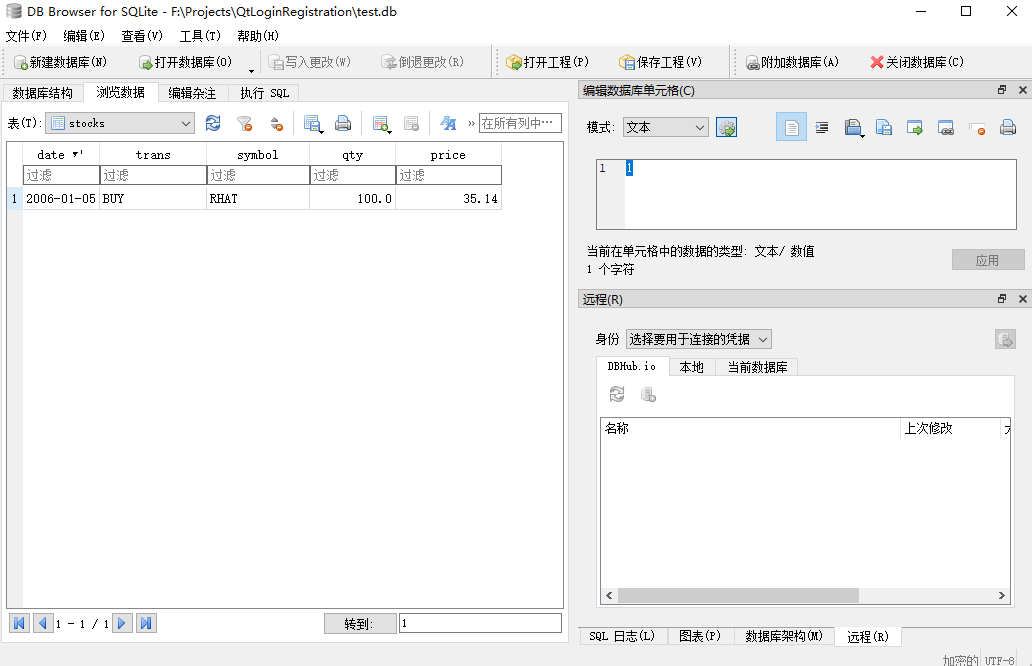
使用最新版本的DB.Browser.for.SQLite 3.12.2查看
参考文章
Install pysqlcipher3 windows
编译Windows 64bit平台pysqlcipher3 for Python3.7
本文章的原文地址
GitHub主页