大模型微调
微调
在深度学习和自然语言处理(NLP)领域,大规模语言模型如BERT、GPT-3等通过在大量数据上进行预训练获得了强大的语言理解和生成能力。这些预训练模型通常需要进行微调(Fine-tuning),以便在特定的下游任务上表现更好。微调可以采取不同的形式,包括full、LoRA和Q-LoRA。
- Full微调(Full Fine-tuning)
Full微调是最传统的微调方法,指的是在特定任务上对整个预训练模型的所有参数进行更新。这种方法简单直接,可以使模型完全适应新任务,但它有两个缺点:一是参数量大,更新所有参数需要大量的计算资源;二是容易过拟合,特别是当下游任务数据量不足时。 - LoRA(Low-Rank Adaptation)
LoRA是一种新颖的微调方法,它通过将模型中的权重矩阵分解为低秩矩阵来减少需要更新的参数数量。基本思想是在预训练模型的基础上引入额外的小型矩阵,并且只更新这些小型矩阵。这些小型矩阵与原始权重矩阵进行某种形式的交互(例如加法或者变换),从而微调模型的行为。LoRA的好处在于,它可以大幅减少微调时需要更新的参数数量,从而降低计算成本并减小过拟合的风险。 - Q-LoRA
Q-LoRA是在LoRA的基础上进一步发展的技术。它旨在通过量化技术进一步减少模型参数。量化通常涉及将模型的权重和激活函数的精度降低,例如从32位浮点数减少到8位整数。这样不仅可以减少模型的存储空间,也可以加快计算速度。Q-LoRA通过在LoRA的基础上应用量化,结合了低秩逼近和量化的优势,进一步提高了模型微调的效率。
这三种方法各有优势和用途,选择哪一种方法取决于具体任务的需求、可用的计算资源以及对模型大小和速度的约束。在实际应用中,研究者和工程师需要根据具体情况做出选择。
经过 LoRA 微调后的模型无法与量化模型合并参数,因为会损失过多的精度
指令跟随是一种让语言模型根据给定的提示来执行特定任务的能力。例如,指令可以是继续聊天,对这段文本进行总结,或者是提供一份销售某个小部件公司的名单。指令跟随模型可以执行任何你给定的指令,只要它们是合理和安全的。
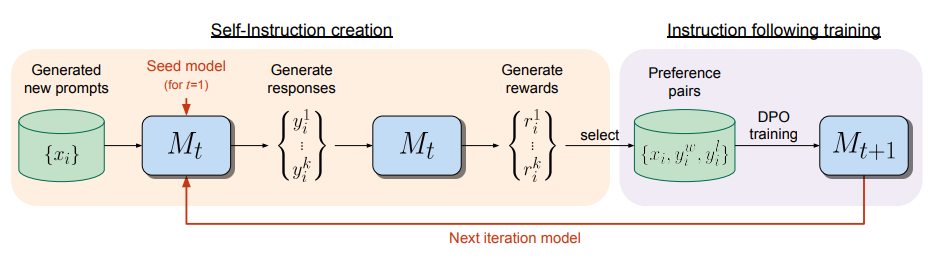
指令跟随是语言模型的一种重要应用,可以让用户更方便地利用语言模型的强大功能。指令跟随模型的训练方法有很多,例如使用人工编写的指令跟随数据集,使用人类反馈的强化学习,或者使用自我指令创建等技术。
DeepSpeed是一个由微软开发的开源深度学习优化库,旨在提高大规模模型训练的效率和可扩展性。它通过多种技术手段来加速训练,包括模型并行化、梯度累积、动态精度缩放、本地模式混合精度等。DeepSpeed还提供了一些辅助工具,如分布式训练管理、内存优化和模型压缩等,以帮助开发者更好地管理和优化大规模深度学习训练任务。此外,deepspeed基于pytorch构建,只需要简单修改即可迁移。DeepSpeed已经在许多大规模深度学习项目中得到了应用,包括语言模型、图像分类、目标检测等等。
Swift 框架
- 支持的SFT方法: lora, qlora, longlora, qalora, 全参数微调, 部分参数微调.
- 支持的特性: 模型量化, DDP, 模型并行, gradient checkpointing, 支持推送ModelScope Hub, 自定义数据集, 多模态和Agent SFT, 多轮对话, DPO, 自我认知微调, ...
- 支持的模型: [详细信息]
- 多模态:
- qwen-vl 系列、qwen-audio 系列、yi-vl 系列、cogagent 系列、internlm-xcomposer2 系列
- 通用:
- qwen 系列、qwen1.5 系列、chatglm 系列、llama 系列、yi 系列、internlm 系列
- deepseek 系列、openbuddy 系列、mistral 系列、mixtral 系列、baichuan 系列
- yuan 系列、xverse 系列、orion 系列、openbmb-minicpm 系列、bluelm 系列
- zephyr 系列、ziya 系列、skywork 系列、other:
- 金融:
- tongyi-finance 系列:
- 代码:
- codefuse 系列、deepseek-coder 系列:、codegeex2 系列、phi 系列
- 数学:
- internlm2-math 系列、deepseek-math 系列
- 多模态:
- 支持的数据集: [详细信息]
- NLP:
- 通用: 🔥ms-bench, 🔥alpaca-en(gpt4), 🔥alpaca-zh(gpt4), multi-alpaca-all, instinwild-en, instinwild-zh, cot-en, cot-zh, firefly-all-zh, instruct-en, gpt4all-en, sharegpt-en, sharegpt-zh, tulu-v2-sft-mixture, wikipedia-zh, open-orca, open-orca-gpt4, sharegpt-gpt4, 🔥sharegpt-gpt4-mini.
- Agent: 🔥ms-agent, damo-mini-agent-zh, damo-agent-zh, agent-instruct-all-en.
- RLHF: 🔥hh-rlhf, stack-exchange-paired.
- 代码: code-alpaca-en, 🔥leetcode-python-en, 🔥codefuse-python-en, 🔥codefuse-evol-instruction-zh.
- 医疗: medical-en, medical-zh, medical-mini-zh, disc-med-sft-zh.
- 法律: 🔥lawyer-llama-zh, tigerbot-law-zh, disc-law-sft-zh.
- 数学: 🔥blossom-math-zh, school-math-zh, open-platypus-en.
- SQL: text2sql-en, 🔥sql-create-context-en.
- 文本生成: 🔥advertise-gen-zh, 🔥dureader-robust-zh.
- 分类: cmnli-zh, 🔥cmnli-mini-zh, 🔥jd-sentiment-zh, 🔥hc3-zh, 🔥hc3-en.
- RLHF: 🔥hh-rlhf, stack-exchange-paired.
- 其他: finance-en, poetry-zh, webnovel-zh, generated-chat-zh, cls-fudan-news-zh, ner-jave-zh.
- 多模态:
- 视觉: coco-en, 🔥coco-mini-en, coco-mini-en-2, capcha-images.
- 音频: aishell1-zh, 🔥aishell1-mini-zh.
- 自定义数据集
- NLP:
- 支持的对话模板:
- 文本生成: default-generation, default-generation-bos, chatglm-generation, qwen-audio-generation.
- 对话: default, qwen, qwen-audio, baichuan, chatglm2, chatglm3, llama, openbuddy, internlm, internlm2, internlm-xcomposer2, yi, yi-vl, yuan, xverse, ziya, skywork, bluelm, zephyr, sus, deepseek, deepseek-coder, codefuse-codellama, codefuse, cogagent-chat, cogagent-instruct, orion, openbmb, chatml.
安装
# 全量能力
pip install ms-swift[all] -U
# 仅使用LLM
pip install ms-swift[llm] -U
# 仅使用AIGC
pip install ms-swift[aigc] -U
# 仅使用adapters
pip install ms-swift -U
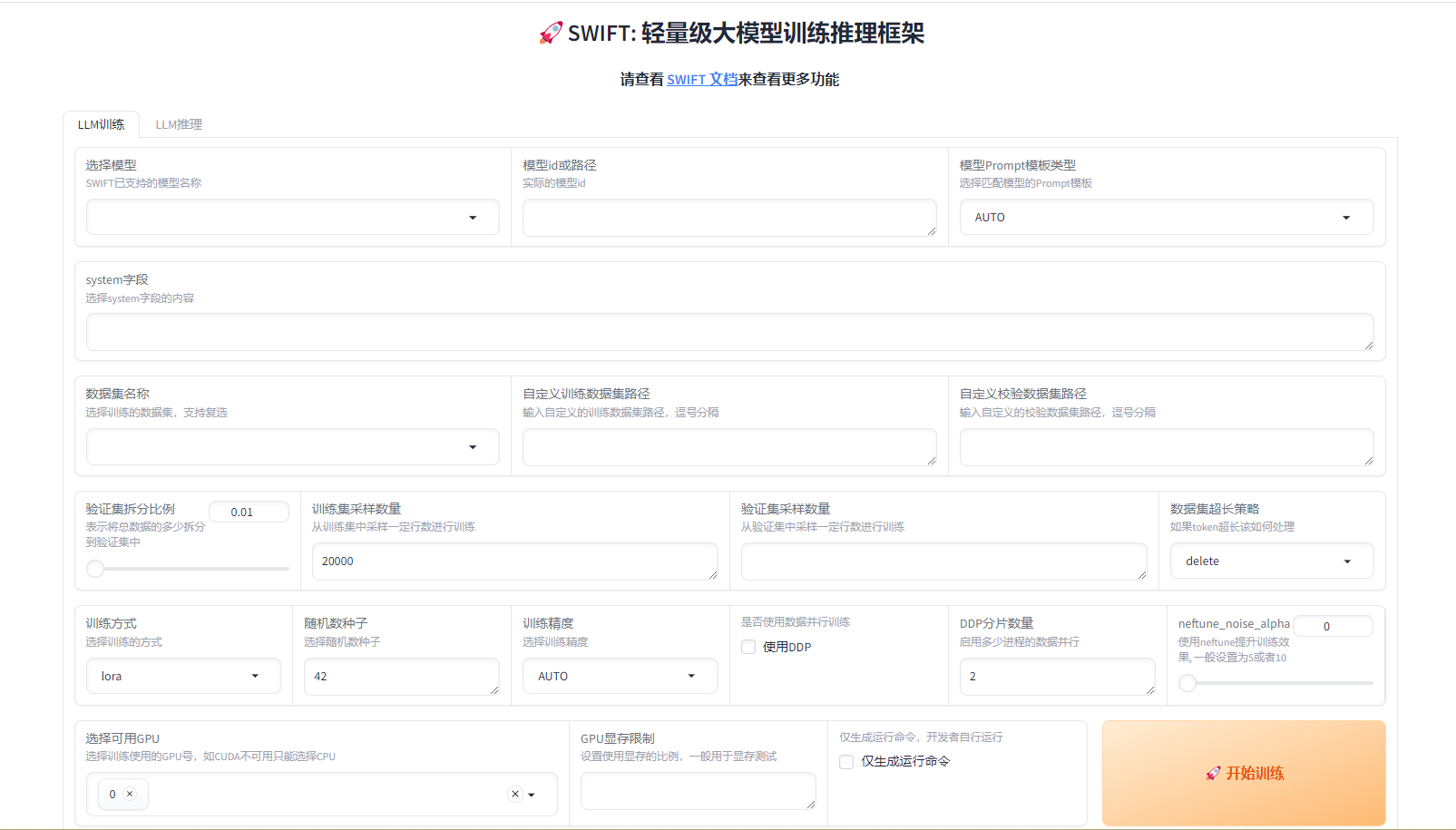
运行 web ui
WEBUI_SERVER=0.0.0.0 WEBUI_PORT=6006 swift web-ui
支持的环境变量:
WEBUI_SHARE=1 控制gradio是否是share状态 SWIFT_UI_LANG=en/zh 控制web-ui界面语言 WEBUI_SERVER server_name参数, web-ui host ip,0.0.0.0代表所有ip均可访问,127.0.0.1代表只允许本机访问 WEBUI_PORT web-ui的端口号
数据集准备
swift/docs/source/LLM/自定义与拓展.md at main · modelscope/swift
[{"conversations": [{"from": "user", "value": "Picture 1:<img>img_path</img>\n11111"}, {"from": "assistant", "value": "22222"}]},
{"conversations": [{"from": "user", "value": "Picture 1:<img>img_path</img>\nPicture 2:<img>img_path</img>\naaaaa"}, {"from": "assistant", "value": "bbbbb"}, {"from": "user", "value": "Picture 1:<img>img_path</img>\nccccc"}, {"from": "assistant", "value": "ddddd"}]},
{"conversations": [{"from": "user", "value": "AAAAA"}, {"from": "assistant", "value": "BBBBB"}, {"from": "user", "value": "CCCCC"}, {"from": "assistant", "value": "DDDDD"}]}]
参数设置
swift/docs/source/LLM/命令行参数.md at main · modelscope/swift
- --resume_from_checkpoint: 用于断点续训, 默认为None. 你可以将其设置为checkpoint的路径, 例如: 'output/qwen-7b-chat/vx_xxx/checkpoint-xxx', 来进行断点续训.
CUDA_VISIBLE_DEVICES=0 nohup swift sft \
--model_type "qwen1half-1_8b-chat" --model_cache_dir "/root/autodl-tmp/model/qwen/Qwen1___5-1___8B-Chat" \
--template_type "qwen" --system "You are a helpful assistant." \
--custom_train_dataset_path /root/autodl-tmp/dataset.jsonl \
--train_dataset_sample "50" \
--num_train_epochs "55" \
--save_steps "50" --lora_target_modules ALL \
--learning_rate "1e-5" --gradient_accumulation_steps "1" \
--eval_batch_size "1" --add_output_dir_suffix False \
--output_dir /root/autodl-tmp/output/qwen1half-1_8b-chat/v0-20240221-172110 \
--logging_dir /root/autodl-tmp/output/qwen1half-1_8b-chat/v0-20240221-172110/runs > /root/autodl-tmp/output/qwen1half-1_8b-chat/v0-20240221-172110/runs/run.log 2>&1
模型合并
swift merge-lora --ckpt_dir 'xxx/vx_xxx/checkpoint-xxx'
模型推理
CUDA_VISIBLE_DEVICES=0 swift infer --ckpt_dir 'xxx/vx_xxx/checkpoint-xxx-merged'
输入数据样式
[{"conversations": [{"from": "user", "value": "Picture 1:<img>img_path</img>\n11111"}, {"from": "assistant", "value": "22222"}]},
{"conversations": [{"from": "user", "value": "Picture 1:<img>img_path</img>\nPicture 2:<img>img_path</img>\naaaaa"}, {"from": "assistant", "value": "bbbbb"}, {"from": "user", "value": "Picture 1:<img>img_path</img>\nccccc"}, {"from": "assistant", "value": "ddddd"}]},
{"conversations": [{"from": "user", "value": "AAAAA"}, {"from": "assistant", "value": "BBBBB"}, {"from": "user", "value": "CCCCC"}, {"from": "assistant", "value": "DDDDD"}]}]
python 推理
import os
os.environ['CUDA_VISIBLE_DEVICES'] = '0'

from swift.llm import (
    get_model_tokenizer, get_template, inference, ModelType, get_default_template_type,
)
from swift.utils import seed_everything

model_type = ModelType.qwen_vl_chat
template_type = get_default_template_type(model_type)
print(f'template_type: {template_type}')  # template_type: qwen

model, tokenizer = get_model_tokenizer(model_type, model_kwargs={'device_map': 'auto'})

template = get_template(template_type, tokenizer)
seed_everything(42)
query = tokenizer.from_list_format([
    {'image': 'https://qianwen-res.oss-cn-beijing.aliyuncs.com/Qwen-VL/assets/demo.jpeg'},
    {'text': '这是什么'},
])
response, history = inference(model, template, query)
print(f'query: {query}')
print(f'response: {response}')
query = '输出击掌的检测框'
response, history = inference(model, template, query, history)
print(f'query: {query}')
print(f'response: {response}')
print(f'history: {history}')
image = tokenizer.draw_bbox_on_latest_picture(response, history)
image.save('output_chat.jpg')
"""
query: Picture 1:<img>https://qianwen-res.oss-cn-beijing.aliyuncs.com/Qwen-VL/assets/demo.jpeg</img>
这是什么
response: 图中是一名女子在沙滩上和狗玩耍,旁边的狗是一只拉布拉多犬,它们处于沙滩上。
query: 输出击掌的检测框
response: <ref>击掌</ref><box>(523,513),(584,605)</box>
history: [('Picture 1:<img>https://qianwen-res.oss-cn-beijing.aliyuncs.com/Qwen-VL/assets/demo.jpeg</img>\n这是什么', '图中是一名女子在沙滩上和狗玩耍,旁边的狗是一只拉布拉多犬,它们处于沙滩上。'), ('输出击掌的检测框', '<ref>击掌</ref><box>(523,513),(584,605)</box>')]
"""
使用LoRA增量权重进行推理:
import os
os.environ['CUDA_VISIBLE_DEVICES'] = '0'

from swift.llm import (
get_model_tokenizer, get_template, inference, ModelType, get_default_template_type
)
from swift.tuners import Swift

model_dir = 'vx_xxx/checkpoint-100'
model_type = ModelType.qwen_7b_chat
template_type = get_default_template_type(model_type)

model, tokenizer = get_model_tokenizer(model_type, model_kwargs={'device_map': 'auto'})

model = Swift.from_pretrained(model, model_dir, inference_mode=True)
template = get_template(template_type, tokenizer)
query = 'xxxxxx'
response, history = inference(model, template, query)
print(f'response: {response}')
print(f'history: {history}')
使用LoRA merged的权重进行推理:
import os
os.environ['CUDA_VISIBLE_DEVICES'] = '0'

from swift.llm import (
get_model_tokenizer, get_template, inference, ModelType, get_default_template_type
)

model_dir = 'vx_xxx/checkpoint-100-merged'
model_type = ModelType.qwen_7b_chat
template_type = get_default_template_type(model_type)

model, tokenizer = get_model_tokenizer(model_type, model_kwargs={'device_map': 'auto'},
                                       model_dir=model_dir)

template = get_template(template_type, tokenizer)
query = 'xxxxxx'
response, history = inference(model, template, query)
print(f'response: {response}')
print(f'history: {history}')
Self-Rewarding Language Models
引言:超越人类的AI,需要超人类的反馈
在人工智能的发展历程中,我们已经见证了从简单的规则引擎到复杂的自然语言处理模型的演变。随着大型语言模型(LLMs)的出现,我们进入了一个新的时代,这些模型在理解和生成人类语言方面的能力令人震惊。然而,要实现超越人类水平的人工智能代理,我们需要的不仅仅是更多的数据或更复杂的算法,而是一种全新的训练方法——一种能够提供超人类水平反馈的方法。
传统的训练方法,如基于人类偏好的强化学习(RLHF),通常依赖于人类提供的偏好数据来训练奖励模型。然而,这种方法存在两个主要的瓶颈:首先,它受限于人类表现水平,因为奖励模型的质量取决于人类偏好数据的大小和质量;其次,这些独立的、固定的奖励模型在LLM训练期间无法进一步学习和改进。为了突破这些限制,我们提出了一种新的训练范式——自奖励语言模型(Self-Rewarding Language Models),它们不仅能够生成符合指令的响应,还能自我生成和评估新的指令遵循示例,以此来丰富自己的训练集。
参考文献
GitHub - modelscope/swift: ms-swift is a framework for LLM finetuning, inference, and deployment. It supports a wide range of models (such as LLaMA, Qwen, ChatGLM, Yi, Internlm, Mistral, Mixtral, Baichuan, etc.) and training methods (including LoRA, QLoRA, Full, ResTuning, LongLoRA, NEFTune, etc.)
Self-Rewarding Language Models
Self-Rewarding Language Models 总结版
零一万物开源Yi-VL多模态大模型,魔搭社区推理&微调最佳实践来啦!