RPi.GPIO API All In One
RPi.GPIO API All In One
Python & Raspberry Pi
# RPi.GPIO 0.7.1 / Released: Feb 6, 2022
$ pip install RPi.GPIO
$ pip3 install RPi.GPIO
https://pypi.org/project/RPi.GPIO/
https://sourceforge.net/projects/raspberry-gpio-python/
API docs
import RPi.GPIO as GPIO

GPIO.setmode
GPIO.BCM

GPIO.setup
GPIO.OUT

GPIO.PWM
https://sourceforge.net/p/raspberry-gpio-python/wiki/Examples/
import RPi.GPIO as GPIO
GPIO.setmode(GPIO.BOARD)

func = GPIO.gpio_function(pin)
# will return a value from:
GPIO.IN, GPIO.OUT, GPIO.SPI, GPIO.I2C, GPIO.HARD_PWM, GPIO.SERIAL, GPIO.UNKNOWN

P17_value = GPIO.gpio_function(17)
P27_value = GPIO.gpio_function(27)
P22_value = GPIO.gpio_function(22)
print('GPIO.gpio_function(17) =', P17_value)
print('GPIO.gpio_function(27) =', P27_value)
print('GPIO.gpio_function(22) =', P22_value)
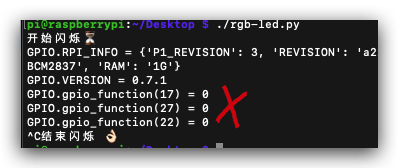
https://sourceforge.net/p/raspberry-gpio-python/wiki/Checking function of GPIO channels/
https://sourceforge.net/p/raspberry-gpio-python/wiki/Inputs/
import RPi.GPIO as GPIO
GPIO.setmode(GPIO.BOARD)
GPIO.setup(12, GPIO.OUT)

# To set an output high:
GPIO.output(12, GPIO.HIGH)
 # or
GPIO.output(12, 1)
 # or
GPIO.output(12, True)

# To set an output low:
GPIO.output(12, GPIO.LOW)
 # or
GPIO.output(12, 0)
 # or
GPIO.output(12, False)
https://sourceforge.net/p/raspberry-gpio-python/wiki/Outputs/
# To discover information about your RPi:
GPIO.RPI_INFO

# To discover the Raspberry Pi board revision:
GPIO.RPI_INFO['P1_REVISION']
# GPIO.RPI_REVISION    (deprecated)

# To discover the version of RPi.GPIO:
GPIO.VERSION

print('GPIO.RPI_INFO =', GPIO.RPI_INFO)
print('GPIO.VERSION =', GPIO.VERSION)

"""

GPIO.RPI_INFO = {'P1_REVISION': 3, 'REVISION': 'a22082', 'TYPE': 'Pi 3 Model B', 'MANUFACTURER': 'Embest', 'PROCESSOR': 'BCM2837', 'RAM': '1G'}
GPIO.VERSION = 0.7.1


"""
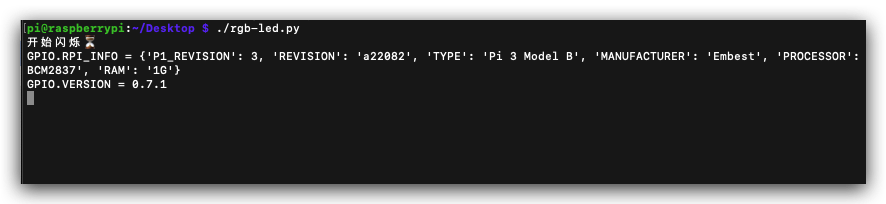
cleanup
GPIO.cleanup()
# It is possible that don't want to clean up every channel leaving some set up when your program exits.
# You can clean up individual channels, a list or a tuple of channels:

GPIO.cleanup(channel)
GPIO.cleanup( (channel1, channel2) )
GPIO.cleanup( [channel1, channel2] )
import RPi.GPIO as GPIO
# choose BCM numbering scheme.
GPIO.setmode(GPIO.BCM)

# red / green / blue
# GPIO.setup(17, GPIO.OUT)
# GPIO.setup(27, GPIO.OUT)
# GPIO.setup(22, GPIO.OUT)

# GPIO.setup list
LEDs = [17, 27, 22]
GPIO.setup(LEDs, GPIO.OUT)
GPIO.setup(LEDs, GPIO.OUT)
GPIO.setup(LEDs, GPIO.OUT)
https://sourceforge.net/p/raspberry-gpio-python/wiki/BasicUsage/
import time
import RPi.GPIO as GPIO
GPIO.setmode(GPIO.BOARD)
GPIO.setup(12, GPIO.OUT)

p = GPIO.PWM(12, 50)  # channel=12 frequency=50Hz
p.start(0)
try:
    while 1:
        for dc in range(0, 101, 5):
            p.ChangeDutyCycle(dc)
            time.sleep(0.1)
        for dc in range(100, -1, -5):
            p.ChangeDutyCycle(dc)
            time.sleep(0.1)
except KeyboardInterrupt:
    pass
p.stop()
GPIO.cleanup()
https://sourceforge.net/p/raspberry-gpio-python/wiki/PWM/
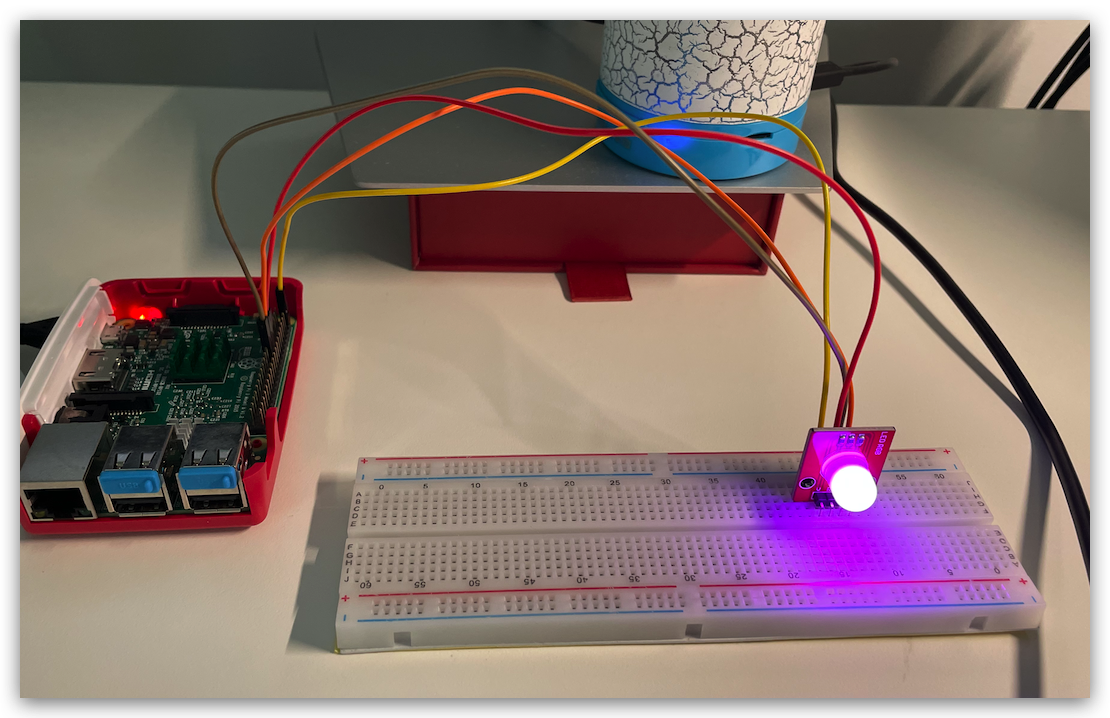
demos
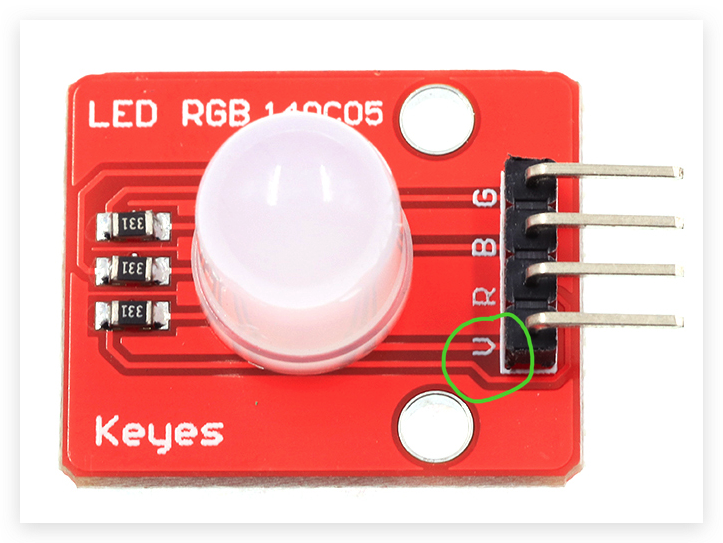
Keyes
RGB LED140C50
V 针脚需要接共阳极的 5V
refs
©xgqfrms 2012-2021
原创文章,版权所有©️xgqfrms, 禁止转载 🈲️,侵权必究⚠️!
未经授权禁止转载,违者必究!