Python一些提高效率的类库和装饰器用法
本文主要是慢慢积累Python中一些能提高效率的类库和装饰器,闲话少说,开始进入主题。
一、重试
【问题引申:接口网络抖动不稳如何做?回答:请求接口捕获异常和接口请求重试】
1 from retrying import retry
2 # 等待1秒后重试,最大重试次数为3
3 @retry(stop_max_attempt_number=3, wait_fixed=1000)
4 def test_foo():
5     pass
二、接口返回值深度校验
【问题引申:接口返回值如何做校验?回答:用deepdiff可以做返回值类型及值不一致的校验】
 1 from deepdiff import DeepDiff
 2 def vaildate_json(expected, actual):
 3     #  比较两个JSON对象的差异
 4     diff = DeepDiff(expected, actual)
 5     #  输出差异
 6     if diff:
 7         print("实际结果与预期结果不一致:")
 8         print(diff)
 9         return False
10     else:
11         print("实际结果与预期结果一致")
12         return True
13
14 # 需要比较的JSON对象
15 expected = {
16     "key1":33,
17     "key2":{
18         "nested_key":"value",
19         "nested_list":[2,3,4]
20     }
21 }
22 actual = {
23     "key1":"33",
24     "key2":{
25         "nested_key":"value",
26         "nested_list":[2,3,4]
27     }
28 }
29 #  调用函数进行比较
30 vaildate_json(expected,actual)
三、接口返回值取值:jsonpath
【问题引申:如何快速方便的获取json中的某一个值?回答:用jsonpath】
 1 import jsonpath
 2 actual = {
 3     "key1":"33",
 4     "key2":{
 5         "nested_key":"value",
 6         "key1":"hankai",
 7         "nested_list":[2,3,4]
 8    }
 9  }
10 list1 = jsonpath.jsonpath(actual,'$..key1')
11 print(list1)  # ['33', 'hankai']
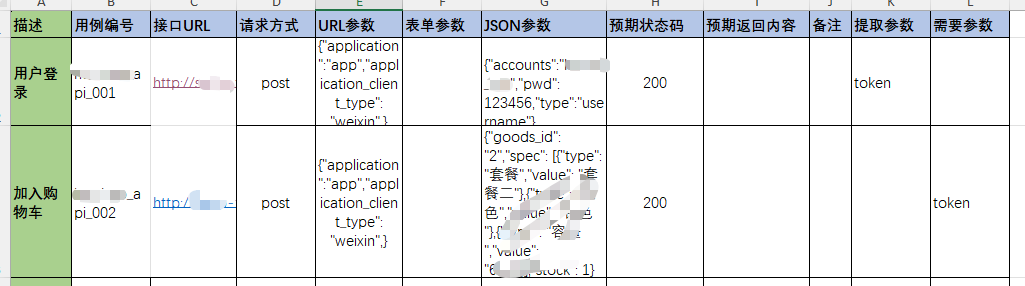
四、读取Excel并转换成列表:xToolkit
【问题引申:如何遍历Excel做接口自动化?回答:xToolkit库】
 1 from xToolkit import xfile
 2
 3 # 读取Excel数据转换成列表
 4 testdata = xfile.read("接口测试用例.xls").excel_to_dict(sheet=1)
 5 print(testdata)
 6 """
 7 [
 8     {'描述': '用户登录', '用例编号': 'shop_api_001', '接口URL': 'http://shoo.hu.com/index.php?s=api/user/login', '请求方式': 'post', 'URL参数': '{"application":"app","application_client_type": "weixin",}', '表单参数': '', 'JSON参数': ' {"accounts":"ce_hk","pwd": 123456,"type":"username"}', '预期状态码': 200, '预期返回内容': '', '备注': '', '提取参数': 'token', '需要参数': ''},
 9     {'描述': '加入购物车', '用例编号': 'shop_api_002', '接口URL': 'http://shoo.hu.com/index.php?s=api/cart/save', '请求方式': 'post', 'URL参数': '{"application":"app","application_client_type": "weixin",}', '表单参数': '', 'JSON参数': '{"goods_id": "2","spec": [{"type": "套餐","value": "套餐二"},{"type": "颜色","value": "银色"},{"type": "容量","value": "64G"}],"stock": 1}', '预期状态码': 200, '预期返回内容': '', '备注': '', '提取参数': '', '需要参数': 'token'}
10  ]
11 """
五、