使用phpword生成电子合同与GD库绘制表格
function create_table(){
    $data = array();
    //生成演示数据
    for($i = 0; $i< 10; $i++){
        $data[] = [
            'name' => '测试名' . $i,
            'zhuang' => 100,
            'xian' => 50,
            'he' => 50,
            'zhuang_dui' => 500,
            'xian_dui' => 5000,
        ];
    }
    $params = [
        'row' => 11,//数据的行数
        'file_name' => '12.png',
        'title' => '数据表',
        'table_time' => '2018-4-29 22:50:43',
        'data' => $data
    ];
    $base = [
        'border' => 10,//图片外边框
        'file_path' => './',//图片保存路径
        'title_height' => 30,//报表名称高度
        'title_font_size' => 16,//报表名称字体大小
        'font_ulr' => 'D:/fzxh1jw.ttf',//字体文件绝对路径
        'text_size' => 12,//正文字体大小
        'row_hight' => 30,//每行数据行高
        'filed_id_width' => 60,//序号列的宽度
        'filed_name_width' => 120,//玩家名称的宽度
        'filed_data_width' => 100,//数据列的宽度
        'table_header' => ['序号','昵称','数据1','数据2','数据3','数据4','数据5'],//表头文字
        'column_text_offset_arr' => [45,90,55,55,55,65,65],//表头文字左偏移量
        'row_text_offset_arr' => [50,110,90,90,90,90,90],//数据列文字左偏移量
    ];
    $base['img_width'] = $base['filed_id_width'] + $base['filed_name_width'] + $base['filed_data_width'] * 5 + $base['border'] * 2;//图片宽度
    $base['img_height'] = $params['row'] * $base['row_hight'] + $base['border'] * 2 + $base['title_height'];//图片高度
    $border_top = $base['border'] + $base['title_height'];//表格顶部高度
    $border_bottom = $base['img_height'] - $base['border'];//表格底部高度
    $base['column_x_arr'] = [
        $base['border'] + $base['filed_id_width'],//第一列边框线x轴像素
        $base['border'] + $base['filed_id_width'] + $base['filed_name_width'],//第二列边框线x轴像素
        $base['border'] + $base['filed_id_width'] + $base['filed_name_width'] + $base['filed_data_width'] * 1,//第三列边框线x轴像素
        $base['border'] + $base['filed_id_width'] + $base['filed_name_width'] + $base['filed_data_width'] * 2,//第四列边框线x轴像素
        $base['border'] + $base['filed_id_width'] + $base['filed_name_width'] + $base['filed_data_width'] * 3,//第五列边框线x轴像素
        $base['border'] + $base['filed_id_width'] + $base['filed_name_width'] + $base['filed_data_width'] * 4,//第五列边框线x轴像素
        $base['border'] + $base['filed_id_width'] + $base['filed_name_width'] + $base['filed_data_width'] * 5,//第五列边框线x轴像素
    ];
    $img = imagecreatetruecolor($base['img_width'], $base['img_height']);//创建指定尺寸图片
    $bg_color = imagecolorallocate($img, 255, 255, 255);//设定图片背景色
    $text_coler = imagecolorallocate($img, 0, 0, 0);//设定文字颜色
    $border_coler = imagecolorallocate($img, 0, 0, 0);//设定边框颜色
    $white_coler = imagecolorallocate($img, 255, 255, 255);//设定边框颜色
    imagefill($img, 0, 0, $bg_color);//填充图片背景色
    //先填充一个黑色的大块背景
    imagefilledrectangle($img, $base['border'], $base['border'] + $base['title_height'], $base['img_width'] - $base['border'], $base['img_height'] - $base['border'], $border_coler);//画矩形
    //再填充一个小两个像素的 背景色区域,形成一个两个像素的外边框
    imagefilledrectangle($img, $base['border'] + 2, $base['border'] + $base['title_height'] + 2, $base['img_width'] - $base['border'] - 2, $base['img_height'] - $base['border'] - 2, $bg_color);//画矩形
    //画表格纵线 及 写入表头文字
    foreach($base['column_x_arr'] as $key => $x){
        imageline($img, $x, $border_top, $x, $border_bottom,$border_coler);//画纵线
        imagettftext($img, $base['text_size'], 0, $x - $base['column_text_offset_arr'][$key] + 1, $border_top + $base['row_hight'] - 8, $text_coler, $base['font_ulr'], $base['table_header'][$key]);//写入表头文字
    }
    //画表格横线
    foreach($params['data'] as $key => $item){
        $border_top += $base['row_hight'];
        imageline($img, $base['border'], $border_top, $base['img_width'] - $base['border'], $border_top, $border_coler);
        imagettftext($img, $base['text_size'], 0, $base['column_x_arr'][0] - $base['row_text_offset_arr'][0], $border_top + $base['row_hight'] - 10, $text_coler, $base['font_ulr'], $key + 1);//写入序号
        $sub = 0;
        foreach ($item as $value){
            $sub++;
            imagettftext($img, $base['text_size'], 0, $base['column_x_arr'][$sub] - $base['row_text_offset_arr'][$sub], $border_top + $base['row_hight'] - 10, $text_coler, $base['font_ulr'], $value);//写入data数据
        }
    }
    //计算标题写入起始位置
    $title_fout_box = imagettfbbox($base['title_font_size'], 0, $base['font_ulr'], $params['title']);//imagettfbbox() 返回一个含有 8 个单元的数组表示了文本外框的四个角:
    $title_fout_width = $title_fout_box[2] - $title_fout_box[0];//右下角 X 位置 - 左下角 X 位置 为文字宽度
    $title_fout_height = $title_fout_box[1] - $title_fout_box[7];//左下角 Y 位置- 左上角 Y 位置 为文字高度
    //居中写入标题
    imagettftext($img, $base['title_font_size'], 0, ($base['img_width'] - $title_fout_width)/2, $base['title_height'], $text_coler, $base['font_ulr'], $params['title']);
    //写入制表时间
    imagettftext($img, $base['text_size'], 0, $base['border'], $base['title_height'], $text_coler, $base['font_ulr'], '时间:' . $params['table_time']);    $save_path = $base['file_path'] . $params['file_name'];
    if(!is_dir($base['file_path'])){
        mkdir($base['file_path'],0777,true);//可创建多级目录
    }
    imagepng($img,$save_path);//输出图片,输出png使用imagepng方法,输出gif使用imagegif方法
}
phpword的github地址: https://github.com/PHPOffice/PHPWord
项目中安装: composer require phpoffice/phpword
使用:
        $phpWord = new PhpWord();
        $template = new TemplateProcessor('./template/劳务d协议模板.docx');
        $template->setValue('name','张三');
        $template->setValue('idcard','320325555555444444');
        $template->setValue('address','北京路23号');
        $template->setValue('mobile','16555555555');
        $template->setValue('year','2023');
        $template->setValue('month','07');
        $template->setValue('day','23');
        $template->setImageValue('sign',['src' => 'uploads/20230722/78b90aed153bca713f2394293adbc566.jpg']);
        $template->saveAs('./shijuan2.docx');
截图对比:
模板 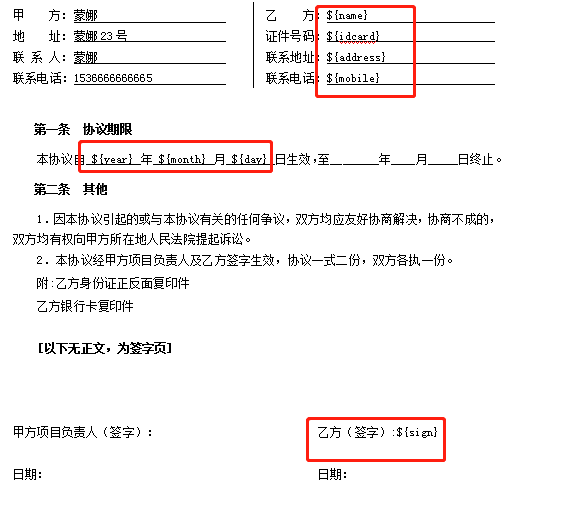 重新生成:
重新生成: 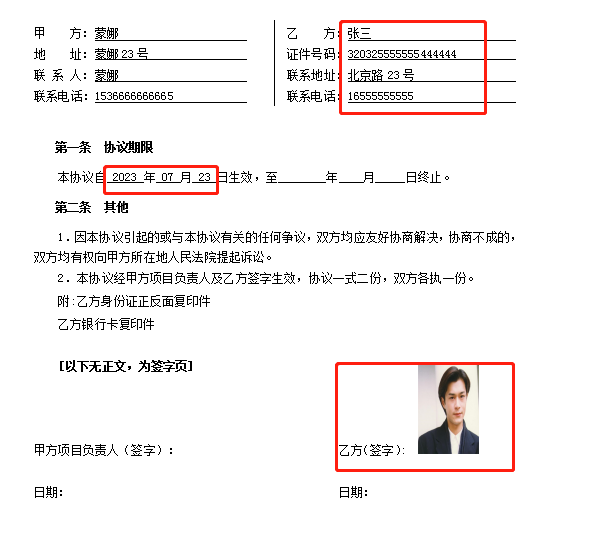
效果可以说是非常不错; 签名的图片比较大,可以设置图片的样式,使用嵌入型就可以了.如果合同中报表数据,可以先用GD库绘制成图,然后当做图片写进去也不错.