PHP error_log()函数的使用方法
error_log(
string
int
?string
?string
): bool
string
$message,int
$message_type = 0,?string
$destination = null,?string
$additional_headers = null): bool
1 当$message_type=0
发送到PHP的系统日志
$message = "[DB] [数据库繁忙0]";
error_log($message,0);
记录在 D:\phpstudy_pro2018\Extensions\php\php5.3.29nts.log

2 当$message_type=1
发送到邮件
$message = "[DB] [数据库繁忙1]";
$to = '11111@qq.com';
$fromName='ttt';
$fromEmail = '22222@qq.com';
$rs = error_log($message, 1, $to, "From: $fromName <$fromEmail>\r\n");
if($rs){
    echo '发送成功';
}else{
    echo '发送失败';
}
3 当$message_type=3
把系统日志存放到目标文件里,要自己加上PHP_EOL 换行符
error_log($message.PHP_EOL, 3, "G:/php72_apache/html/06/error.log");
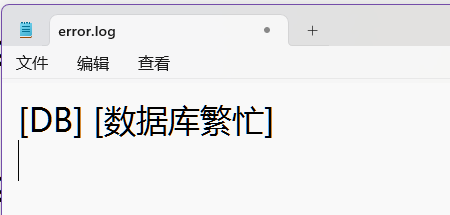
最好定义一个专用的地址
const USER_ERROR_DIR = '/home/site/error_log/Site_User_errors.log';
error_log($log, 3,  USER_ERROR_DIR);
4 当$message_type=4
PHP SAPI---CLI 介绍 https://blog.csdn.net/shupan001/article/details/7176210
,比如返回给了nginx,可以在nginx配置的error_log里看到。

