接入PayPal支付
注:最底部有sdk的代码文档说明,如是代码问题可直接参考底部官方sdk文档
安装SDK
composer require paypal/rest-api-sdk-php:*
生成支付链接
class Paypal
{
    protected $apiContext;
    protected $amount;
    protected $orderId;

    public function __construct()
    {
        // CLIENT_ID、SECRET_KEY从Apps & Credentials->API Credentials->REST API apps列表中获取,参考图01
        $this->apiContext = new ApiContext(
            new OAuthTokenCredential(
                "CLIENT_ID",
                "SECRET_KEY"
            )
        );

        $this->apiContext->setConfig(
            [
                'mode' => 'sandbox', //sandbox沙箱 或 'live'生产环境,根据你的环境设置
                'log.LogEnabled' => true,
                'log.FileName' => LOG_PATH . 'pay/paypal.log',
                'log.LogLevel' => 'DEBUG'
            ]
        );
    }

    /**
     * 设置金额
     * @param string $amount
     * @return $this
     */
    public function setAmount(string $amount): Paypal
    {
        $this->amount = $amount;
        return $this;
    }

    /**
     * 设置订单号
     * @param string $orderId
     * @return $this
     */
    public function setOrderId(string $orderId): Paypal
    {
        $this->orderId = $orderId;
        return $this;
    }

    /**
     * 拉起支付
     * @return string|null
     * @throws Exception
     */
    public function pay()
    {

        // 设置付款金额
        $payment = new Payment();
        $payment->setIntent("sale");

        // 设置payer信息
        $payer = new Payer();
        $payer->setPaymentMethod('paypal');

        $payment->setPayer($payer);
        // 设置付款金额
        $amount = new Amount();
        $amount->setTotal($this->amount);
        $amount->setCurrency('USD');

        // 创建交易
        $transaction = new Transaction();
        $transaction->setAmount($amount);
        $transaction->setCustom($this->orderId);

        // 将交易添加到付款
        $payment->addTransaction($transaction);

        // 设置重定向 URL
        $redirectUrls = new RedirectUrls();
        $redirectUrls->setReturnUrl("支付成功跳转链接")
            ->setCancelUrl("支付失败或取消支付跳转链接");
        $payment->setRedirectUrls($redirectUrls);
        // 创建付款并获取批准 URL
        try {
            $payment->create($this->apiContext);
            // 获取支付链接,直接做跳转就行了 跳转效果参考图02
            return $payment->getApprovalLink();
        } catch (\PayPalConnectionException $e) {
            throw new Exception($e->getMessage());
        }
    }
}
图01
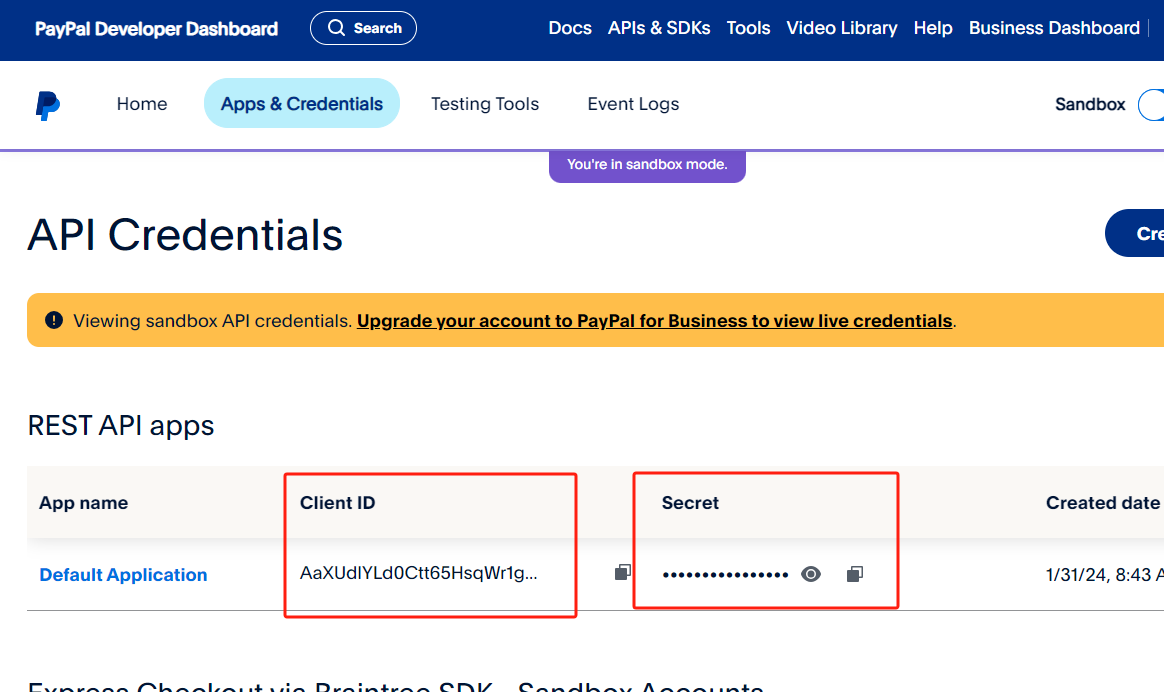
图02(注:测试支付时,在沙箱模式下用沙箱个人账号登录就可以支付,企业账号那是收款账号)
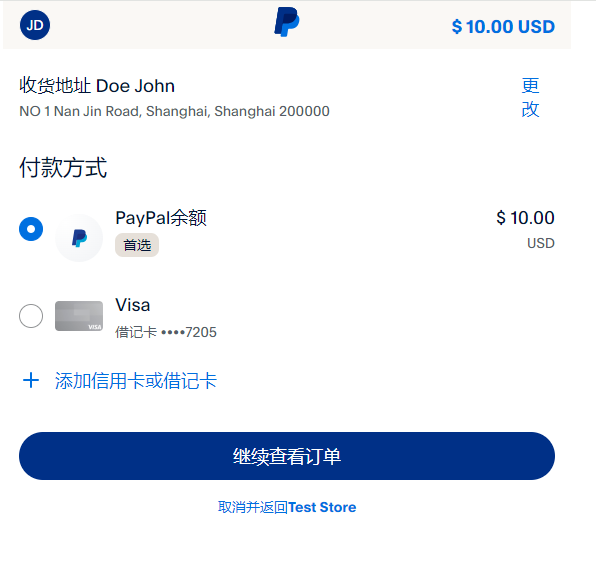
选择支付方式,点击继续查看订单就能跳转到支付成功的地方了
WebHook
从参考图01中的Default Application点击进去,在最底部有个Add WebHook
添加你的Webhook Url 然后选择Event types,
选择事件Event types的时候碰到一些坑。
1、支付成功之后 设定的Webhook Url没有接收到Webhook,网站找了好些事件都没收到,干脆选择了ALL Events所有事件,就有收到Webhook的消息。
2、设置webhook成功之后,可以使用paypal上的Webhooks simulator,模拟Webhooks请求来确认设定的webhook url是否能被paypal调用。(需要注意的是,这个只是用来测试链接是都可用,不能用来做webhook的回调验证)
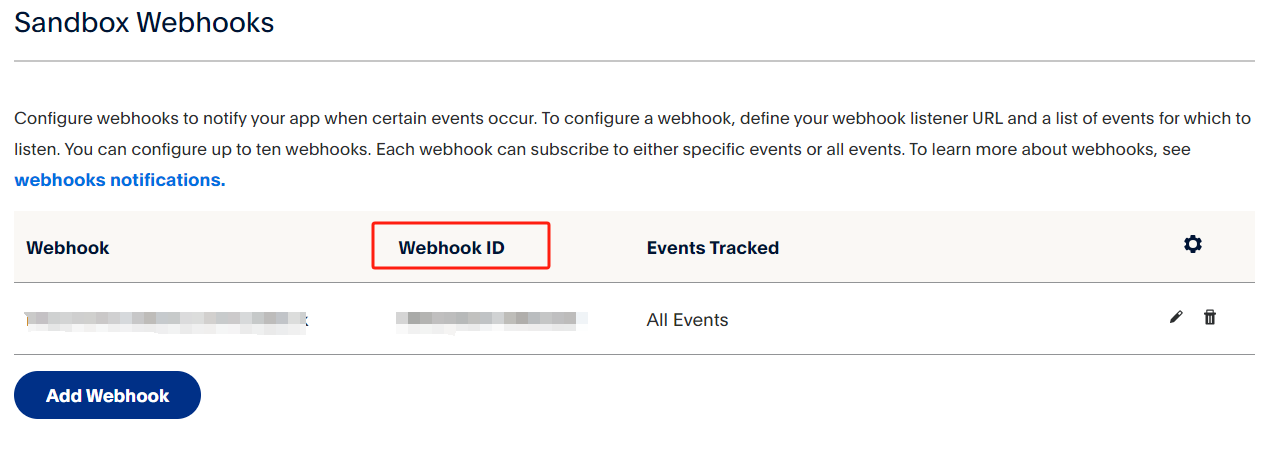
设定成功之后,Webhook ID要用来做webhook通知的验证
 1 public function completed()
 2 {
 3
 4         $requestBody = file_get_contents('php://input');
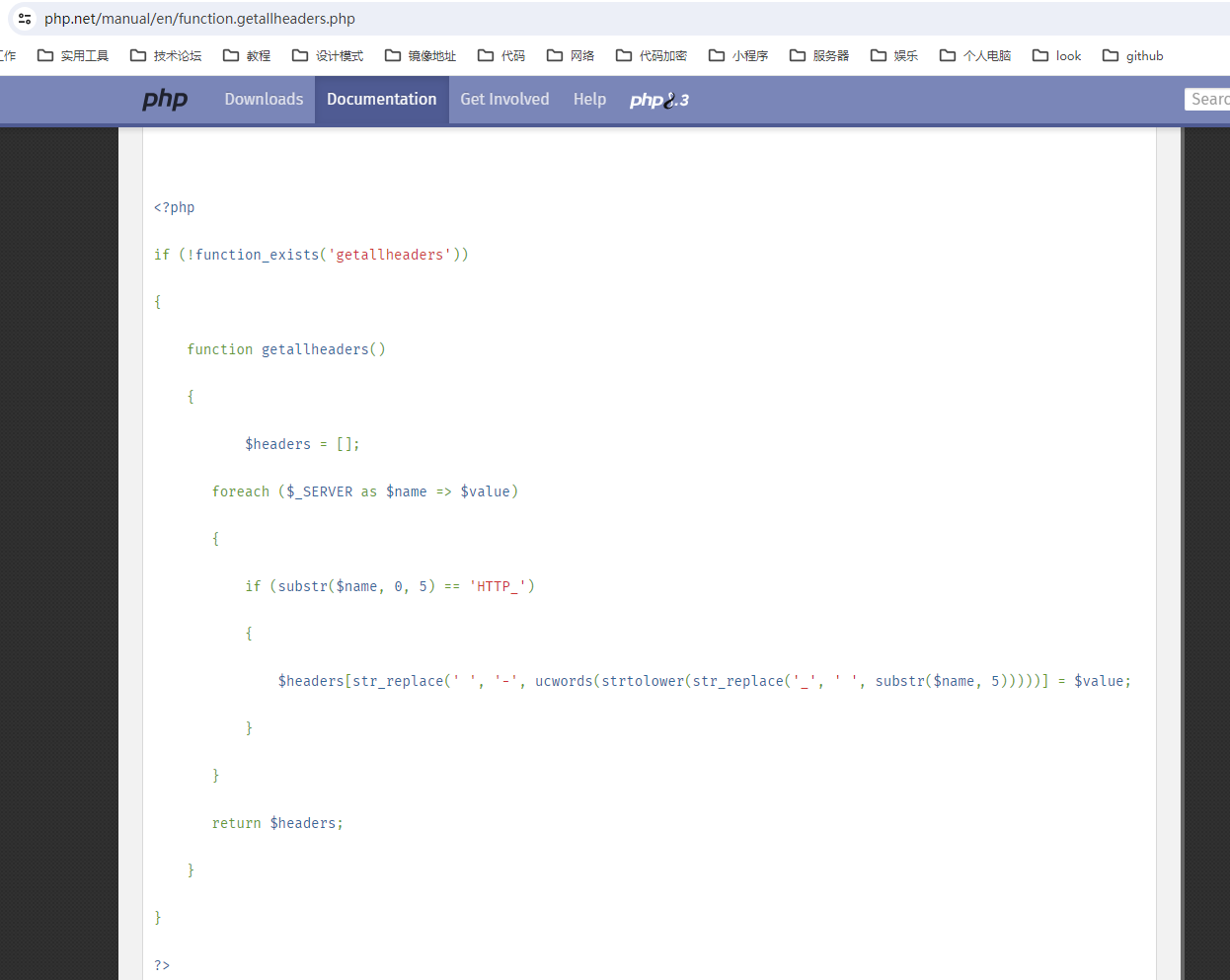
 5         // getallheaders() 并非 PHP 标准库中的内置函数。这个函数通常是由 Apache 或 Nginx 提供的服务器软件自带的,用于获取 HTTP 请求的所有报头信息
 6         // 可以参考 https://php.net/manual/en/function.getallheaders.php 参考图03自己写一个
 7         $headers = getallheaders();
 8         $headers = array_change_key_case($headers, CASE_UPPER);
 9         $signatureVerification = new VerifyWebhookSignature();
10         $signatureVerification->setAuthAlgo($headers['PAYPAL-AUTH-ALGO']);
11         $signatureVerification->setTransmissionId($headers['PAYPAL-TRANSMISSION-ID']);
12         $signatureVerification->setCertUrl($headers['PAYPAL-CERT-URL']);
13         $signatureVerification->setWebhookId("7NR07992TT6909325"); // 此处填写Webhook id 参考上图
14         $signatureVerification->setTransmissionSig($headers['PAYPAL-TRANSMISSION-SIG']);
15         $signatureVerification->setTransmissionTime($headers['PAYPAL-TRANSMISSION-TIME']);
16
17         $signatureVerification->setRequestBody($requestBody);
18         $request = clone $signatureVerification;
19         try {
20             $output = $signatureVerification->post($this->apiContext);
21         } catch (\Exception $ex) {
22             log_message('验证webhook失败' . $request, 'log', LOG_PATH . 'pay/notify/paypal/');
23             http_response_code(400);
24             exit(1);
25         }
26         $checkArray = json_decode($output);
27         if ($checkArray['verification_status'] !== "SUCCESS") {
28             log_message('验证失败' . $output, 'log', LOG_PATH . 'pay/notify/paypal/');
29             http_response_code(400);
30             exit(1);
31         }
32         // 获取自定义订单号 从$requestBody中获取就行了,底部有附上webhook post过来的数据
33
34
35         http_response_code(200);
36 }
图03
附上sdk代码说明:
第一次调用:https://github.com/paypal/PayPal-PHP-SDK/wiki/Making-First-Call
webhook验证:https://github.com/paypal/PayPal-PHP-SDK/blob/master/sample/notifications/ValidateWebhookEvent.php
 1 {
 2     "id": "WH-xxxxx29646",
 3     "event_version": "1.0",
 4     "create_time": "2024-03-01T06:05:05.071Z",
 5     "resource_type": "payment",
 6     "event_type": "PAYMENTS.PAYMENT.CREATED",
 7     "summary": "Checkout payment is created and approved by buyer",
 8     "resource": {
 9         "update_time": "2024-03-01T06:05:05Z",
10         "create_time": "2024-03-01T06:04:17Z",
11         "redirect_urls": {
12             "return_url": "不给你看/success?order_id=xxxx17092730559494713269&paymentId=PAYID-MXQW7YQ1WK07543WU5660207",
13             "cancel_url": "不给你看/cancel?order_id=xxxx17092730559494713269"
14         },
15         "links": [{
16             "href": "https://api.sandbox.paypal.com/v1/payments/payment/PAYID-MXQW7YQ1WK07543WU5660207",
17             "rel": "self",
18             "method": "GET"
19         }, {
20             "href": "https://api.sandbox.paypal.com/v1/payments/payment/PAYID-MXQW7YQ1WK07543WU5660207/execute",
21             "rel": "execute",
22             "method": "POST"
23         }, {
24             "href": "https://www.sandbox.paypal.com/cgi-bin/webscr?cmd=_express-checkout&token=EC-88T51633HV219313S",
25             "rel": "approval_url",
26             "method": "REDIRECT"
27         }],
28         "id": "PAYID-MXQW7YQ1WKX07543WU5660207",
29         "state": "created",
30         "transactions": [{
31             "amount": {
32                 "total": "10.00",
33                 "currency": "USD"
34             },
35             "payee": {
36                 "merchant_id": "56LKGLM7XKYZS",
37                 "email": "sb-pst2f29464466@business.example.com"
38             },
39             "custom": "xxxx17092730559494713269",
40             "item_list": {
41                 "shipping_address": {
42                     "recipient_name": "Doe John",
43                     "line1": "NO 1 Nan Jin Road",
44                     "city": "Shanghai",
45                     "state": "Shanghai",
46                     "postal_code": "200000",
47                     "country_code": "C2"
48                 }
49             },
50             "related_resources": []
51         }],
52         "intent": "sale",
53         "payer": {
54             "payment_method": "paypal",
55             "status": "VERIFIED",
56             "payer_info": {
57                 "email": "sb-bmgd529469552@personal.example.com",
58                 "first_name": "John",
59                 "last_name": "Doe",
60                 "payer_id": "3X3PG26EMGJUXA",
61                 "shipping_address": {
62                     "recipient_name": "Doe John",
63                     "line1": "NO 1 Nan Jin Road",
64                     "city": "Shanghai",
65                     "state": "Shanghai",
66                     "postal_code": "200000",
67                     "country_code": "C2"
68                 },
69                 "country_code": "C2"
70             }
71         },
72         "cart": "88T51633HV219313S"
73     },
74     "links": [{
75         "href": "https://api.sandbox.paypal.com/v1/notifications/webhooks-events/WH-9X625867WT536171R-0TU00941FP4129646",
76         "rel": "self",
77         "method": "GET"
78     }, {
79         "href": "https://api.sandbox.paypal.com/v1/notifications/webhooks-events/WH-9X625867WT536171R-0TU00941FP4129646/resend",
80         "rel": "resend",
81         "method": "POST"
82     }]
83 }