#include "mywidget.h"
#include <QApplication>

int main(int argc, char *argv[])
{
    // QApplication 应用程序类 每个程序中有且只有一个
    QApplication a(argc, argv);
    // 窗口类 创建出来之后默认不显示
    MyWidget w;
    // 显示窗口
    w.show();

    return a.exec(); //a.exec();  程序进入死循环,不断的对用户的操作进行监控
}
#ifndef MYWIDGET_H
#define MYWIDGET_H
// qt中类名和头文件的名称没有后缀
#include <QWidget>
#include <QPushButton>

class MyWidget : public QWidget
{
    Q_OBJECT  // 固定用法  如果使用信号和槽,必须添加这个宏Q_OBJECT

public:
    MyWidget(QWidget *parent = 0);
    ~MyWidget();
private:
    QPushButton b1;
    QPushButton *b2;
};

#endif // MYWIDGET_H
#include "mywidget.h"

MyWidget::MyWidget(QWidget *parent)
    : QWidget(parent)
{
    // 不用手动进行回收?:
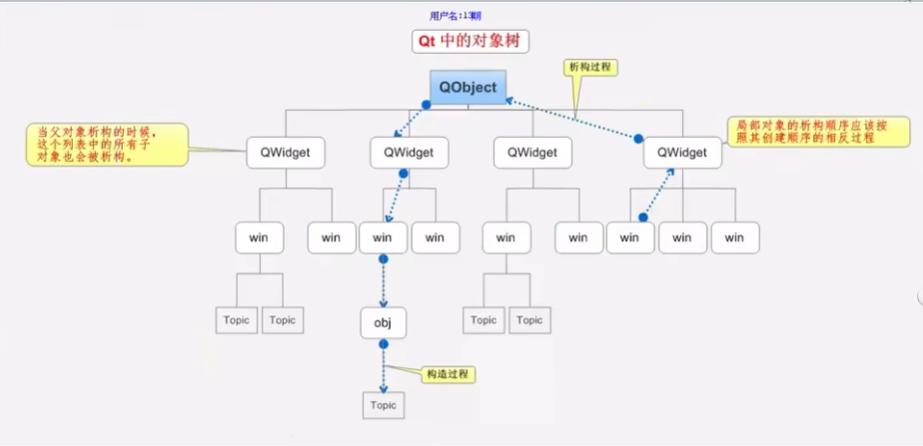
    // 条件一: 在QT中建立了内存回收机制 从QBject派生的类,
    // 条件二: 指定父类,父类对象析构的时候,先析构子类对象
    b2=new QPushButton("hello,qt",this);
//    b2->show();
    b2->setParent(this);  // 指定了父窗口后,组件和跟着父窗口一起显示

    b1.setText("这是按钮1");
    b1.setParent(this);
//    b1.move(QPoint(100,300));
    b1.move(20,50);
//    b1.show();
}

MyWidget::~MyWidget()
{

}
 #-------------------------------------------------
#
# Project created by QtCreator 2023-07-29T09:46:52
#
#-------------------------------------------------

QT       += core gui
# 为了兼容以前的版本 QT_MAJOR_VERSION 判断当前的 版本
greaterThan(QT_MAJOR_VERSION, 4): QT += widgets
# 生成应用程序的名字
TARGET = HelloQt
# 模版的意思指定生成的makefile的类型  app: 针对于应用程序的app  lib:生成库  先生成makefile,编译器找makefile,再去根据makefile编译源码
TEMPLATE = app

# The following define makes your compiler emit warnings if you use
# any feature of Qt which as been marked as deprecated (the exact warnings
# depend on your compiler). Please consult the documentation of the
# deprecated API in order to know how to port your code away from it.
DEFINES += QT_DEPRECATED_WARNINGS

# You can also make your code fail to compile if you use deprecated APIs.
# In order to do so, uncomment the following line.
# You can also select to disable deprecated APIs only up to a certain version of Qt.
#DEFINES += QT_DISABLE_DEPRECATED_BEFORE=0x060000    # disables all the APIs deprecated before Qt 6.0.0

#源文件  \ 便是换行
SOURCES += \
        main.cpp \
        mywidget.cpp
#头文件
HEADERS += \
        mywidget.h