Node脚本对象

Node对象:包含脚本编写,点击对象在Script界面中进行编程
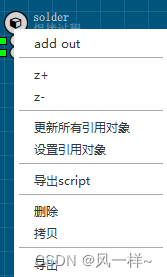
对Node上面右键点击:
* [导出script]脚本和[导出]对象,以实现 对象的保存/复用
* 引用:选择一个被引用的对象, 在需要引用的对象上面 右键/设置引用
那么 就会复用 被引用对象的script, 当更新被引用对象 所有引用对象都会自动更新最新脚本
为当前的runObj对象添加函数/变量:
this.变量名称=123
this.函数名称=function(){}
//out输入参数
this.arg={
    motor:{v:'X',des:'Motor',model:['X','Y','Z']},
}

//入口函数
this.start=function(out){

    var m=nodes[out.arg.motor]
    var axis=m.axis

    //if(!isNaN(_n))//不是数字

    var i=down.indexOf(out)//获取out id号
    ///var _input_in=nodes[['iLin','iRin'][i]]

    //等待移动停止的 简化函数
    var moveEndNext
    function waitMoving(_next){
        out.istep='waitMove'
        moveEndNext=_next
    }

    //Out节点的扫描函数
    out.wait({
        interval:10,
        runEnd:function(){
            axis.stop()//当流程执行停止后,停止电机
            },
        doing:function(out){
            try{
            if(this.istep==='waitMove'){
                if(!axis.is_moving())out.istep=moveEndNext
                return
            }
            //编写流程的过程
            switch(out.istep){
            case 0:_log('---move to limit')
                m.move(dir*200,{vel:vel,acc:acc,nsafe:true})
                waitMoving('waitPlat')
                break

            case 'waitPlat':_msg('等待平台稳定')
                if(out.waitTime(2000))out.istep='finished'
                break

            case 'finished':
                m.isIni=true
                out.next()
            }
            }catch(err){
            axis.stop()
            _log('----err:'+err)
            __run_state=-1
            }
    }
    });

}