在windows平台使用Visual Studio 2017编译动态库并使用
使用VS stdio制作顺序表的库文件
- .lib与.dll 区别
- lib是编译时需要的
- dll是运行时需要的
1、新建头文件和源文件
- SeqList.h
// SeqList.h
#ifndef SEQLIST_H__
#define SEQLIST_H__

#define N 10

typedef int SLDataType;

typedef struct SeqList
{
	SLDataType data[N];
	int size;
} SeqList;

void SeqInit(SeqList *L);                   // 初始化
void SeqPushBack(SeqList *L, SLDataType x); // 尾插
void SeqPrit(SeqList ps);                   // 打印

#endif
- SeqList.c
// SeqList.h
#include <stdio.h>
#include <stdlib.h>

#include "SeqList.h"

void SeqInit(SeqList *L)
{
	L->size = 0;
}

void SeqPushBack(SeqList *L, SLDataType x)
{
	L->data[L->size] = x;
	L->size++;
}

void SeqPrit(const SeqList L)
{
	for (size_t i = 0; i < L.size; i++)
	{
		printf("%d\t", L.data[i]);
	}
	printf("\n");
}
2、编译.lib库文件
依次点击调试-属性,打开属性页面。

在属性页面,选择配置Debug,平台选择x64,更改常规-属性默认值-配置类型选项,并选择 静态库。

点击生成-生成解决方案,看到生成SeqList.lib。


在x64-Debug文件下面可以看到生成的SeqList.lib。

2、编译.dll库文件
然后再点击生成-清理生成解决方案,并同样打开属性页面。

更改常规-属性默认值-配置类型选项,并选择动态库。

点击生成-生成解决方案,看到生成SeqList.dll。

在x64-Debug文件下面可以看到生成的 SeqList.dll。
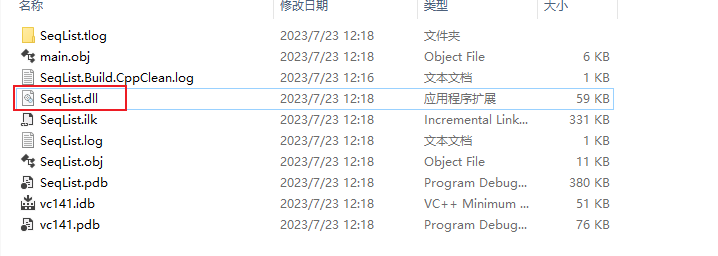
至此,SeqList.lib 和 SeqList.dll都已经制作成功,下面开始使用。
使用SeqList.lib 和 SeqList.dll
新建解决方案Project.sln,并新建include和lib文件,并将SeqList.h和SeqList.dll复制到.sln 同级目录。

依次点击调试-属性,打开属性配置页面。将include和lib目录分别加到包含目录和库目录。

并在连接器-添加附加依赖项中加入SeqList.lib

然后编写测试文件,注意此时没有用到SeqList.c 。
#include <stdio.h>
#include <stdlib.h>

#include "include/SeqList.h"

int main(int argc, char** argv)
{
	SeqList L;
	SeqInit(&L);
	SeqPushBack(&L, 1);
	SeqPushBack(&L, 5);
	SeqPushBack(&L, 9);
	SeqPushBack(&L, 7);
	SeqPrint(L);

	return 0;
}
点击生成解决方案,运行结果如下

行文至此,关于自定义库文件的制作与使用全部介绍完毕。