Linux shell command cut All In One
Linux shell command cut All In One
cut 截取指定符号等号后面的字符串
cut 截取等号后面的字符串
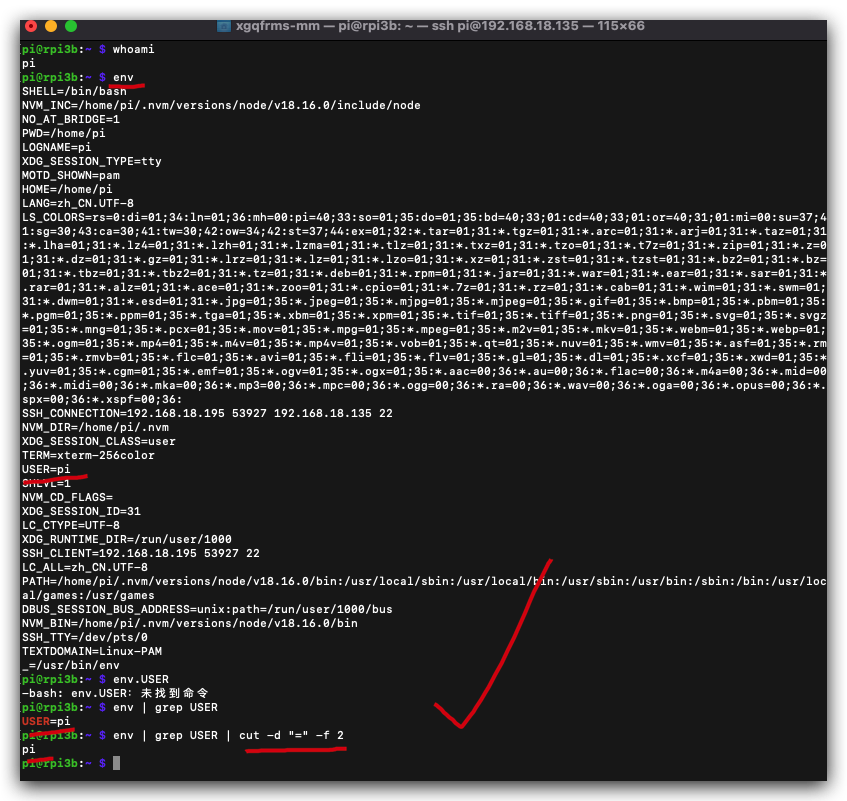
# 获取 env
$ env
# 获取登录当前用户信息
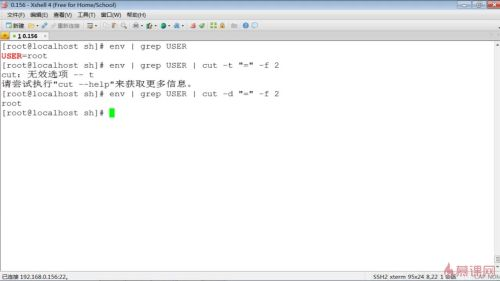
$ env | grep USER
$ env | grep USER | cut -d "=" -f 2
$ man cut
$ man cut > ./man-docs/cut.md
$ cat ./man-docs/cut.md
$ cat ./man-docs/cut.md
CUT(1)                                            User Commands                                           CUT(1)

NAME
       cut - remove sections from each line of files

SYNOPSIS
       cut OPTION... [FILE]...

DESCRIPTION
       Print selected parts of lines from each FILE to standard output.

       With no FILE, or when FILE is -, read standard input.

       Mandatory arguments to long options are mandatory for short options too.

       -b, --bytes=LIST
              select only these bytes

       -c, --characters=LIST
              select only these characters

       -d, --delimiter=DELIM # 分隔符 ✅
              use DELIM instead of TAB for field delimiter

       -f, --fields=LIST  # 字段 ✅
              select only these fields;  also print any line that contains no delimiter character, unless the -s
              option is specified

       -n     (ignored)

       --complement
              complement the set of selected bytes, characters or fields

       -s, --only-delimited
              do not print lines not containing delimiters

       --output-delimiter=STRING
              use STRING as the output delimiter the default is to use the input delimiter

       -z, --zero-terminated
              line delimiter is NUL, not newline

       --help display this help and exit

       --version
              output version information and exit

       Use one, and only one of -b, -c or -f.  Each LIST is made up of one range, or many  ranges  separated  by
       commas.   Selected input is written in the same order that it is read, and is written exactly once.  Each
       range is one of:

       N      N'th byte, character or field, counted from 1

       N-     from N'th byte, character or field, to end of line

       N-M    from N'th to M'th (included) byte, character or field

       -M     from first to M'th (included) byte, character or field

AUTHOR
       Written by David M. Ihnat, David MacKenzie, and Jim Meyering.

REPORTING BUGS
       GNU coreutils online help: <https://www.gnu.org/software/coreutils/>
       Report any translation bugs to <https://translationproject.org/team/>

COPYRIGHT
       Copyright  ©  2020  Free  Software  Foundation,  Inc.   License  GPLv3+:  GNU  GPL  version  3  or  later
       <https://gnu.org/licenses/gpl.html>.
       This  is  free software: you are free to change and redistribute it.  There is NO WARRANTY, to the extent
       permitted by law.

SEE ALSO
       Full documentation <https://www.gnu.org/software/coreutils/cut>
       or available locally via: info '(coreutils) cut invocation'

GNU coreutils 8.32                               September 2020                                           CUT(1)
user
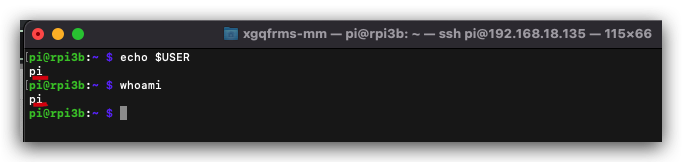
# 获取登录当前用户信息
$ whomai
$ echo $USER
demos
#!/usr/bin/env bash
# coding: utf8

bug='throttled=0x50005'
state=$(vcgencmd get_throttled)
# echo $state

# 没有空格 bug ❌
# if [$state == $bug]
# 有空格 OK ✅
# if [ $state == $bug ]
# 有空格 OK ✅
if [ $state == 'throttled=0x50005' ]
then
  echo "❌ Error"
else
  echo "✅ OK"
fi

WIFI=$(ifconfig | grep "192.168")
echo $WIFI
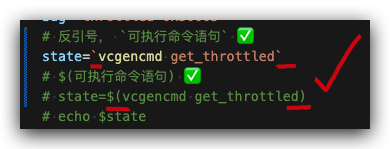
shell script 中写可执行命令的语句方法
- 反引号,
可执行命令语句 - 美元符号 + 小括号,
$(可执行命令语句)
#!/usr/bin/env bash
# coding: utf8

bug='throttled=0x50005'
# $(可执行命令语句) ✅
# state=$(vcgencmd get_throttled)
# echo $state

# 有空格 OK ✅
# if [ $state == $bug ]
# 有空格 OK ✅
if [ $state == 'throttled=0x50005' ]
then
  echo "❌ Error"
else
  echo "✅ OK"
fi
#!/usr/bin/env bash
# coding: utf8

bug='throttled=0x50005'
# 反引号, `可执行命令语句` ✅
state=`vcgencmd get_throttled`
# echo $state

# 有空格 OK ✅
# if [ $state == $bug ]
# 有空格 OK ✅
if [ $state == 'throttled=0x50005' ]
then
  echo "❌ Error"
else
  echo "✅ OK"
fi
refs
https://www.imooc.com/video/7953
©xgqfrms 2012-2021
原创文章,版权所有©️xgqfrms, 禁止转载 🈲️,侵权必究⚠️!
未经授权禁止转载,违者必究!