IIS 配置跨域_IIS配置Access-Control-Allow-Origin
一、使用IIS 界面操作
1、设置Access-Control-Allow-Origin
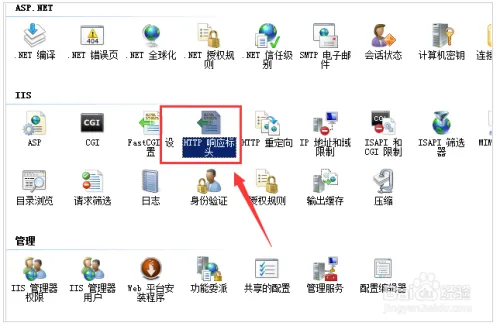
2、打开IIS,找到“HTTP响应标头”点进去
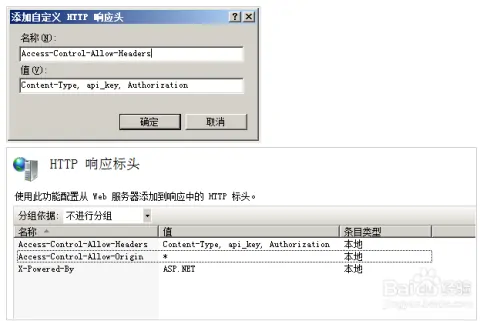
3、在右侧可以看到添加,然后添加如下标头即可
Access-Control-Allow-Headers:Content-Type, api_key, Authorization
Access-Control-Allow-Origin:*
二、修改IIS 配置文件
<?xml version="1.0" encoding="UTF-8"?>
<configuration>
  <system.webServer>
    <httpProtocol>
      <customHeaders>
        <add name="Access-Control-Allow-Origin" value="*" />
        <add name="Access-Control-Allow-Methods" value="GET" />
      </customHeaders>
    </httpProtocol>
        <staticContent>
            <remove fileExtension=".woff2" />
            <mimeMap fileExtension=".woff2" mimeType="font/woff2" />
        </staticContent>
  </system.webServer>
</configuration>
更多:
IIS 配置referer 请求筛选_请求拒绝
IIS 执行此操作时出错。 详细信息:web.config 错误,.net core项目
iis怎么限制http下载速度_IIS 限制网站带宽使用?