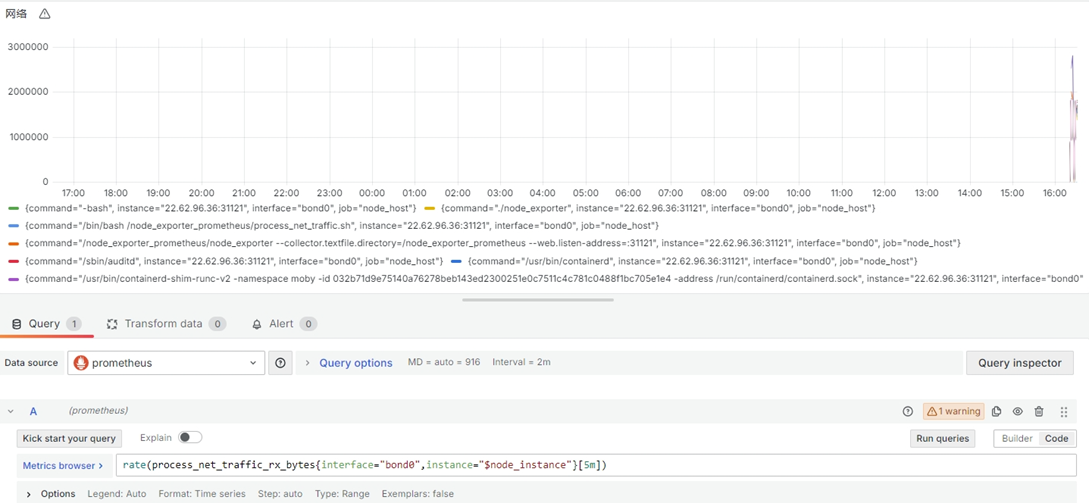
prometheus监控主机上各个进程的网络流量情况
没有什么便利的方法,自己写bash脚本,然后让node_exporter上报给prometheus。
Bash脚本
#!/bin/bash

#获取各个进程的网络流量信息
#crontable设置每隔一分钟执行一次
#* * * * * /node_exporter_prometheus/process_net_traffic.sh

# 输出文件
output_file="/node_exporter_prometheus/process_net_traffic.prom"
echo -e "# HELP namedprocess_namegroup_write_bytes_total number of bytes written by this group\n# TYPE namedprocess_namegroup_write_bytes_total counter" > $output_file

#输出PID和command
#过滤内核态的进程(command内容中,用中括号括起来的那部分)
ps -eo pid,command | grep -v '\[.*\]' | while IFS= read -r line;do
	#跳过第一行
	if [[ "$line" == *PID* ]]; then
		continue
	fi
	#使用read命令将pid和command分别赋值
	read -r pid command <<< "$line"
	#检查路径是否存在
	if [[ -d /proc/$pid ]]; then
		#初始化行计数器
		line_numbers=0

		#循环处理每一行
		while IFS= read -r line; do
			((line_numbers++))

			#获取网络流量信息,从第三行开始
			if ((line_numbers >= 3)); then
				#提取接口名称
				if [[ $line =~ ^[[:space:]]*([a-zA-Z0-9]+): ]]; then
					iface="${BASH_REMATCH[1]}"

					# 提取接收和发送的字节数、数据包数和错误数
					read -r rx_bytes rx_packets rx_errors <<< $(echo "$line" | awk '{print $2, $3, $4}')
					read -r tx_bytes tx_packets tx_errors <<< $(echo "$line" | awk '{print $10, $11, $12}')
					# 将结果写入输出文件
					echo "process_net_traffic_rx_bytes{interface=\"$iface\",command=\"$command\"} $rx_bytes" >> "$output_file"
					echo "process_net_traffic_rx_packets{interface=\"$iface\",command=\"$command\"} $rx_packets" >> "$output_file"
					echo "process_net_traffic_rx_errors{interface=\"$iface\",command=\"$command\"} $rx_errors" >> "$output_file"
					echo "process_net_traffic_tx_bytes{interface=\"$iface\",command=\"$command\"} $tx_bytes" >> "$output_file"
					echo "process_net_traffic_tx_packets{interface=\"$iface\",command=\"$command\"} $tx_packets" >> "$output_file"
					echo "process_net_traffic_tx_errors{interface=\"$iface\",command=\"$command\"} $tx_errors" >> "$output_file"
				fi
			fi
		done < /proc/$pid/net/dev
	fi
Done
然后设置可执行权限,定时任务,每分钟执行一次;还有要设置nod_explorter的启动命令:
/node_exporter_prometheus/node_exporter --collector.textfile.directory=/node_exporter_prometheus --web.listen-address=:31121关键在于--collector.textfile.directory=/node_exporter_prometheus。node_exporter会读取该目录下所有以.prom结尾的文件。
然后就可以使用了。