Validation两种验证方法: ValidationRule +iDataErrorInfo+DataAnimation 的用法
Validation:依赖属性用(在验证回调中返回false)
ValidationRule:依赖属性和普通类的属性都能用
IdataErrorInfo:依赖属性和普通类的属性都能用,谁想用的话 就继承iDataErrorInfo
区别?
ValidationRule可以自定义错误信息,Validation和ValidationRule在xaml中的用法一样,比较繁琐
iDataErrorErrorInfo可以使用属性索引器,在xaml中只需咋binding表达式中打开ValidatesOnDataErrors=True即可,xaml代码比较少
ValidationRule和iDataErrorInfo的错误信息都是被全局静态对象Validation接收的
1.Validation 依赖属性的验证
界面上有2个控件,一个textbox绑定一个自定义的依赖属性,一个textblock绑定前面依赖属性的验证结果
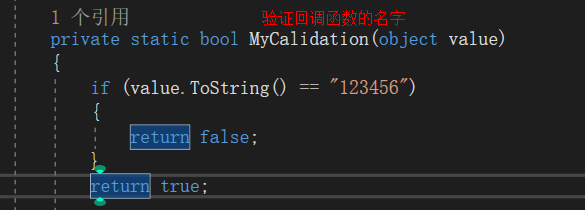
依赖属性都有一个private static bool ValidateValueCallback(object value)验证回调函数,返回值是验证的结果bool类型的,value是依赖属性的数据,在验证回调中做一下判断,当不满足条件时,返回一个false,
这时候全局静态对象Validation就能捕获到这个验证结果

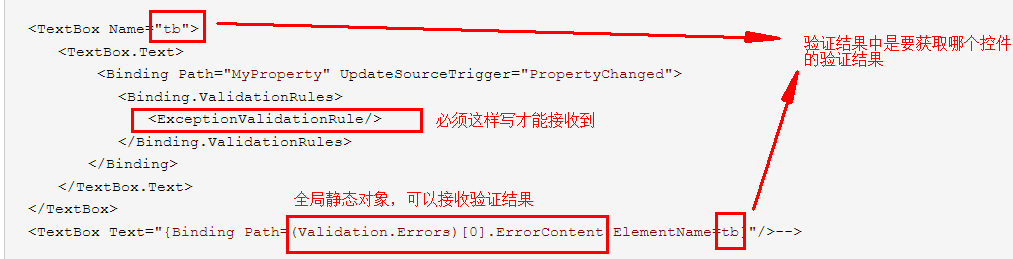
<TextBox Name="tb">
  <TextBox.Text>
     <Binding Path="MyProperty" UpdateSourceTrigger="PropertyChanged">
      <Binding.ValidationRules>
        <ExceptionValidationRule/>
      </Binding.ValidationRules>
    </Binding>
  </TextBox.Text>
</TextBox>
<TextBox Text="{Binding Path=(Validation.Errors)[0].ErrorContent,ElementName=tb}"/>-->
在依赖属性的验证回调中判断,
运行结果

2.ValidationRule 依赖属性的验证
上面的验证信息(“123456”不是属性“Myproperty”的有效值)是由ExceptionValidationRule默认提供的错误提示消息
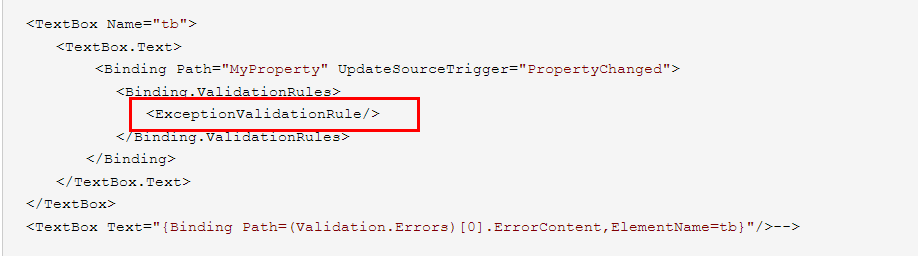
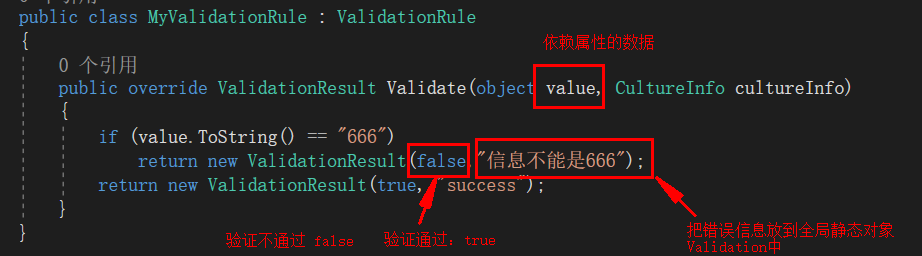
错误信息能不能自定义呢?这时候要自己写一个ValidationRule
可以看到ExceptionValidationRule也是继承自ValidationRule的

新建一个类继承自ValidationRule,重写ValidationResult
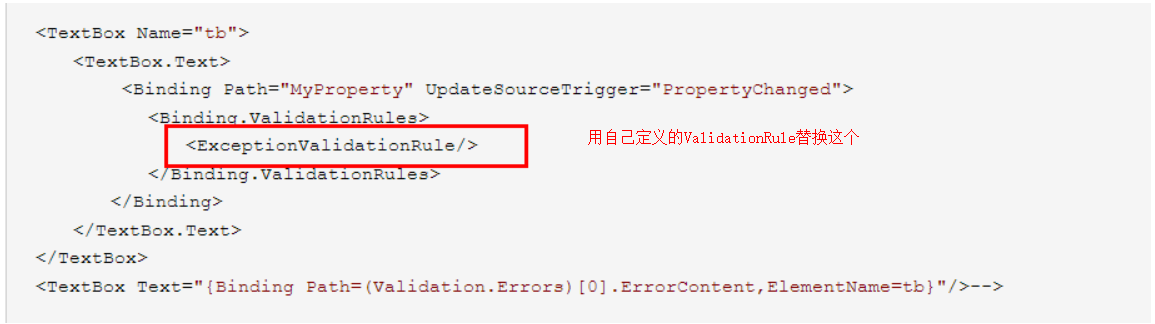
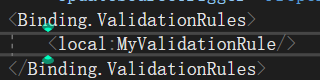
那怎么用自己定义的去代替ExceptionValidationRule?
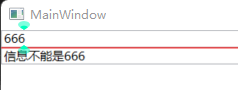
运行结果:
3.iDataErrorInfo和DataAnnotations特性
普通属性所在的类继承iDataErrorInfo,并实现iDataErrorInfo提供的接口和索引器
public class Person : INotifyPropertyChanged, IDataErrorInfo { private int _id; private string _name;</span><span style="color: rgba(0, 0, 255, 1)">public</span> <span style="color: rgba(0, 0, 255, 1)">string</span><span style="color: rgba(0, 0, 0, 1)"> Name { </span><span style="color: rgba(0, 0, 255, 1)">get</span> { <span style="color: rgba(0, 0, 255, 1)">return</span><span style="color: rgba(0, 0, 0, 1)"> _name; } </span><span style="color: rgba(0, 0, 255, 1)">set</span> { _name =<span style="color: rgba(0, 0, 0, 1)"> value; PropertyChanged</span>?.Invoke(<span style="color: rgba(0, 0, 255, 1)">this</span>, <span style="color: rgba(0, 0, 255, 1)">new</span> PropertyChangedEventArgs(<span style="color: rgba(128, 0, 0, 1)">"</span><span style="color: rgba(128, 0, 0, 1)">Name</span><span style="color: rgba(128, 0, 0, 1)">"</span><span style="color: rgba(0, 0, 0, 1)">)); } } </span><span style="color: rgba(0, 0, 255, 1)">public</span> <span style="color: rgba(0, 0, 255, 1)">int</span><span style="color: rgba(0, 0, 0, 1)"> ID { </span><span style="color: rgba(0, 0, 255, 1)">get</span> { <span style="color: rgba(0, 0, 255, 1)">return</span><span style="color: rgba(0, 0, 0, 1)"> _id; } </span><span style="color: rgba(0, 0, 255, 1)">set</span> { _id =<span style="color: rgba(0, 0, 0, 1)"> value; PropertyChanged</span>?.Invoke(<span style="color: rgba(0, 0, 255, 1)">this</span>, <span style="color: rgba(0, 0, 255, 1)">new</span> PropertyChangedEventArgs(<span style="color: rgba(128, 0, 0, 1)">"</span><span style="color: rgba(128, 0, 0, 1)">ID</span><span style="color: rgba(128, 0, 0, 1)">"</span><span style="color: rgba(0, 0, 0, 1)">)); } } </span><span style="color: rgba(0, 128, 0, 1)">//</span><span style="color: rgba(0, 128, 0, 1)">INotifyPropertyChanged的接口</span> <span style="color: rgba(0, 0, 255, 1)">public</span> <span style="color: rgba(0, 0, 255, 1)">event</span> PropertyChangedEventHandler?<span style="color: rgba(0, 0, 0, 1)"> PropertyChanged; </span><span style="color: rgba(0, 128, 0, 1)">//</span><span style="color: rgba(0, 128, 0, 1)">IDataErrorInfo的接口</span> <span style="color: rgba(0, 0, 255, 1)">public</span> <span style="color: rgba(0, 0, 255, 1)">string</span> Error { <span style="color: rgba(0, 0, 255, 1)">get</span> { <span style="color: rgba(0, 0, 255, 1)">return</span> <span style="color: rgba(128, 0, 0, 1)">""</span><span style="color: rgba(0, 0, 0, 1)">; } } </span><span style="color: rgba(0, 0, 255, 1)">public</span> <span style="color: rgba(0, 0, 255, 1)">string</span> <span style="color: rgba(0, 0, 255, 1)">this</span>[<span style="color: rgba(0, 0, 255, 1)">string</span><span style="color: rgba(0, 0, 0, 1)"> columnName] { </span><span style="color: rgba(0, 0, 255, 1)">get</span><span style="color: rgba(0, 0, 0, 1)"> { </span><span style="color: rgba(0, 0, 255, 1)">if</span> (columnName == <span style="color: rgba(128, 0, 0, 1)">"</span><span style="color: rgba(128, 0, 0, 1)">ID</span><span style="color: rgba(128, 0, 0, 1)">"</span><span style="color: rgba(0, 0, 0, 1)">) { </span><span style="color: rgba(0, 0, 255, 1)">if</span> (_id ><span style="color: rgba(128, 0, 128, 1)">18</span><span style="color: rgba(0, 0, 0, 1)">) { </span><span style="color: rgba(0, 0, 255, 1)">return</span> <span style="color: rgba(128, 0, 0, 1)">"</span><span style="color: rgba(128, 0, 0, 1)">>18</span><span style="color: rgba(128, 0, 0, 1)">"</span><span style="color: rgba(0, 0, 0, 1)">; } } </span><span style="color: rgba(0, 0, 255, 1)">if</span> (columnName == <span style="color: rgba(128, 0, 0, 1)">"</span><span style="color: rgba(128, 0, 0, 1)">Name</span><span style="color: rgba(128, 0, 0, 1)">"</span><span style="color: rgba(0, 0, 0, 1)">) { </span><span style="color: rgba(0, 0, 255, 1)">if</span> (Name.Length > <span style="color: rgba(128, 0, 128, 1)">3</span><span style="color: rgba(0, 0, 0, 1)">) </span><span style="color: rgba(0, 0, 255, 1)">return</span> <span style="color: rgba(128, 0, 0, 1)">"</span><span style="color: rgba(128, 0, 0, 1)">leng>3</span><span style="color: rgba(128, 0, 0, 1)">"</span><span style="color: rgba(0, 0, 0, 1)">; } </span><span style="color: rgba(0, 0, 255, 1)">return</span> <span style="color: rgba(0, 0, 255, 1)">string</span><span style="color: rgba(0, 0, 0, 1)">.Empty; } } }</span></pre>
Person类提供了2个属性,继承了iDataErrorInfo,在索引器中判断每个属性的值是否符合要求,在索引器中的return 返回的值会被全局静态对象Validation接受,这是binding表达式提供的功能,会在绑定的目标和数据源之间检测是否存在检验信息,在控件上如何获取呢?
只需要在需要接受验证的对象上打开
ValidatesOnDataErrors=True,ValidatesOnExceptions=True
xaml代码:
<Grid>
        <StackPanel>
            <Label Content="ID"/>
            <TextBox x:Name="tb" Text="{Binding ID, UpdateSourceTrigger=PropertyChanged,Mode=TwoWay,ValidatesOnDataErrors=True,ValidatesOnExceptions=True}"/>
            <TextBox Text="{Binding Path=(Validation.Errors)[0].ErrorContent,ElementName=tb}"/>
            <Label Content="Name"/>
            <TextBox x:Name="tbname" Text="{Binding Name,UpdateSourceTrigger=PropertyChanged,Mode=TwoWay,ValidatesOnDataErrors=True,ValidatesOnExceptions=True}"/>
            <TextBox Text="{Binding Path=(Validation.Errors)[0].ErrorContent,ElementName=tbname}"/>
        </StackPanel>
    </Grid>
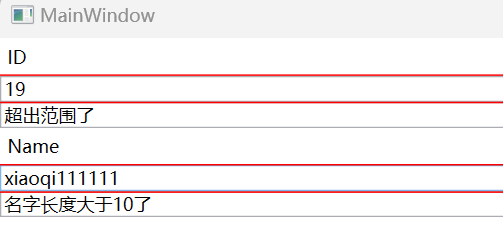
运行结果:
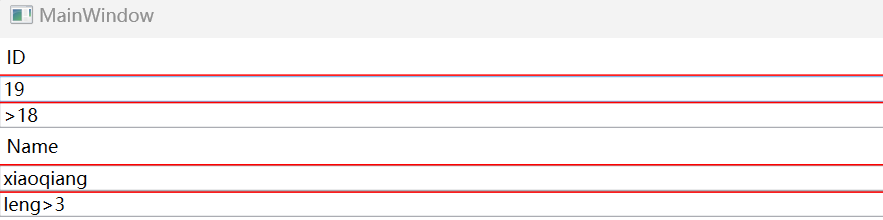
当使用IdataErrorInfo时,需要在索引器中以此判断每个属性和属性的值,为了简化索引器中的代码,通过反射去获取每个属性,并通过添加特性的方法去完成验证
public class Person : INotifyPropertyChanged, IDataErrorInfo { private int _id; private string _name; [Required] [MyArrtibute ] public string Name { get { return _name; } set { _name = value; PropertyChanged?.Invoke(this, new PropertyChangedEventArgs("Name")); } } [Range(0,18,ErrorMessage ="超出范围了")] [Required] public int ID { get { return _id; } set { _id = value; PropertyChanged?.Invoke(this, new PropertyChangedEventArgs("ID")); } }</span><span style="color: rgba(0, 128, 0, 1)">//</span><span style="color: rgba(0, 128, 0, 1)">INotifyPropertyChanged的接口</span> <span style="color: rgba(0, 0, 255, 1)">public</span> <span style="color: rgba(0, 0, 255, 1)">event</span> PropertyChangedEventHandler?<span style="color: rgba(0, 0, 0, 1)"> PropertyChanged; </span><span style="color: rgba(0, 128, 0, 1)">//</span><span style="color: rgba(0, 128, 0, 1)">IDataErrorInfo的接口</span> <span style="color: rgba(0, 0, 255, 1)">public</span> <span style="color: rgba(0, 0, 255, 1)">string</span> Error { <span style="color: rgba(0, 0, 255, 1)">get</span> { <span style="color: rgba(0, 0, 255, 1)">return</span> <span style="color: rgba(128, 0, 0, 1)">""</span><span style="color: rgba(0, 0, 0, 1)">; } } </span><span style="color: rgba(0, 0, 255, 1)">public</span> <span style="color: rgba(0, 0, 255, 1)">string</span> <span style="color: rgba(0, 0, 255, 1)">this</span>[<span style="color: rgba(0, 0, 255, 1)">string</span><span style="color: rgba(0, 0, 0, 1)"> columnName] { </span><span style="color: rgba(0, 0, 255, 1)">get</span><span style="color: rgba(0, 0, 0, 1)"> { </span><span style="color: rgba(0, 128, 0, 1)">//</span><span style="color: rgba(0, 128, 0, 1)">引入命名空间using System.ComponentModel.DataAnnotations;</span> <span style="color: rgba(0, 0, 255, 1)">var</span> vc = <span style="color: rgba(0, 0, 255, 1)">new</span> ValidationContext(<span style="color: rgba(0, 0, 255, 1)">this</span>, <span style="color: rgba(0, 0, 255, 1)">null</span>, <span style="color: rgba(0, 0, 255, 1)">null</span><span style="color: rgba(0, 0, 0, 1)">); vc.MemberName </span>=<span style="color: rgba(0, 0, 0, 1)"> columnName; </span><span style="color: rgba(0, 0, 255, 1)">var</span> res = <span style="color: rgba(0, 0, 255, 1)">new</span> List<ValidationResult><span style="color: rgba(0, 0, 0, 1)">(); </span><span style="color: rgba(0, 0, 255, 1)">var</span> result = Validator.TryValidateProperty(<span style="color: rgba(0, 0, 255, 1)">this</span>.GetType().GetProperty(columnName).GetValue(<span style="color: rgba(0, 0, 255, 1)">this</span>, <span style="color: rgba(0, 0, 255, 1)">null</span><span style="color: rgba(0, 0, 0, 1)">), vc, res); </span><span style="color: rgba(0, 0, 255, 1)">if</span> (res.Count > <span style="color: rgba(128, 0, 128, 1)">0</span><span style="color: rgba(0, 0, 0, 1)">) { </span><span style="color: rgba(0, 0, 255, 1)">return</span> <span style="color: rgba(0, 0, 255, 1)">string</span>.Join(Environment.NewLine, res.Select(r =><span style="color: rgba(0, 0, 0, 1)"> r.ErrorMessage).ToArray()); } </span><span style="color: rgba(0, 0, 255, 1)">return</span> <span style="color: rgba(0, 0, 255, 1)">string</span><span style="color: rgba(0, 0, 0, 1)">.Empty; } } }</span></pre>
一个类继承了IdataErrorInfi后,又使用DataAnnotations去改善索引器后,属性的验证逻辑需要通过特性的方式去完成,特性分为系统自带的和自定义的,新建特性的方法,新建一个类并继承ValidationAttribute,在该类中返回一个ValidationResult即可。
新建特性代码:
public class MyArrtibute : ValidationAttribute { protected override ValidationResult? IsValid(object? value, ValidationContext validationContext) { if (value.ToString().Length > 10) return new ValidationResult("名字长度大于10了");</span><span style="color: rgba(0, 0, 255, 1)">return</span> <span style="color: rgba(0, 0, 255, 1)">base</span><span style="color: rgba(0, 0, 0, 1)">.IsValid(value, validationContext); } }</span></pre>
第一个参数value就是在binding表达式,从数据源到目标的值,这里的return返回的值依旧是被全局静态对象Validation接受,这是由binding功能提供的
特性的使用方法:
    [Required]
        [MyArrtibute ]
        public string Name
        {
            get { return _name; }
            set
            {
                _name = value;
                PropertyChanged?.Invoke(this, new PropertyChangedEventArgs("Name"));
            }
        }
在需要验证的属性前加上特性即可
运行结果: