《nodejs跨栏》vue篇——vue简介
Vue读音
读作view
Vue文件结构
参考链接:https://www.runoob.com/vue2/vue-directory-structure.html
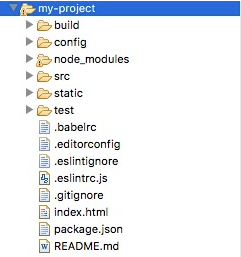

其中App.vue代码如下:
点击查看代码
<!-- 展示模板 -->
<template>
  <div id="app">
    <img decoding="async" src="./assets/logo.png">
    <hello></hello>
  </div>
</template>

<script>
// 导入组件
import Hello from './components/Hello'

export default {
  name: 'app',
  components: {
    Hello
  }
}
</script>
<!-- 样式代码 -->
<style>
#app {
  font-family: 'Avenir', Helvetica, Arial, sans-serif;
  -webkit-font-smoothing: antialiased;
  -moz-osx-font-smoothing: grayscale;
  text-align: center;
  color: #2c3e50;
  margin-top: 60px;
}
</style>
接下来我们可以尝试修改下初始化的项目,将 Hello.vue 修改为以下代码:
点击查看代码
<template>
  <div class="hello">
    <h1>{{ msg }}</h1>
  </div>
</template>

<script>
export default {
  name: 'hello',
  data () {
    return {
      msg: '欢迎来到菜鸟教程!'
    }
  }
}
</script>
重新打开页面 http://localhost:8080/ ,一般修改后会自动刷新,显示效果如下所示:
