在Vscode使用命令npm报错-The operation was rejected by your operating system. npm ERR! It's possible that the file was already in use (by a text editor or antivirus)
报错信息:
PS D:\disk\xubo\个人博客文章\27-Vue\资料(含课件)\vuedemo\vueproject> npm i pubsub-js
npm ERR! code EPERM
npm ERR! syscall open
npm ERR! path D:\disk\soft\node.js\node_cache_cacache\index-v5\1d\32\0400202fc22af03ff2926f006e455fe92c77b8136b8fbebbad5eee83f240
npm ERR! Error: EPERM: operation not permitted, open 'D:\disk\soft\node.js\node_cache_cacache\index-v5\1d\32\0400202fc22af03ff2926f006e455fe92c77b8136b8fbebbad5eee83f240'
npm ERR! [Error: EPERM: operation not permitted, open 'D:\disk\soft\node.js\node_cache_cacache\index-v5\1d\32\0400202fc22af03ff2926f006e455fe92c77b8136b8fbebbad5eee83f240'] {
npm ERR! errno: -4048,
npm ERR! code: 'EPERM',
npm ERR! syscall: 'open',
npm ERR! path: 'D:\disk\soft\node.js\node_cache\_cacache\index-v5\1d\32\0400202fc22af03ff2926f006e455fe92c77b8136b8fbebbad5eee83f240',
npm ERR! requiredBy: '.'
npm ERR! }
npm ERR!
npm ERR! The operation was rejected by your operating system.
npm ERR! It's possible that the file was already in use (by a text editor or antivirus),
npm ERR! or that you lack permissions to access it.
npm ERR!
npm ERR! If you believe this might be a permissions issue, please double-check the
npm ERR! permissions of the file and its containing directories, or try running
npm ERR! the command again as root/Administrator.
npm ERR! Log files were not written due to an error writing to the directory: D:\disk\soft\node.js\node_cache_logs
npm ERR! You can rerun the command with --loglevel=verbose to see the logs in your terminal
问题原因:没有权限打开这个目录->operation not permitted, open 'D:\disk\soft\node.js\node_cache_cacache
没有管理员权限,无法在node_global和node_cache两个文件夹下进行一些必要的操作
解决方式:
方式一:
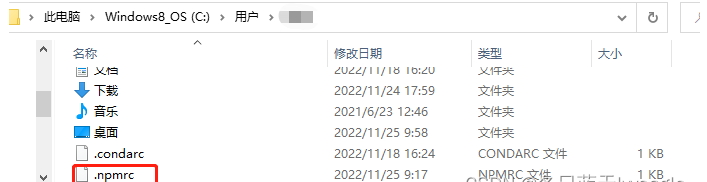
删除用户下的.npmrc文件,即不改变全局安装的路径(不够好,本质问题仍没有解决,全局还是会安装在C盘)
每次都用管理员身份运行命令行(不够方便,vscode 下的命令行默认也不是管理员身份运行的)
方式二:
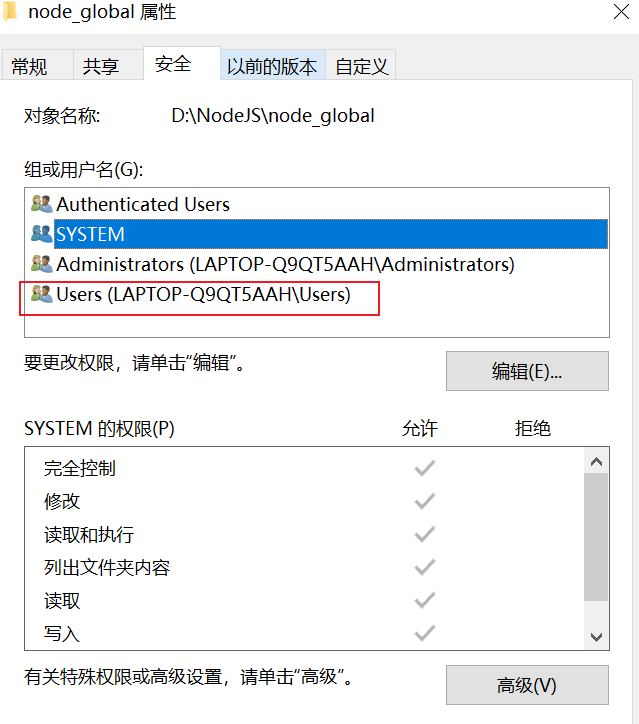
直接修改node_global和node_cache文件夹的权限:
右键文件夹,打开属性,切换到安全选项卡
在Vscode使用命令npm报错-The operation was rejected by your operating system. npm ERR! It's possible that the file was already in use (by a text editor or antivirus)更多相关文章
JavaScript CSS Vue3 实现一个简单的Loading
配置和使用nvm免安装版本(nvm-noinstall.zip)
HarmonyOS:使用Node-API实现ArkTS与C/C++跨语言交互
【NodeJS】NodeJS+mongoDB在线版开发简单RestfulAPI (一):项目简介及安装依赖
【NodeJS】NodeJS+mongoDB在线版开发简单RestfulAPI (四):状态码的使用
【NodeJS】NodeJS+mongoDB在线版开发简单RestfulAPI (五):POST上传文件的设置
【NodeJS】NodeJS+mongoDB在线版开发简单RestfulAPI (六):token的设置
【NodeJS】NodeJS+mongoDB在线版开发简单RestfulAPI (七):MongoDB的设置
【NodeJS】NodeJS+mongoDB在线版开发简单RestfulAPI (三):Cors的设置及.env文件的设置
【NodeJS】NodeJS+mongoDB在线版开发简单RestfulAPI (二):项目文件夹架构及路由的设置
【NodeJS】NodeJS+mongoDB在线版开发简单RestfulAPI (八):API说明(暂时完结,后续考虑将在线版mongoDB变为本地版)
报error:0308010C:digital envelope routines::unsupported错--nodejs版本过高(nvm安装(更换)不同版本nodejs)
小结---安装nvm解决node版本不兼容的问题(node版本切换)