Maven四种打包方式
问题
Maven可以使用mvn package指令对项目进行打包,如果使用java -jar xxx.jar执行运行jar文件,
会出现"no main manifest attribute, in xxx.jar"(没有设置Main-Class)、ClassNotFoundException(找不到依赖包)等错误。
解决方法
要想jar包能直接通过java -jar xxx.jar运行,需要满足:
1、在jar包中的META-INF/MANIFEST.MF中指定Main-Class,这样才能确定程序的入口在哪里;
2、要能加载到依赖包。
方法一
使用maven-jar-plugin和maven-dependency-plugin插件打包
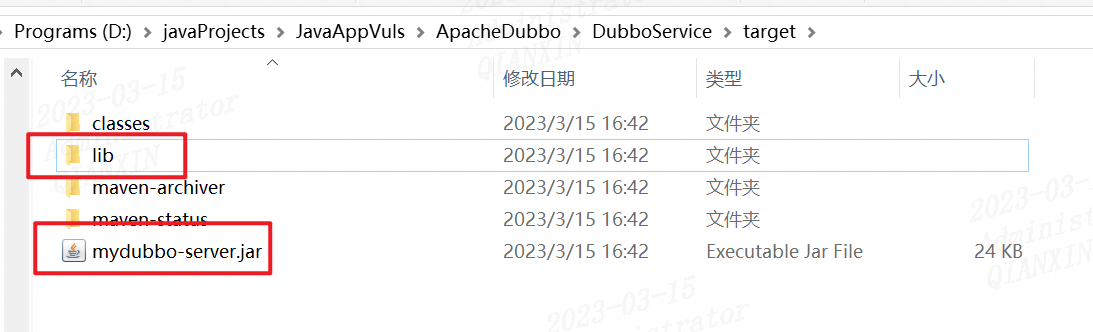
打包效果
生成一个jar文件和lib目录
相关插件
maven-jar-plugin
https://mvnrepository.com/artifact/org.apache.maven.plugins/maven-jar-plugin/
maven-jar-plugin用于生成jar包中META-INF/MANIFEST.MF文件的部分内容
<mainClass>com.xxg.Main</mainClass>指定MANIFEST.MF中的Main-Class
<addClasspath>true</addClasspath>会在MANIFEST.MF加上Class-Path项并配置依赖包,<classpathPrefix>lib/</classpathPrefix>指定依赖包所在目录。
maven-dependency-plugin
https://mvnrepository.com/artifact/org.apache.maven.plugins/maven-dependency-plugin
maven-dependency-plugin插件用于将依赖包拷贝到指定路径下
<outputDirectory>${project.build.directory}/lib</outputDirectory>
示例POM
<plugins>
	<plugin>
		<groupId>org.apache.maven.plugins</groupId>
		<artifactId>maven-jar-plugin</artifactId>
		<version>2.6</version>
		<configuration>
			<archive>
				<manifest>
					<addClasspath>true</addClasspath>
					<classpathPrefix>lib/</classpathPrefix>
					<mainClass>com.xxg.Main</mainClass>
				</manifest>
			</archive>
		</configuration>
	</plugin>

	<plugin>
		<groupId>org.apache.maven.plugins</groupId>
		<artifactId>maven-dependency-plugin</artifactId>
		<version>2.10</version>
		<executions>
			<execution>
				<id>copy-dependencies</id>
				<phase>package</phase>
				<goals>
					<goal>copy-dependencies</goal>
				</goals>
				<configuration>
					<outputDirectory>${project.build.directory}/lib</outputDirectory>
				</configuration>
			</execution>
		</executions>
	</plugin>
</plugins>
方法二
使用maven-assembly-plugin插件打包
打包效果
相关插件
maven-assembly-plugin
https://mvnrepository.com/artifact/org.apache.maven.plugins/maven-assembly-plugin
示例POM
<plugins>
	<plugin>
		<groupId>org.apache.maven.plugins</groupId>
		<artifactId>maven-assembly-plugin</artifactId>
		<version>2.5.5</version>
		<configuration>
			<archive>
				<manifest>
					<mainClass>com.xxg.Main</mainClass>
				</manifest>
			</archive>
			<descriptorRefs>
				<descriptorRef>jar-with-dependencies</descriptorRef>
			</descriptorRefs>
		</configuration>
	</plugin>
</plugins>
方法三
使用maven-shade-plugin插件打包
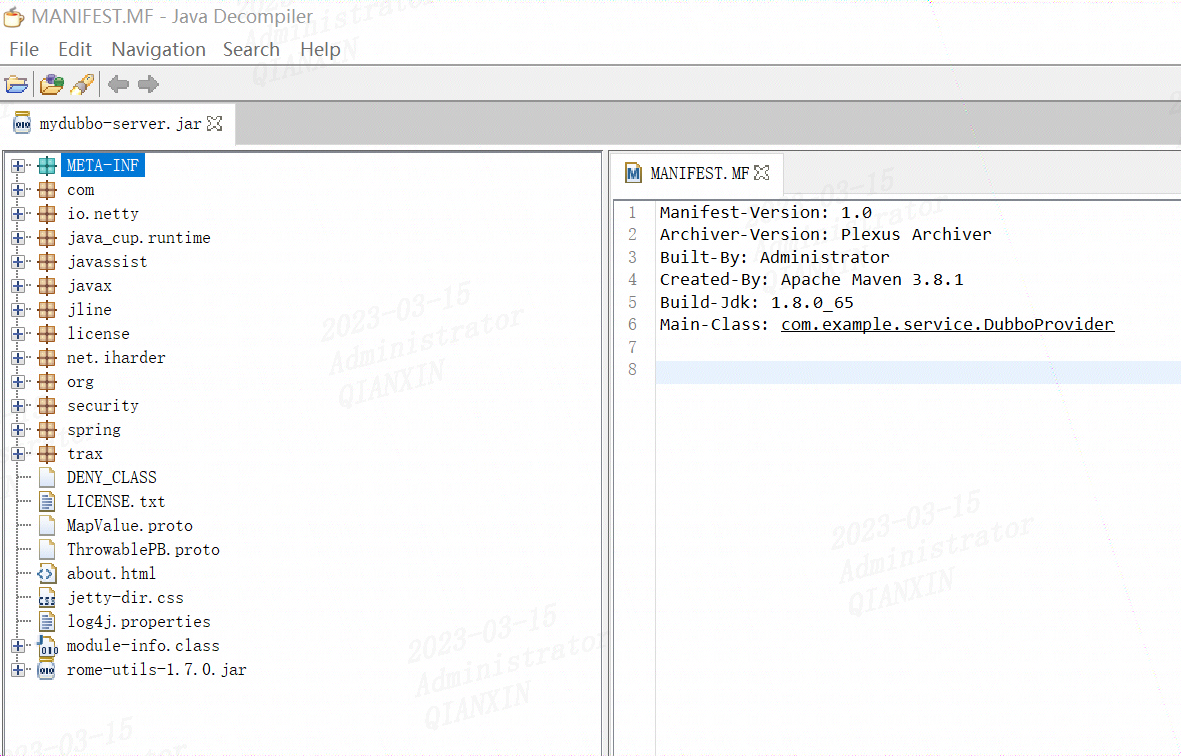
打包效果
生成一个jar包,jar包里面是将class类拷贝
相关插件
maven-shade-plugin
https://mvnrepository.com/artifact/org.apache.maven.plugins/maven-shade-plugin
示例POM
<plugins>
	<plugin>
		<groupId>org.apache.maven.plugins</groupId>
		<artifactId>maven-shade-plugin</artifactId>
		<version>2.4.1</version>
		<executions>
			<execution>
				<phase>package</phase>
				<goals>
					<goal>shade</goal>
				</goals>
				<configuration>
					<transformers>
						<transformer implementation="org.apache.maven.plugins.shade.resource.ManifestResourceTransformer">
							<mainClass>com.xxg.Main</mainClass>
						</transformer>
					</transformers>
				</configuration>
			</execution>
		</executions>
	</plugin>
</plugins>
遇到过的问题
如果项目中用到了Spring Framework,将依赖打到一个jar包中,运行时会出现读取XML schema文件出错。原因是Spring Framework的多个jar包中包含相同的文件spring.handlers和spring.schemas,如果生成一个jar包会互相覆盖。为了避免互相影响,可以使用AppendingTransformer来对文件内容追加合并:
<plugins>

	<plugin>
		<groupId>org.apache.maven.plugins</groupId>
		<artifactId>maven-shade-plugin</artifactId>
		<version>2.4.1</version>
		<executions>
			<execution>
				<phase>package</phase>
				<goals>
					<goal>shade</goal>
				</goals>
				<configuration>
					<transformers>
						<transformer implementation="org.apache.maven.plugins.shade.resource.ManifestResourceTransformer">
							<mainClass>com.xxg.Main</mainClass>
						</transformer>
						<transformer implementation="org.apache.maven.plugins.shade.resource.AppendingTransformer">
							<resource>META-INF/spring.handlers</resource>
						</transformer>
						<transformer implementation="org.apache.maven.plugins.shade.resource.AppendingTransformer">
							<resource>META-INF/spring.schemas</resource>
						</transformer>
					</transformers>
				</configuration>
			</execution>
		</executions>
	</plugin>

</plugins>
方法四
使用spring-boot-maven-plugin插件打包,多用于spring项目。
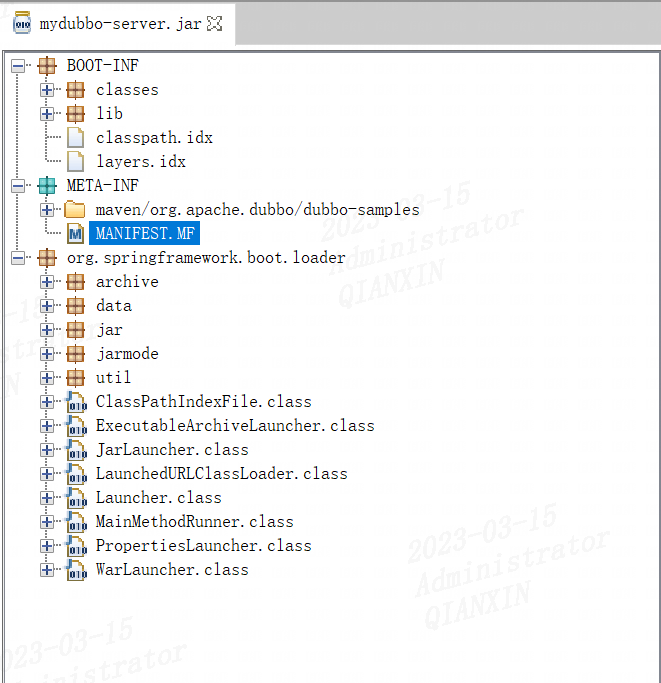
打包效果
生成一个jar包
相关插件
spring-boot-maven-plugin
https://mvnrepository.com/artifact/org.springframework.boot/spring-boot-maven-plugin
示例POM
<plugins>
    <plugin>
        <groupId>org.springframework.boot</groupId>
        <artifactId>spring-boot-maven-plugin</artifactId>
        <version>2.7.9</version>
        <executions>
            <execution>
                <goals>
                    <goal>repackage</goal>
                </goals>
            </execution>
        </executions>
        <configuration>
            <mainClass>com.example.service.DubboProvider</mainClass>
        </configuration>
    </plugin>
</plugins>
参考
https://blog.csdn.net/xiao__gui/article/details/47341385#
maven多模块项目springboot打包:
https://blog.csdn.net/Blackjoker0/article/details/126954209