java导出PDF文件
我们需要将生成的PDF文件直接导出到浏览器而不是保存到本地,需要对HttpServletResponse进行配置,将PDF写入到响应流中。
以下是可以将PDF导出到浏览器进行下载:
我们首先先编写PDF工具类:
package com.scenic.util;

import com.itextpdf.text.*;
import com.itextpdf.text.pdf.*;

import java.io.IOException;

public class PdfFUtil {
    // 最大宽度
    private static int maxWidth = 720;

/**------------------------创建表格单元格的方法start----------------------------*/
    /**
     * 创建单元格(指定字体)
     *
     * @param value
     * @param font
     * @return
     */
    public static PdfPCell createCell(String value, Font font) {
        PdfPCell cell = new PdfPCell();
        cell.setVerticalAlignment(Element.ALIGN_MIDDLE); //垂直居中
        cell.setHorizontalAlignment(Element.ALIGN_CENTER); //水平居中
        cell.setPhrase(new Phrase(value, font));
        return cell;
    }

    /**
     * 创建单元格(指定字体、设置单元格高度)
     *
     * @param value
     * @param font
     * @return 申请事由——这行使用的方法
     */
    public static PdfPCell createCell(String value, Font font, float f) {
        PdfPCell cell = new PdfPCell();
        cell.setVerticalAlignment(Element.ALIGN_MIDDLE);
        cell.setHorizontalAlignment(Element.ALIGN_CENTER);
        cell.setPhrase(new Phrase(value, font));
        cell.setFixedHeight(f); // 设置表格中的单行高度
        return cell;
    }

    /**
     * 创建单元格(指定字体、水平局左/中/右)
     *
     * @param value
     * @param font
     * @param align
     * @return
     */
    public static PdfPCell createCell(String value, Font font, int align) {
        PdfPCell cell = new PdfPCell();
        cell.setVerticalAlignment(Element.ALIGN_MIDDLE); //垂直居中
        cell.setHorizontalAlignment(align); //水平居中
        cell.setPhrase(new Phrase(value, font));
        return cell;
    }

    /**
     * 创建单元格(指定字体、水平局左/中/右、单元格跨x列合并)
     *
     * @param value
     * @param font
     * @param align
     * @param colspan
     * @return
     */
    public PdfPCell createCell(String value, Font font, int align, int colspan) {
        PdfPCell cell = new PdfPCell();
        cell.setVerticalAlignment(Element.ALIGN_MIDDLE); //垂直居中
        cell.setHorizontalAlignment(align); //水平居中
        cell.setColspan(colspan);
        cell.setPhrase(new Phrase(value, font));
        return cell;
    }

    /**
     * 创建单元格(指定字体、水平居..、单元格跨x列合并、设置单元格内边距)
     *
     * @param value
     * @param font
     * @param align
     * @param colspan
     * @param boderFlag
     * @return
     */
    public static PdfPCell createCell(String value, Font font, int align, int colspan, boolean boderFlag) {
        PdfPCell cell = new PdfPCell();
        cell.setVerticalAlignment(Element.ALIGN_MIDDLE);
        cell.setHorizontalAlignment(align);
        cell.setColspan(colspan);
        cell.setPhrase(new Phrase(value, font));
        cell.setPadding(3.0f);
        if (!boderFlag) {
            cell.setBorder(0);
            cell.setPaddingTop(10.0f);
            cell.setPaddingBottom(7.0f);
        } else if (boderFlag) {
            cell.setBorder(0);
            cell.setPaddingTop(0.0f);
            cell.setPaddingBottom(15.0f);
        }
        return cell;
    }

    /**
     * 创建单元格(指定字体、水平..、边框宽度:0表示无边框、内边距)
     *
     * @param value
     * @param font
     * @param align
     * @param borderWidth
     * @param paddingSize
     * @param flag
     * @return
     */
    public static PdfPCell createCell(String value, Font font, int align, float[] borderWidth, float[] paddingSize, boolean flag) {
        PdfPCell cell = new PdfPCell();
        cell.setVerticalAlignment(Element.ALIGN_MIDDLE);
        cell.setHorizontalAlignment(align);
        cell.setPhrase(new Phrase(value, font));
        cell.setBorderWidthLeft(borderWidth[0]);
        cell.setBorderWidthRight(borderWidth[1]);
        cell.setBorderWidthTop(borderWidth[2]);
        cell.setBorderWidthBottom(borderWidth[3]);
        cell.setPaddingTop(paddingSize[0]);
        cell.setPaddingBottom(paddingSize[1]);
        if (flag) {
            cell.setColspan(2);
        }
        return cell;
    }
/**------------------------创建表格单元格的方法end----------------------------*/


/**--------------------------创建表格的方法start----------------------------*/
    /**
     * 创建默认列宽,指定列数、水平(居中、右、左)的表格
     *
     * @param colNumber
     * @param align
     * @return
     */
    public PdfPTable createTable(int colNumber, int align) {
        PdfPTable table = new PdfPTable(colNumber);
        try {
            table.setTotalWidth(maxWidth);
            table.setLockedWidth(true);
            table.setHorizontalAlignment(align);
            table.getDefaultCell().setBorder(1);
        } catch (Exception e) {
            e.printStackTrace();
        }
        return table;
    }

    /**
     * 创建指定列宽、列数的表格
     *
     * @param widths
     * @return
     */
    public static PdfPTable createTable(float[] widths) {
        PdfPTable table = new PdfPTable(widths);
        try {
            table.setTotalWidth(maxWidth);
            table.setLockedWidth(true);
            table.setHorizontalAlignment(Element.ALIGN_CENTER);
            table.getDefaultCell().setBorder(1);
        } catch (Exception e) {
            e.printStackTrace();
        }
        return table;
    }

    /**
     * 创建空白的表格
     *
     * @return
     */
    public PdfPTable createBlankTable() throws IOException, DocumentException {
        BaseFont bfChinese = BaseFont.createFont("STSong-Light", "UniGB-UCS2-H", BaseFont.NOT_EMBEDDED);
        Font keyfont = new Font(bfChinese, 10, Font.BOLD);
        PdfPTable table = new PdfPTable(1);
        table.getDefaultCell().setBorder(0);
        table.addCell(createCell("", keyfont));
        table.setSpacingAfter(20.0f);
        table.setSpacingBefore(20.0f);
        return table;
    }
/**--------------------------创建表格的方法end----------------------------*/
    /**
     * --------------------------页码方法start----------------------------
     */
    public static void onEndPage(PdfWriter writer, Document document) throws IOException, DocumentException {
        PdfContentByte cb = writer.getDirectContent();
        PdfTemplate tpl; // 页码模板用来固定显示数据
        BaseFont bfChinese = BaseFont.createFont("STSong-Light", "UniGB-UCS2-H", BaseFont.NOT_EMBEDDED);
        tpl = writer.getDirectContent().createTemplate(100, 100);
        cb.saveState();
        String text = "第" + writer.getPageNumber() + "页";
        cb.beginText();
        cb.setFontAndSize(bfChinese, 8);
        cb.setTextMatrix(480, 35);//定位“第x页” 在具体的页面调试时候需要更改这xy的坐标
        cb.showText(text);
        cb.endText();
        //** 创建以及固定显示总页数的位置
        cb.addTemplate(tpl, 283, 10);//定位“y页” 在具体的页面调试时候需要更改这xy的坐标
        cb.stroke();
        cb.restoreState();
        cb.closePath();
/**--------------------------页码方法end----------------------------*/
    }
}
接着我们编写controller层进行实现代码
/**
     * 导出pdf格式文档
     *
     * @return
     * @throws Exception
     */
    @PostMapping("/pdf")
    public void getUser(HttpServletResponse response) throws Exception {
        List<ActivityVo> list = activityService.searchActivityByConditions(new ActivityDTO());
        long currentTime = System.currentTimeMillis();
        int total = list.size();

        try {
            // 1.新建Document对象
            Document document = new Document(PageSize.A4.rotate());  //建立一个Document对象

            // 2.建立一个书写器(writer)与document对象关联
            PdfWriter writer = PdfWriter.getInstance(document, response.getOutputStream());

            // 3.打开文档
            document.open();

            // 设置响应头信息
            response.setContentType("application/pdf");
            response.setHeader("Content-Disposition", "attachment;filename=user_" + currentTime + ".pdf");

            // 标题
            Paragraph paragraph = new Paragraph("用户表", titlefont_16);
            paragraph.setAlignment(1); //设置文字居中,0靠左,1居中,2靠右
            paragraph.setIndentationLeft(12); //设置左缩进
            paragraph.setIndentationRight(12);  //设置右缩进
            paragraph.setFirstLineIndent(24); //设置首行缩进
            paragraph.setLeading(20f);  //设置行间距
            paragraph.setSpacingBefore(5f);  //设置段落上空白
            paragraph.setSpacingAfter(10f);  //设置段落下空白

            document.add(paragraph);   //标题
            // 表格
            PdfPTable table = PdfFUtil.createTable(new float[]{75, 110, 75, 140, 75});
            table.addCell(PdfFUtil.createCell("ID", textfont_10));
            table.addCell(PdfFUtil.createCell("姓名", textfont_10));
            table.addCell(PdfFUtil.createCell("年龄", textfont_10));
            table.addCell(PdfFUtil.createCell("住址", textfont_10));
            table.addCell(PdfFUtil.createCell("住址2", textfont_10));

            for (int i = 0; i < total; i++) {
                table.addCell(PdfFUtil.createCell(String.valueOf(list.get(i).getId()), textfont_10));
                table.addCell(PdfFUtil.createCell(list.get(i).getActivityName(), textfont_10));
                table.addCell(PdfFUtil.createCell(String.valueOf(list.get(i).getActivityInstructions()), textfont_10));
                table.addCell(PdfFUtil.createCell(String.valueOf(list.get(i).getActivityAddr()), textfont_10));
                table.addCell(PdfFUtil.createCell(String.valueOf(list.get(i).getActivityPerson()), textfont_10));
            }
            document.add(table);
            PdfFUtil.onEndPage(writer, document);

            // 5.关闭文档
            document.close();
        } catch (Exception e) {
            e.printStackTrace();
        }
    }


    /**
     * 全局变量
     */
//    定义全局的字体静态变量
    private static Font titlefont_16;
    private static Font titlefontnormal_16;
    private static Font headfont_14;
    private static Font headfontnormal_14;
    private static Font headfont_12;
    private static Font headfontnormal_12;
    private static Font keyfont_10;
    private static Font textfont_10;
    private static Font underlinefont_10;

    //    静态代码块
    static {
        try {
            // 定义字体样式
            BaseFont bfChinese = BaseFont.createFont("STSong-Light", "UniGB-UCS2-H", BaseFont.NOT_EMBEDDED);
            titlefont_16 = new Font(bfChinese, 16, Font.BOLD);
            headfont_14 = new Font(bfChinese, 14, Font.BOLD);
            headfont_12 = new Font(bfChinese, 12, Font.BOLD);
            keyfont_10 = new Font(bfChinese, 10, Font.BOLD);

            titlefontnormal_16 = new Font(bfChinese, 16, Font.NORMAL);
            headfontnormal_14 = new Font(bfChinese, 14, Font.NORMAL);
            headfontnormal_12 = new Font(bfChinese, 12, Font.NORMAL);
            textfont_10 = new Font(bfChinese, 10, Font.NORMAL);
            underlinefont_10 = new Font(bfChinese, 10, Font.UNDERLINE);
        } catch (Exception e) {
            e.printStackTrace();
        }
    }
到这里基本就可以测试了,我使用的是postman来测试的
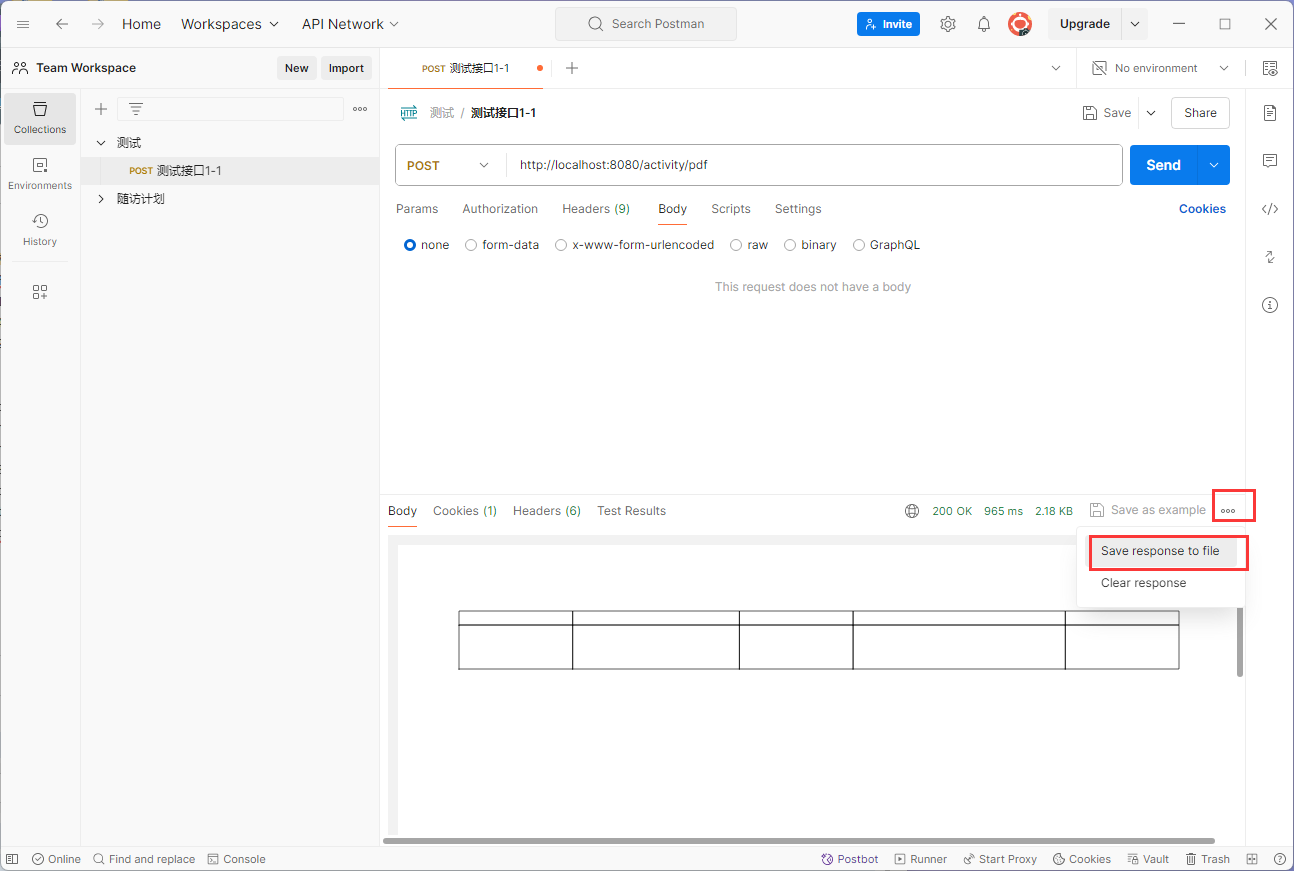
然后就到这里就结束了!!