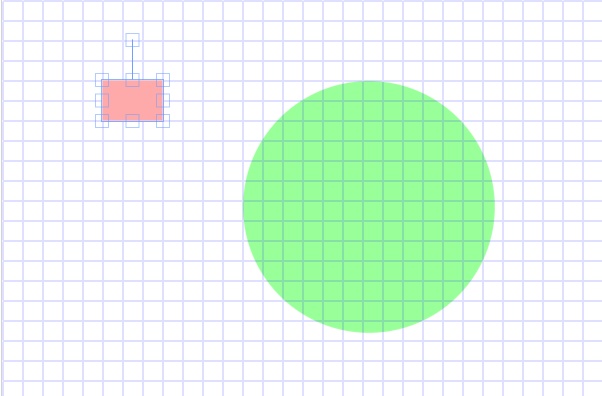
fabricjs怎么添加网格线
html文件:
1 <canvas id="c" width="600" height="400"></canvas>
css文件:
1 canvas { 2 border: 1px solid lightgrey; 3 }
javascript文件
 1 var canvas = new fabric.Canvas('c', {
 2   selection: false
 3 });
 4 var i = 0;
 5 var gridx = 20;                        // (number) horizontaler Rasterabstand
 6 var gridy = 20;                        // (number) vertikaler Rasterabstand
 7 var path = "";                        // (string) Linien für das Raster
 8 var gridshape = null;            // (fabric.js Object) Angezeigtes Raster
 9 var snapdistance = 2;            // (number) Faktor für den Abstand zum Einschnappen
10
11 if ( (gridx <= 20) || (gridy <= 20) ) {
12     snapdistance = 1;
13 }
14 // add objects
15 canvas.add(new fabric.Rect({
16   left: 100,
17   top: 100,
18   width: 60,
19   height: 40,
20   fill: '#faa',
21   originX: 'left',
22   originY: 'top',
23   centeredRotation: true
24 }));
25
26 canvas.add(new fabric.Circle({
27   left: 200,
28   top: 200,
29   radius: 60,
30   fill: '#9f9',
31   originX: 'left',
32   originY: 'top',
33   centeredRotation: true
34 }));
35
36 // create grid
37
38 // path = "M 50 0 L 50 600  L 51 600 L 51 0 z ";
39 // path = path + "M 100 0 L 100 600  L 101 600 L 101 0 z ";
40
41 // vertical lines
42 for (i = 0; i < (600 / gridx); i++) {
43 path = path + "M " + (i * gridx) + " 0 L " + (i * gridx) + " 400 ";
44 path = path + "L " + (i * gridx + 1) + " 400 L " + (i * gridx + 1) + " 0 z ";
45
46 /*
47   canvas.add(new fabric.Line([i * gridx, 0, i * gridx, 600], {
48     stroke: '#ccc',
49     selectable: false
50   }));
51 */
52 }
53
54 // horizontal lines
55 for (i = 0; i < (400 / gridy); i++) {
56 path = path + " M 0 " + (i * gridy) + " L 600 " + (i * gridy);
57 path = path + " L 600 " + (i * gridy + 1) + " L 0 " + (i * gridy + 1) + " z ";
58 }
59
60 // add grid to canvas
61 // console.log(path);
62 gridshape = new fabric.Path(path);
63 gridshape.set({
64   fill: "#00f",
65   opacity: 0.25,
66   selectable: false,
67   evented: false
68 });
69 canvas.add(gridshape);
70
71 // snap to grid
72 canvas.on('object:moving', function(options) {
73   if (Math.round(options.target.left / gridx * snapdistance) % snapdistance == 0 &&
74     Math.round(options.target.top / gridy * snapdistance) % snapdistance == 0) {
75     options.target.set({
76       left: Math.round(options.target.left / gridx) * gridx,
77       top: Math.round(options.target.top / gridy) * gridy
78     }).setCoords();
79   }
80 });
参考原文:https://jsfiddle.net/awehring/4rt2hyg5/7/