超级详细 JAVA 对接 ChatGPT 教程,实现自己的AI对话小助手
1 前言
大家好,由于近期需要对接了ChatGPT API所以特地记录下来,据介绍该模型是和当前官网使用的相同的模型,如果你还没体验过ChatGPT,那么今天就教大家如何打破网络壁垒,打造一个属于自己的智能助手把。本文包括API Key的申请以及网络代理的搭建,那么事不宜迟,我们现在开始。
若有想体验的可联系我获取体验账号。
2 对接流程
2.1 API-Key的获取
首先第一步要获取OpenAI接口的API Key,该Key是你用来调用接口的token,主要用于接口鉴权。获取该key首先要注册OpenAi的账号。
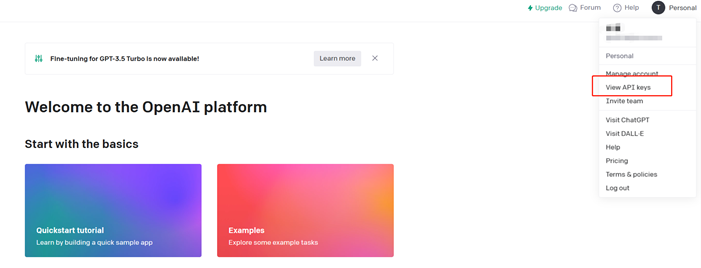
2.1.1 打开platform.openai.com网站,点击view API Key
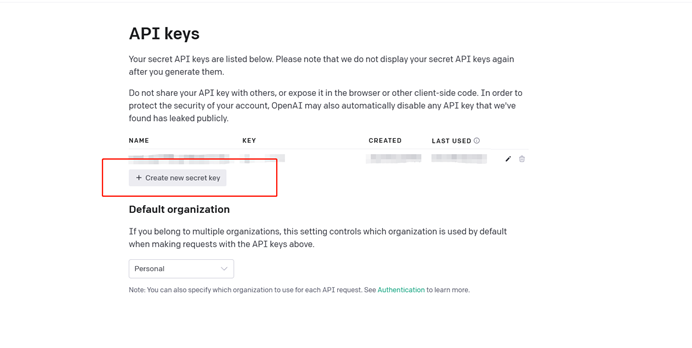
2.1.2 点击创建key
2.1.3 弹窗显示生成的key,记得把key复制,不然等会就找不到这个key了,只能重新创建
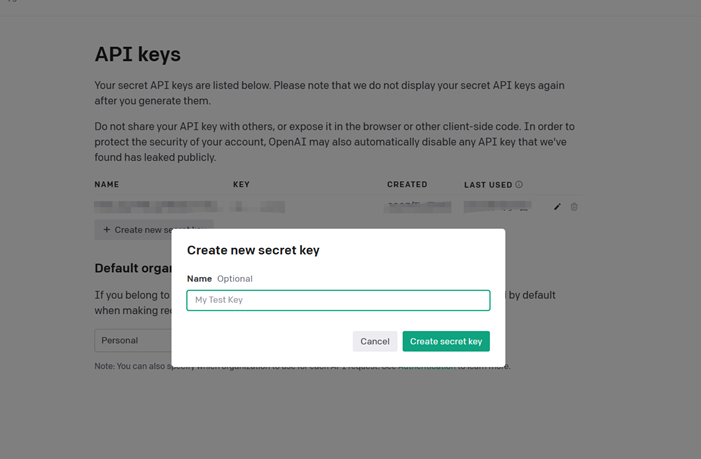
将API Key保存好以备用
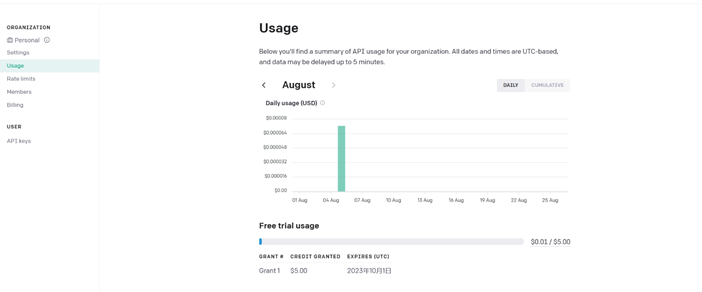
2.2 API用量的查看
这里可以查看API的使用情况,新账号注册默认有5美元的试用额度,之前都是18美元,API成本降了之后试用额度也狠狠地砍了一刀。
2.3 核心代码实现
2.3.1 pom依赖
其中引入包cdkj-core请参考另一开源项目 维基框架
-
-
<project xmlns="http://maven.apache.org/POM/4.0.0"
-
xmlns:xsi="http://www.w3.org/2001/XMLSchema-instance"
-
xsi:schemaLocation="http://maven.apache.org/POM/4.0.0 http://maven.apache.org/xsd/maven-4.0.0.xsd">
-
<parent>
-
<artifactId>framewiki-gpt</artifactId>
-
<groupId>com.framewiki.gpt</groupId>
-
<version>1.0.0</version>
-
</parent>
-
<modelVersion>4.0.0</modelVersion>
-
-
<artifactId>gpt-util</artifactId>
-
-
<dependencies>
-
<dependency>
-
<groupId>com.cdkjframework</groupId>
-
<artifactId>cdkj-core</artifactId>
-
</dependency>
-
<dependency>
-
<groupId>com.cdkjframework</groupId>
-
<artifactId>cdkj-util</artifactId>
-
</dependency>
-
<dependency>
-
<groupId>commons-httpclient</groupId>
-
<artifactId>commons-httpclient</artifactId>
-
</dependency>
-
<dependency>
-
<groupId>org.springframework.boot</groupId>
-
<artifactId>spring-boot-starter-validation</artifactId>
-
</dependency>
-
</dependencies>
-
-
</project>

2.3.2 实体类ChatMessagesDto.java
用于存放发送的消息信息,注解使用了lombok,如果没有使用lombok可以自动生成构造方法以及get和set方法
-
package com.framewiki.gpt.dto.response;
-
-
import lombok.AllArgsConstructor;
-
import lombok.Data;
-
import lombok.NoArgsConstructor;
-
-
/**
-
* @ProjectName: framewiki-gpt
-
* @Package: com.framewiki.gpt.dto
-
* @ClassName: ChatMessagesDto
-
* @Description: java类作用描述
-
* @Author: xiaLin
-
* @Date: 2023/6/10 22:30
-
* @Version: 1.0
-
*/
-
-
-
-
public class ChatMessagesDto {
-
-
/**
-
* 消息角色
-
* system
-
* user
-
* assistant
-
*/
-
private String role;
-
-
/**
-
* 消息内容
-
*/
-
private String content;
-
}
2.3.3 实体类CreateChatCompletionDto.java
-
package com.framewiki.gpt.dto.request;
-
-
import lombok.Data;
-
-
/**
-
* @ProjectName: framewiki-gpt
-
* @Package: com.framewiki.gpt.dto.request
-
* @ClassName: CreateChatCompletionDto
-
* @Description: java类作用描述
-
* @Author: xiaLin
-
* @Date: 2023/6/21 22:07
-
* @Version: 1.0
-
*/
-
-
public class CreateChatCompletionDto {
-
-
/**
-
* 内容
-
*/
-
private String content;
-
-
/**
-
* 模型
-
*/
-
private String model;
-
-
/**
-
* 用户
-
*/
-
private String user;
-
}
2.3.4 实体类ChatCompletionRequestDto.java
用于发送的请求的参数实体类,参数释义如下:
-
package com.framewiki.gpt.dto.request;
-
-
import com.alibaba.fastjson.annotation.JSONField;
-
import com.framewiki.gpt.dto.response.ChatMessagesDto;
-
import lombok.Builder;
-
import lombok.Data;
-
-
import java.math.BigDecimal;
-
import java.util.List;
-
-
/**
-
* @ProjectName: framewiki-gpt
-
* @Package: com.framewiki.gpt.dto
-
* @ClassName: ChatCompletionRequestDto
-
* @Description: 请求实体
-
* @Author: xiaLin
-
* @Date: 2023/6/10 22:27
-
* @Version: 1.0
-
*/
-
-
-
public class ChatCompletionRequestDto {
-
-
/**
-
* 模型
-
* gpt-4
-
* gpt-4-0314
-
* gpt-4-32k
-
* gpt-4-32k-0314
-
* gpt-3.5-turbo
-
* gpt-3.5-turbo-0301
-
*/
-
private String model;
-
-
/**
-
* 温度,参数从0-2,越低表示越精准,越高表示越广发,回答的内容重复率越低
-
*/
-
private BigDecimal temperature;
-
-
/**
-
* 消息
-
*/
-
private List<ChatMessagesDto> messages;
-
-
/**
-
* 回复条数,一次对话回复的条数
-
*/
-
private Integer n;
-
-
/**
-
* 是否流式处理,就像ChatGPT一样的处理方式,会增量的发送信息。
-
*/
-
private Boolean stream;
-
-
/**
-
* 状态
-
*/
-
private List<String> stop;
-
-
/**
-
* 生成的答案允许的最大token数
-
*/
-
-
private Integer maxTokens;
-
-
/**
-
* 对话用户
-
*/
-
private String user;
-
}
2.3.5 实体类ChatCompletionResponseDto.java
用于接收请求返回的信息以及执行结果
-
package com.framewiki.gpt.dto.response;
-
-
import lombok.Data;
-
-
import java.util.List;
-
-
/**
-
* @ProjectName: framewiki-gpt
-
* @Package: com.framewiki.gpt.dto
-
* @ClassName: ChatCompletionResponseDto
-
* @Description: 响应
-
* @Author: xiaLin
-
* @Date: 2023/6/16 23:18
-
* @Version: 1.0
-
*/
-
-
public class ChatCompletionResponseDto {
-
/**
-
* ID
-
*/
-
private String id;
-
-
/**
-
* 返回的内容
-
*/
-
private String object;
-
-
/**
-
* 模型
-
*/
-
private String model;
-
-
/**
-
* 创建时间
-
*/
-
private long created;
-
-
/**
-
* 用户
-
*/
-
private String user;
-
-
/**
-
* 选择
-
*/
-
private List<ChatCompletionChoiceDto> choices;
-
-
/**
-
* 用量
-
*/
-
private ChatCompletionUsageDto usage;
-
}
2.3.6 实体类ChatCompletionUsageDto.java
-
package com.framewiki.gpt.dto.response;
-
-
import com.alibaba.fastjson.annotation.JSONField;
-
import lombok.Data;
-
-
/**
-
* @ProjectName: framewiki-gpt
-
* @Package: com.framewiki.gpt.dto
-
* @ClassName: ChatCompletionUsageDto
-
* @Description: 用量信息
-
* @Author: xiaLin
-
* @Date: 2023/6/16 22:44
-
* @Version: 1.0
-
*/
-
-
public class ChatCompletionUsageDto {
-
-
/**
-
* 输入 token 数量
-
*/
-
-
private int promptTokens;
-
-
/**
-
* 完成 token数量
-
*/
-
-
private int completionTokens;
-
-
/**
-
* token 总数
-
*/
-
-
private int totalTokens;
-
}
2.3.7 实体类ChatCompletionChoiceDto.java
用于接收ChatGPT返回的数据
-
package com.framewiki.gpt.dto.response;
-
-
import lombok.Data;
-
-
/**
-
* @ProjectName: framewiki-gpt
-
* @Package: com.framewiki.gpt.dto
-
* @ClassName: ChatCompletionChoiceDto
-
* @Description: java类作用描述
-
* @Author: xiaLin
-
* @Date: 2023/6/16 22:44
-
* @Version: 1.0
-
*/
-
-
public class ChatCompletionChoiceDto {
-
-
/**
-
* 搜索
-
*/
-
private Integer index;
-
-
/**
-
* 消息
-
*/
-
private ChatMessagesDto message;
-
-
/**
-
* 完成的原因
-
*/
-
private String finishReason;
-
}
2.3.8 接口调用核心类ChatServiceImpl.java
使用HttpURLConnection用于进行api接口的调用,支持post和get方法请求。
url为配置文件open.ai.url的值,表示调用api的地址:https://api.openai.com/ ,token为获取的api-key。
执行post或者get方法时增加头部信息headers.put("Authorization", "Bearer " + token); 用于通过接口鉴权。
-
package com.framewiki.gpt.service.impl;
-
-
import com.cdkjframework.constant.EncodingConsts;
-
import com.cdkjframework.constant.IntegerConsts;
-
import com.cdkjframework.entity.http.HttpRequestEntity;
-
import com.cdkjframework.enums.HttpMethodEnums;
-
import com.cdkjframework.util.log.LogUtils;
-
import com.cdkjframework.util.network.http.HttpRequestUtils;
-
import com.cdkjframework.util.tool.StringUtils;
-
import com.framewiki.gpt.config.ChatConfig;
-
import com.framewiki.gpt.config.ChatConfiguration;
-
import com.framewiki.gpt.dto.request.ChatCompletionRequestDto;
-
import com.framewiki.gpt.dto.request.CreateChatCompletionDto;
-
import com.framewiki.gpt.dto.response.ChatCompletionResponseDto;
-
import com.framewiki.gpt.dto.response.ChatMessagesDto;
-
import com.framewiki.gpt.service.ChatService;
-
import lombok.RequiredArgsConstructor;
-
import org.springframework.stereotype.Service;
-
-
import java.math.BigDecimal;
-
import java.util.ArrayList;
-
import java.util.HashMap;
-
import java.util.List;
-
import java.util.Map;
-
-
/**
-
* @ProjectName: framewiki-gpt
-
* @Package: com.framewiki.gpt.service.impl
-
* @ClassName: ChatServiceImpl
-
* @Description: java类作用描述
-
* @Author: xiaLin
-
* @Date: 2023/6/16 22:58
-
* @Version: 1.0
-
*/
-
-
-
public class ChatServiceImpl implements ChatService {
-
-
/**
-
* 日志
-
*/
-
private LogUtils logUtils = LogUtils.getLogger(ChatServiceImpl.class);
-
-
/**
-
* 配置信息
-
*/
-
private final ChatConfiguration configuration;
-
-
/**
-
* 地址
-
*/
-
private final ChatConfig chatConfig;
-
-
/**
-
* 创建对话
-
*
-
* @param content 消息内容
-
*/
-
-
public ChatCompletionResponseDto createChatCompletion(CreateChatCompletionDto content) {
-
if (StringUtils.isNullAndSpaceOrEmpty(content.getModel())) {
-
content.setModel(model);
-
}
-
List<ChatMessagesDto> messages = new ArrayList<>();
-
ChatMessagesDto systemMessage = new ChatMessagesDto(role, content.getContent());
-
messages.add(systemMessage);
-
ChatCompletionRequestDto chatCompletionRequest = ChatCompletionRequestDto.builder()
-
.model(content.getModel())
-
.messages(messages)
-
.user(content.getUser())
-
.maxTokens(IntegerConsts.ONE_HUNDRED * IntegerConsts.FIVE)
-
.temperature(BigDecimal.ONE)
-
.build();
-
-
HttpRequestEntity request = new HttpRequestEntity();
-
request.setRequestAddress(chatConfig.getCreateChatCompletion());
-
request.setMethod(HttpMethodEnums.POST);
-
request.setData(chatCompletionRequest);
-
request.setCharset(EncodingConsts.UTF8);
-
// 请求头
-
Map<String, String> headerMap = new HashMap<>(IntegerConsts.ONE);
-
headerMap.put(AUTHORIZATION, BEARER + configuration.getOpenaiApiKey());
-
request.setHeaderMap(headerMap);
-
ChatCompletionResponseDto response = null;
-
try {
-
response = HttpRequestUtils.httpRequest(request, ChatCompletionResponseDto.class);
-
response.setUser(content.getUser());
-
} catch (Exception e) {
-
logUtils.error(e);
-
}
-
// 返回结果
-
return response;
-
}
-
}
2.3.9 定义接口常量配置类ChatConfig.class
用于维护支持的api接口列表
-
package com.framewiki.gpt.config;
-
-
import org.springframework.beans.factory.annotation.Value;
-
import org.springframework.context.annotation.Configuration;
-
import org.springframework.stereotype.Component;
-
-
/**
-
* @ProjectName: framewiki-gpt
-
* @Package: com.framewiki.gpt.config
-
* @ClassName: GptConfig
-
* @Description: GPT配置
-
* @Author: xiaLin
-
* @Date: 2023/6/10 18:16
-
* @Version: 1.0
-
*/
-
-
-
public class ChatConfig {
-
-
/**
-
* 环境
-
*/
-
-
private String active;
-
-
/**
-
* 默认环境
-
*/
-
private final String defaultActive = "prod";
-
-
/**
-
* 地址
-
*/
-
private final String OPEN_AI_URI = "https://api.openai.com/v1/";
-
-
/**
-
* 测试地址
-
*/
-
private final String TEST_OPEN_AI_URI = "https://vpn.itizzy.com/v1/";
-
-
/**
-
* 请求机构
-
* 列出模型
-
* 检索模型
-
*/
-
private final String MODEL_LIST = "models";
-
-
/**
-
* 聊天完成
-
*/
-
private final String CREATE_CHAT_COMPLETION = "chat/completions";
-
-
/**
-
* 创建对话
-
*/
-
private final String CREATE_COMPLETION = "completions";
-
-
/**
-
* ;
-
* 聊天完成地址
-
*
-
* @return
-
*/
-
public String getCreateChatCompletion() {
-
StringBuffer address = new StringBuffer(getAddress());
-
address.append(CREATE_CHAT_COMPLETION);
-
// 返回结果
-
return address.toString();
-
}
-
-
/**
-
* 获取地址
-
*/
-
private String getAddress() {
-
if (active.startsWith(defaultActive)) {
-
return OPEN_AI_URI;
-
} else {
-
return TEST_OPEN_AI_URI;
-
}
-
}
-
}
2.3.10 接口调用OpenAi配置信息类ChatConfiguration.class
-
package com.framewiki.gpt.config;
-
-
import lombok.Data;
-
import org.springframework.boot.context.properties.ConfigurationProperties;
-
import org.springframework.context.annotation.Configuration;
-
-
/**
-
* @ProjectName: framewiki-gpt
-
* @Package: com.framewiki.gpt.config
-
* @ClassName: ChatConfiguration
-
* @Description: java类作用描述
-
* @Author: xiaLin
-
* @Date: 2023/6/10 19:35
-
* @Version: 1.0
-
*/
-
-
-
-
public class ChatConfiguration {
-
-
/**
-
* openai Api密钥
-
*/
-
private String openaiApiKey;
-
-
/**
-
* 机构ID
-
*/
-
private String organizationId;
-
-
/**
-
* appKey
-
*/
-
private String appKey;
-
}
3 常见问题
3.1 OpenAi接口调用不通
因为https://api.openai.com/ 地址也被限制了,但是接口没有对地区做校验,因此可以自己搭建一个代理。
我采用的是亚马逊云代理的模式(新账号可申请1H1G、8G硬盘的云服务器),具体代理配置流程如下:
下载及安装nginx就不在此详说了。
部署nginx并修改/nginx/nginx.conf文件,配置接口代理路径如下
-
server {
-
listen 443 ssl;
-
server_name vpn.ai.com;
-
-
ssl_certificate /usr/local/cert/vpn.ai.com.pem;
-
ssl_certificate_key /usr/local/cert/vpn.ai.com.key;
-
-
ssl_session_cache shared:SSL:1m;
-
ssl_session_timeout 5m;
-
-
ssl_ciphers HIGH:!aNULL:!MD5;
-
ssl_prefer_server_ciphers on;
-
-
location / {
-
proxy_pass https://chat.openai.com/;
-
proxy_ssl_server_name on;
-
proxy_ssl_session_reuse off;
-
}
-
}
-
}
3.2 接口返回401
检查请求方法是否增加token字段以及key是否正确
4 总结
至此JAVA对OpenAI对接就已经完成了,并且也支持连续对话,大家可以在此基础上不断地完善和桥接到web服务,定制自己的ChatGPT助手了。我自己也搭建了个平台,不断地在完善中,想要体验的可以用微信登录体验。
项目开源地址:https://gitee.com/cdkjframework/chatgpt-server