Java实验
Java实验一
-
面向对象编程图书类
点击查看代码
import java.util.Date;//java.sql.Date;
import java.text.SimpleDateFormat;
interface management {
void borrow();
    void rebook();

}
class Book {
    public String m_name;
    public Date m_date;
    public String m_subject;
    public int m_count;
    public Book(String name,Date date,String subject,int count){
        m_name=name;
        m_date=date;
        m_subject=subject;
        m_count=count;
    }
    public Book(){
        m_name = "jobs";
        m_date= new Date(111,4,20);
        m_subject  = "literature";
        m_count = 20;
    }
    void reDate(Date date2){
        m_date = date2;
    }
    void getDate(){
        System.out.print("public date="+m_date+";");
    }
    void getName(){
        System.out.print("name="+m_name+";");
    }
    void getNumber(){
        System.out.print("Quantity="+m_count+";");
    }
    void getSort(){
        System.out.print("class="+m_subject+";");
    }
    void display(){
        System.out.println("name="+m_name+";public date="+m_date+";class="+m_subject+";Quantity="+m_count+";");
    }
}
public class Science extends Book implements management{
    public  String m_degree;
        public Science(String name,Date date,String subject,int count,String degree){
            super(name,date,subject,count);
            m_degree=degree;
        }
        public void borrow(){
            m_count--;
        }
        public void rebook(){
            m_count++;
        }
    void display(){
        System.out.println("name:"+m_name+",public date:"+m_date+",class:"+m_subject+",Quantity:"+m_count+",Professional type:"+m_degree);
    }
	public static void main(String[] args) {
		Date date1 = new Date(2017-01-05);
		Book book1 = new Book("Novel", date1, "Novel class", 200);
		Date date2 = new Date(2015-01-05);
		book1.reDate(date2);
		book1.display();
		Book book2=new Book();
		book2.display();
		Date date3 = new Date(13, 1, 1);
		Book book3 = new Book("Prose", date3, "Prose class", 22);
		book3.getDate();
		book3.getName();
		book3.getNumber();
		book3.getSort();
		Date date4 = new Date(20, 4, 4);
		book3.reDate(date4);
		book3.display();
		Science science = new Science("Technology", date4, "Technology class", 20,"Technology");
		science.borrow();
		science.display();
		science.rebook();
		science.display();
	}
}
-
面向对象编程动物类
点击查看代码
class Animal {
    static int m_age;
	static String m_name;
	static String m_sex;
	public Animal(String name, String sex, int age) {
		m_name=new String();
		m_name=name;
		m_sex=new String();
		m_sex=sex;
		m_age=age;

	}
	public Animal(){}
	public  void getName() {
		System.out.println("name:"+m_name);
	}

	public void getAge() {
		System.out.println("age:"+m_age);
	}

	public void getSex() {
		System.out.println("sex:"+m_sex);
	}

	public void growUp() {
		 m_age+=1;
	}

	public static void getInfo() {
		System.out.println("name:"+m_name);
		System.out.println("sex:"+m_sex);
		System.out.println("age:"+m_age);
	}

}
interface Action {
	void breed();
	void move();
}
public class Frog extends Animal implements Action{
    static String m_sub;
public Frog(String name, String sex, String sub,int age) {
	super(name,sex,age);
	m_sub=new String();
	m_sub=sub;
	}

public Frog(String string, String string2, int i) {
	super();
	m_name=new String();
	m_name="frog";
	m_sex=new String();
	m_sex=string;
	m_sub=new String();
	m_sub=string2;
	m_age=i;

}
public void growup()
{
	super.growUp();


}
public static void getInfo() {
	System.out.println("name:"+m_name);

	System.out.println("sex:"+m_sex);
	System.out.println("age:"+m_age);
	if (m_age>=10)
	{
		System.out.println("Form:"+"frog");
	}
	else
	{
		System.out.println("Form:"+"tadpole");

	}

}
public void breed() {
	System.out.println("Production of larvae");
}

public void move() {
	if(m_age>=10)
	{
		System.out.println("jump");
	}
	else
	{
		System.out.println("swim");
	}
}


public static void main(String[] args) {
Animal cat = new Animal("cat","female",3);
cat.getName();
cat.getAge();
cat.getSex();
cat.growUp();
Animal.getInfo();

Frog frog1 = new Frog("frog","male","tadpole",5);
frog1.growUp();
frog1.getInfo();
frog1.move();
frog1.breed();
Frog frog2 = new Frog("male","tadpole",9);
frog2.growUp();
frog2.getInfo();
frog2.move();
frog2.breed();
}
}
-
面向对象编程点和圆
点击查看代码
class Rectangle {
public double  m_width;
public double  m_height;
public Rectangle(double width,double height){
m_width=width;
m_height=height;
}
public double getArea(){
    return (m_width*m_height);
}
public double getS(){
    return 2*(m_width+m_height);
}
}
class Square extends Rectangle{
public Square(double  d1,double  d2){
    super(d1,d2);
}
}
class Point {
public double  m_x;
public double  m_y;
public double getX()
{
    return m_x;
}
public double getY()
{
    return m_y;
}
public void show()
{

System.out.println("("+m_x+","+m_y+")");
}
public Point(int x,int y)
{
    m_x = x;
    m_y = y;
}
}

class Circle extends Point{
public double m_r;
public double getArea(){
return Math.PI*m_r*m_r;
}
public double getS()
{
return 2*Math.PI*m_r;
}
public double getR()
{
    return m_r;
}
public void setR(int x){

m_r = x;
}
public Circle(int x,int y){
super(x,y);

}

}

public class Test{

public static void main(String args[]){
	Point p = new Point(1,2);
	p.show();

	Circle s = new Circle(1,1);
	s.setR(2);
	System.out.println("The circumference of the circle is:"+s.getS());
	System.out.println("The area of the circle is:"+s.getArea());
	System.out.println("The radius of the circle is:"+s.getR());
	s.show();

	Rectangle r = new Rectangle(1,2);
	System.out.println("The circumference of the rectangle is:"+r.getS());
	System.out.println("The area of the rectangle is:"+r.getArea());

	Square t = new Square(1,1);
	System.out.println("The circumference of the square is:"+t.getS());
	System.out.println("The area of the square is:"+t.getArea());}
}
class Rectangle {
public double  m_width;
public double  m_height;
public Rectangle(double width,double height){
m_width=width;
m_height=height;
}
public double getArea(){
    return (m_width*m_height);
}
public double getS(){
    return 2*(m_width+m_height);
}
}
class Square extends Rectangle{
public Square(double  d1,double  d2){
    super(d1,d2);
}
}
class Point {
public double  m_x;
public double  m_y;
public double getX()
{
    return m_x;
}
public double getY()
{
    return m_y;
}
public void show()
{

System.out.println("("+m_x+","+m_y+")");
}
public Point(int x,int y)
{
    m_x = x;
    m_y = y;
}
}

class Circle extends Point{
public double m_r;
public double getArea(){
return Math.PI*m_r*m_r;
}
public double getS()
{
return 2*Math.PI*m_r;
}
public double getR()
{
    return m_r;
}
public void setR(int x){

m_r = x;
}
public Circle(int x,int y){
super(x,y);

}

}

public class Test{

public static void main(String args[]){
	Point p = new Point(1,2);
	p.show();

	Circle s = new Circle(1,1);
	s.setR(2);
	System.out.println("The circumference of the circle is:"+s.getS());
	System.out.println("The area of the circle is:"+s.getArea());
	System.out.println("The radius of the circle is:"+s.getR());
	s.show();

	Rectangle r = new Rectangle(1,2);
	System.out.println("The circumference of the rectangle is:"+r.getS());
	System.out.println("The area of the rectangle is:"+r.getArea());

	Square t = new Square(1,1);
	System.out.println("The circumference of the square is:"+t.getS());
	System.out.println("The area of the square is:"+t.getArea());}
}
-
虚函数与多态性设计OK
点击查看代码
import java.util.Scanner;
class A{
private int a;
public A(int a_exc){

        a=a_exc;
        System.out.println("A construct");
    }
    public A(){
        System.out.println("A construct");
    }
    public void fun1(){
        System.out.println(a+" A::fun1");
    }
    public void fun2(){
        System.out.println(a+" A::fun2");
    }
    public void finalize(){
        System.out.println("A destruct");
    }

public static void  f(A obja){
           obja.fun1();
           obja.fun2();
   }
}
public class B extends A{
   private int b;
   public void finalize(){
        System.out.println("B destruct");
        System.out.println("A destruct");
    }
   public void fun1(){
        System.out.println(b+" B::fun1");
    }
   public B(int a_exc,int b_exc){

        super(a_exc);
        b=b_exc;
        System.out.println("B construct");
    }

	public static void main(String[] args) {
	        int  a,b;
		Scanner sc = new Scanner(System.in);
		a=sc.nextInt();
	        b=sc.nextInt();
	        A  oa=new A(a);
	        A.f(oa);
	        System.out.println("----------\n");
	        B  ob=new B(a*2,b);
	        A.f(ob);
	        ob.finalize();
	        oa.finalize();
	}
}
Java实验二
-
设计算术运算器图形用户界面
点击查看代码
import java.awt.*;

import java.awt.event.*;

import javax.swing.*;


public class ArithOperJFrame extends      JFrame      implements       ActionListener

{

    private JTextField[] texts;            //文本行数组,操作数和运算结果

    private JComboBox combox;              //组合框,算术运算符

    private JButton button;

    private String[] operators={"+","-","*","/","%"};      //算术运算符


    public ArithOperJFrame()

    {

        super("算术运算器");

        this.setSize(460,100);

        this.setLocation(200,200);

        this.setBackground(Color.lightGray);

        this.     setDefaultCloseOperation     (EXIT_ON_CLOSE);//窗口关闭按钮,关闭功能设置

        this.getContentPane().setLayout(      new FlowLayout()     );  //设置流布局


        this.texts = new JTextField[3];               //文本行数组,2个操作数和1个运算结果

        for (int i=0; i<this.texts.length; i++)

        {

            this.texts[i] = new JTextField("",6);                     //文本行

            this.getContentPane().add(this.texts[i]);

        }

        this.texts[this.texts.length-1].     setEditable(false)     ; //只能显示,不允许编辑

        this.combox = new JComboBox(     this.operators     );    //设置组合框中的值

        this.getContentPane().add(this.combox,1);


        this.button = new JButton("=");

        this.getContentPane().add(button,3);

        this.button.     addActionListener(this)     ;               //按钮注册单击事件监听器


        this.      setVisible(true)     ;         //设置窗体可见

    }


    public void       actionPerformed(ActionEvent e)       //动作事件处理方法,参数事件对象变量e

    {

        try{

        int x = Integer.parseInt(this.texts[0].getText());

                int y = Integer.parseInt(this.texts[1].getText());

                switch (this.combox.      getSelectedIndex()     ){      //获得组合框选中序号

                case 0: x+=y; break;                           //+

                case 1: x-=y; break;                           //-

                case 2: x*=y; break;                           //*

                case 3: if (y!=0){                             //“/”,整数除

                         x/=y; break;

                      }else{

                         JOptionPane.     showMessageDialog     (this, "除数为0,不能计算。");//显示消息对话框

                          this.texts[this.texts.length-1].setText("");

                          return;

                      }

                case 4: x%=y; break;                           //%,取余数

            }

            this.texts[this.texts.length-1].setText(x+"");

        }

        catch (     NumberFormatException      nfex){ //数值格式异常

            try{

                double x = Double.parseDouble(this.texts[0].getText());

                double y = Double.parseDouble(this.texts[1].getText());

                switch (this.combox.      getSelectorIndex()     ){            //获得组合框选中序号

                    case 0: x+=y; break;                       //+

                    case 1: x-=y; break;                        //-

                    case 2: x*=y; break;                       //*

                    case 3: if (y!=0){                          //“/”,整数除

                             x/=y; break;

                          }else{

                              JOptionPane.     showMessageDialog     (this, "除数为0,不能计算。");//显示消息对话框

                              this.texts[this.texts.length-1].setText("");

                              return;

                          }

                    case 4: JOptionPane.      showMessageDialog     (this, "浮点数不能进行%运算。");//显示消息对话框

                          this.texts[this.texts.length-1].setText("");

                          return;

                }

                this.texts[this.texts.length-1].setText(x+"");

            }

            catch (      NumberFormatException      ex){   //数值格式异常

            JOptionPane.     showMessageDialog     (this,"字符串不能转换成浮点数。");//显示消息对话框

            }

        }

        finally{}

    }


    public static void main(String[] arg){

        new ArithOperJFrame();

    }

}
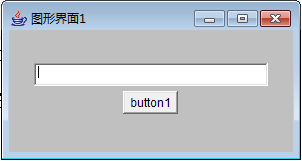
import java.awt.*;

import java.awt.event.ActionEvent;

import java.awt.event.ActionListener;

import java.awt.event.WindowEvent;

import java.awt.event.WindowListener;

public class GraphUI extends Frame implements
   ActionListener,WindowListener     {

 private Label label1;

 private TextField textfield1;

 private Button button1;

 public GraphUI(){

            super     ("图形界面1");

     this.setSize(300,160);

     this.setBackground(Color.LIGHT_GRAY);

     this.setLocation(500,500);

     this.     setLayout     (new FlowLayout());


     label1 = new Label("            ");

     textfield1 = new TextField(30);

     button1 = new Button("button1");


     this.add(label1);

     this.add(textfield1);

     this.add(button1);


     button1.     addActionListener(this::actionPerform)     ;//注册事件

     this.      assWindowListener(this::actionPerform)     ;//注册事件;

     this.     setVisible(true)     ;//显示界面

 }


 public void       actionPerformed(ActonEvent e)      {

     if(e.getSource()==button1)

                     label1.setText(textField1.getText())     ;

 }


 public static void main(String[] args) {

                  new GraphUI()     ;

 }


}


class WinClose implements       WindowListener     {

 public void windowClosing(WindowEvent e){

     System.exit(0);

 }

 public void windowOpened(WindowEvent e){}

 public void windowActivated(WindowEvent e){}

 public void windowDeactivated(WindowEvent e){}

 public void windowClosed(WindowEvent e){}

 public void windowIconified(WindowEvent e){}

 public void windowDeiconified(WindowEvent e){}

}
3.画图
import java.awt.*;

import java.awt.event.*;

public class tuxing extends Frame

             implements      ActionListener,ItemListener,WindowListener     //写出监听接口,按首字母排列写出

{

Color color = Color.red;                  //画线的颜色

Panel p1;

TextField text;

Choice c;

MenuBar mb1;

Menu mf1,me1,mh1,md1;

CheckboxMenuItem cbmi1;

PopupMenu pm1;

Dialog d;

int drawG;//记录画什么图形


public tuxing()

{

     super     ("图形界面设计");

Label l1=new Label("画字内容");

text=new TextField("",20);

Label l2=new Label("设置颜色");

c=new Choice();

c.     addItem     ("红色");

c.     addItem     ("蓝色");

c.     addItem     ("黄色");

c.     addItem     ("绿色");

p1=new Panel();

p1.     add(l1)     ;

p1.     add(text)     ;

p1.     add(l2)     ;

p1.     add(c)     ;

add(p1,"North");


text.     addActionListener(this)     ;           //注册文本行的事件监听程序

this.     addWindowListener(this)     ;//窗口监听事件注册

c.     addItemListener(this)     ;              //注册选择框事件监听程序


setSize(540,380);

setLocation(400,200);

p1.setBackground(Color.lightGray);

setBackground(Color.white);

setVisible(true);


d = new Dialog(     this     ,"Dialog Example",true);

d.add(new Label("打开一个对话框"),"Center");

d.setSize(120,60);

d.setLocation(500,300);

d.     addWindowListener(this)     ;      //为对话框d注册事件监听程序

addmyMenu();

    }

public void addmyMenu()

    {

        mb1 = new MenuBar();             //生成一个菜单栏

        this.     setMenuBar(mb1)     ;               //框架f上添加菜单栏

        mf1 = new Menu("File");          //生成一个菜单

        me1 = new Menu("Edit");

        mh1 = new Menu("Help");

        mb1.add(mf1);                    //菜单栏中加入菜单

        mb1.add(me1);

        mb1.add(mh1);

             mf1.add(new MenuItem("Open"))     ;   //生成菜单项Open并加入到File菜单

       mf1.addActionListener(this);

             me1.add(new MenuItem("画圆"))     ;  //生成菜单项画圆并加入到Edit菜单

             me1.add(new MenuItem("画矩形"))     ; //生成菜单项画矩形并加入到Edit菜单

             me1.add(new MenuItem("画线"))     ; //生成菜单项画线并加入到Edit菜单

       me1.addActionListener(this);

    }

    public void actionPerformed(ActionEvent e)

    {

if (e.getSource()==text)      repaint()     ;

if(e.getActionCommand()=="Open")         d.setVisible(ture)     ;

if(e.getActionCommand()=="画圆") {   drawG=1;repaint();}

if(e.getActionCommand()=="画矩形"){  drawG=2;repaint(); }

if(e.getActionCommand()=="画线") {   drawG=3;repaint();}

    }


    public void      ItemStateChanged(ItemEvent e)     (ItemEvent e)

    {

        if (c.getSelectedItem()=="红色")  color = Color.red;          //对选择框操作时触发

        if (c.getSelectedItem()=="蓝色")  color = Color.blue;

        if (c.getSelectedItem()=="黄色")  color = Color.yellow;

        if (c.getSelectedItem()=="绿色")  color = Color.green;

        repaint();

    }


 public void windowClosing(WindowEvent e)

    {

        System.exit(0);

    }

public void windowOpened(WindowEvent e){}

public void windowActivated(WindowEvent e){}

public void windowDeactivated(WindowEvent e){}

public void windowClosed(WindowEvent e){}

public void windowIconified(WindowEvent e){}

public void windowDeiconified(WindowEvent e){}


 public void      paint(Graphics g)

    {

        g.setColor(color);

        g.     drawString     (text.getText(),350,350);//画字符串

        if(drawG==1)g.     drawOval     (100,100,200,200);

        if(drawG==2)g.     drawRect     (200,150,120,100);

        if(drawG==3)g.     drawLine     (10,180,170,330);

    }


 public static void main(String arg[])

    {

        new tuxing();

    }

}