Java接口自动化测试框架设计-4-POST请求方法封装过程和测试
这个接口自动化测试框架到目前为止,我们已经完成了Get请求的封装和必要的工具类的支持。接下来这篇,我来介绍如何完成POST请求的封装过程。一般来说,在一个项目中,接口测试很多时候就是测试Get和POST方法,其他的请求方式的接口很少,占的比重几乎不计。所以,这个Java接口自动化测试框架的核心就是Get和POST请求方法的封装过程。
1.POST接口举例
浏览器打开https://reqres.in/,下拉一屏。点击第一个POST请求,这个接口的介绍信息如下。
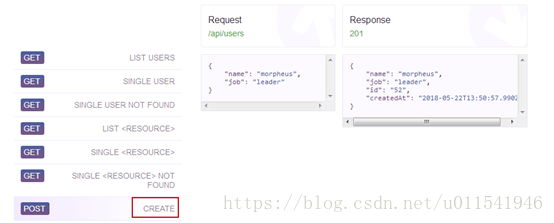
这个接口的作用是创建用户,参数是一个json类型的数据,一个name一个job,两个JSON对象。发送请求之后,返回的JSON数据有name和job和id,以及创建时间这几个数据。
2.Postman手动实现
我们先在本地postman环境,先来手动测试实现下这个post接口的请求过程。
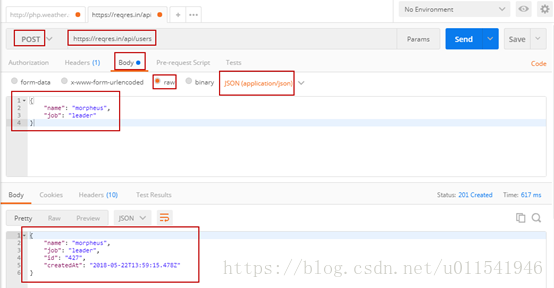
这个post接口请求还是比较简单,很容易在postman上实现该请求。
3.Java代码自动化实现
我们已经可以正确地在postman上实现创建用户这个接口的手动测试,那么我们想要这个过程自动化实现,如何做呢。下面我在RestClient.java封装了两个方法,一个是带请求头信息的Get请求,一个是带请求头信息的POST请求方法。这篇,了解了POST请求方法,带请求头的Get方法封装就很好理解。
-
package com.qa.restclient;
-
-
import java.io.IOException;
-
import java.util.HashMap;
-
import java.util.Map;
-
-
import org.apache.http.client.ClientProtocolException;
-
import org.apache.http.client.methods.CloseableHttpResponse;
-
import org.apache.http.client.methods.HttpGet;
-
import org.apache.http.client.methods.HttpPost;
-
import org.apache.http.entity.StringEntity;
-
import org.apache.http.impl.client.CloseableHttpClient;
-
import org.apache.http.impl.client.HttpClients;
-
-
public class RestClient {
-
-
-
//1. Get 请求方法
-
public CloseableHttpResponse get(String url) throws ClientProtocolException, IOException {
-
-
//创建一个可关闭的HttpClient对象
-
CloseableHttpClient httpclient = HttpClients.createDefault();
-
//创建一个HttpGet的请求对象
-
HttpGet httpget = new HttpGet(url);
-
//执行请求,相当于postman上点击发送按钮,然后赋值给HttpResponse对象接收
-
CloseableHttpResponse httpResponse = httpclient.execute(httpget);
-
-
return httpResponse;
-
}
-
-
//2. Get 请求方法(带请求头信息)
-
public CloseableHttpResponse get(String url,HashMap<String,String> headermap) throws ClientProtocolException, IOException {
-
-
//创建一个可关闭的HttpClient对象
-
CloseableHttpClient httpclient = HttpClients.createDefault();
-
//创建一个HttpGet的请求对象
-
HttpGet httpget = new HttpGet(url);
-
//加载请求头到httpget对象
-
for(Map.Entry<String, String> entry : headermap.entrySet()) {
-
httpget.addHeader(entry.getKey(), entry.getValue());
-
}
-
//执行请求,相当于postman上点击发送按钮,然后赋值给HttpResponse对象接收
-
CloseableHttpResponse httpResponse = httpclient.execute(httpget);
-
-
return httpResponse;
-
}
-
-
//3. POST方法
-
public CloseableHttpResponse post(String url, String entityString, HashMap<String,String> headermap) throws ClientProtocolException, IOException {
-
//创建一个可关闭的HttpClient对象
-
CloseableHttpClient httpclient = HttpClients.createDefault();
-
//创建一个HttpPost的请求对象
-
HttpPost httppost = new HttpPost(url);
-
//设置payload
-
httppost.setEntity(new StringEntity(entityString));
-
-
//加载请求头到httppost对象
-
for(Map.Entry<String, String> entry : headermap.entrySet()) {
-
httppost.addHeader(entry.getKey(), entry.getValue());
-
}
-
//发送post请求
-
CloseableHttpResponse httpResponse = httpclient.execute(httppost);
-
return httpResponse;
-
}
-
-
-
}
-
-

然后,我们需要写一个TestNG测试用例来测试下这个封装的post方法好不好用。由于我们去前面几篇文章介绍了TestNG测试get方法的代码,这里我们就直接拷贝和修改部分代码就行。
在写测试用例之前,我们需要提前准备好json数据,一般来说,在Java中JSON数据都是放在JAVA Bean类中,通过JSON把高级对象序列化成JSON对象。
在src/main/java中新建包:com.qa.data,然后新建一个Users.java,这个命名就参考接口的url单词就行。在postman或者网站该post方法,我们知道,需要name和job这两个json对象。我们新建一个bean类,同alt+shift+s,然后选择生成构造方法和set和get方法。
-
package com.qa.data;
-
-
public class Users {
-
-
private String name;
-
private String job;
-
-
public Users() {
-
super();
-
}
-
-
public Users(String name, String job) {
-
super();
-
this.name = name;
-
this.job = job;
-
}
-
-
public String getName() {
-
return name;
-
}
-
-
public void setName(String name) {
-
this.name = name;
-
}
-
-
public String getJob() {
-
return job;
-
}
-
-
public void setJob(String job) {
-
this.job = job;
-
}
-
-
}
好了,在src/test/java下的com.qa.tests我们新建一个POST测试用例,现在我们的TestNG测试类代码如下:
-
package com.qa.tests;
-
-
import java.io.IOException;
-
import java.util.HashMap;
-
-
import org.apache.http.client.ClientProtocolException;
-
import org.apache.http.client.methods.CloseableHttpResponse;
-
import org.apache.http.util.EntityUtils;
-
import org.testng.Assert;
-
import org.testng.annotations.BeforeClass;
-
import org.testng.annotations.Test;
-
-
import com.alibaba.fastjson.JSON;
-
import com.alibaba.fastjson.JSONObject;
-
import com.qa.base.TestBase;
-
import com.qa.data.Users;
-
import com.qa.restclient.RestClient;
-
import com.qa.util.TestUtil;
-
-
public class PostApiTest extends TestBase {
-
TestBase testBase;
-
String host;
-
String url;
-
RestClient restClient;
-
CloseableHttpResponse closeableHttpResponse;
-
-
-
-
public void setUp() {
-
testBase = new TestBase();
-
host = prop.getProperty("HOST");
-
url = host + "/api/users";
-
-
}
-
-
-
public void postApiTest() throws ClientProtocolException, IOException {
-
restClient = new RestClient();
-
//准备请求头信息
-
HashMap<String,String> headermap = new HashMap<String,String>();
-
headermap.put("Content-Type", "application/json"); //这个在postman中可以查询到
-
-
//对象转换成Json字符串
-
Users user = new Users("Anthony","tester");
-
String userJsonString = JSON.toJSONString(user);
-
//System.out.println(userJsonString);
-
-
closeableHttpResponse = restClient.post(url, userJsonString, headermap);
-
-
//验证状态码是不是200
-
int statusCode = closeableHttpResponse.getStatusLine().getStatusCode();
-
Assert.assertEquals(statusCode, RESPNSE_STATUS_CODE_201,"status code is not 201");
-
-
//断言响应json内容中name和job是不是期待结果
-
String responseString = EntityUtils.toString(closeableHttpResponse.getEntity());
-
JSONObject responseJson = JSON.parseObject(responseString);
-
//System.out.println(responseString);
-
String name = TestUtil.getValueByJPath(responseJson, "name");
-
String job = TestUtil.getValueByJPath(responseJson, "job");
-
Assert.assertEquals(name, "Anthony","name is not same");
-
Assert.assertEquals(job, "tester","job is not same");
-
-
}
-
-
}
建议,在写测试用例过程中,需要和postman上的请求结果参考,特别是Headers这里的键值对。这里留一个作业,上面我写了一个Get带请求头的封装方法,你可以对照postman中的请求头去写一个单元测试用例去测试下这个带headers的Get方法。
目前,Java接口自动化测试框架的核心部分,http请求方法的封装已经完成。接下里还有测试日志,测试报告,或者其他需要抽取优化的模块去完成。