ESM import.meta All In One
ESM import.meta All In One
获取 ES Module 的
meta原数据
import.meta
The import.meta meta-property exposes context-specific metadata to a JavaScript module.
It contains information about the module, such as the module's URL.
import.meta.url
The full URL to the module, includes query parameters and/or hash (following the ? or #).
In browsers, this is either the URL from which the script was obtained (for external scripts), or the URL of the containing document (for inline scripts).
In Node.js, this is the file path (including the file:// protocol).
https://developer.mozilla.org/en-US/docs/Web/JavaScript/Reference/Operators/import.meta
使用场景
- 使用
ESM在 Node.js 中实现__dirname功能, 获取模块所在的文件夹的绝对路径 - ...
import fs from 'node:fs';
import path from 'node:path';
import { fileURLToPath } from 'node:url';

const __filename = fileURLToPath(import.meta.url);
const __dirname = path.dirname(__filename);
console.log(`✅ import.meta.url =`, import.meta.url, typeof import.meta.url)
console.log(`✅ __filename =`, __filename, typeof __filename)
console.log(`✅ __dirname`, __dirname, typeof __dirname)

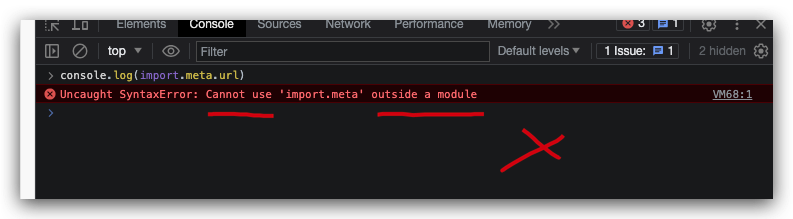
errors
solutions
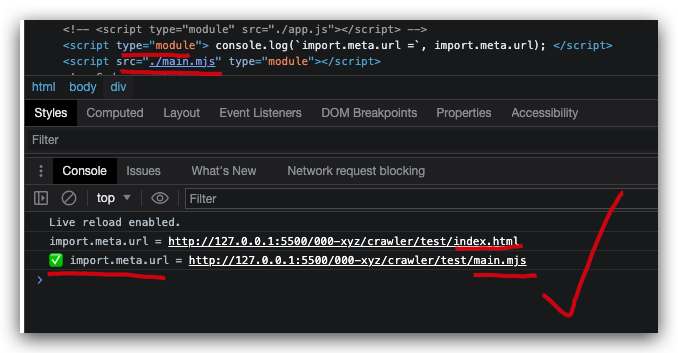
- 浏览器
<script type="module">
<script type="module">
  console.log(`import.meta.url =`, import.meta.url);
</script>
<!-- 或 -->
<script src="./main.mjs" type="module"></script>
// main.mjs
console.log(`✅ import.meta.url =`, import.meta.url);
- Node.js
import.meta.resolve
const absolutePath = await import.meta.resolve(specifier[, parent]);
// main.mjs
const resolvedPath = await import.meta.resolve('./helper.mjs');
https://nodejs.org/docs/latest-v15.x/api/esm.html#esm_import_meta
https://deno.land/manual@v1.36.3/runtime/import_meta_api
demos
ESM 中实现
__dirname
import fs from 'node:fs';
import path from 'node:path';
import { fileURLToPath } from 'node:url';
// import fs from 'fs';
// import path from 'path';
// import { fileURLToPath } from 'url';

// create one custom `__dirname`, because it doesn't exist in es-module env.
// use `import.meta.url` to get the current module's URL, ✅
// then get the module's folder absolute path
const __filename = fileURLToPath(import.meta.url);
const __dirname = path.dirname(__filename);
const dir = path.resolve(path.join(__dirname, 'upload');

if (!fs.existsSync(dir)) {
  fs.mkdirSync(dir);
}

// OR
if (!fs.existsSync(dir)) {
  fs.mkdirSync(dir, {
    mode: 0o744, // Not supported on Windows. Default: 0o777
  });
}
CJS
__dirname
const fs = require('fs');
const path = require('path');

const dir = path.resolve(path.join(__dirname, 'upload');

if (!fs.existsSync(dir)) {
  fs.mkdirSync(dir);
}

// OR
if (!fs.existsSync(dir)) {
  fs.mkdirSync(dir, {
    mode: 0o744, // Not supported on Windows. Default: 0o777
  });
}
node:fs vs fs
import fs from 'node:fs';
import fs from 'fs';
node:类似https://,file://是一种通信协议 ❓
refs
https://stackoverflow.com/questions/21194934/how-to-create-a-directory-if-it-doesnt-exist-using-node-js/71735771#71735771
https://stackoverflow.com/questions/67554506/what-are-the-nodefs-nodepath-etc-modules
©xgqfrms 2012-2021
原创文章,版权所有©️xgqfrms, 禁止转载 🈲️,侵权必究⚠️!
未经授权禁止转载,违者必究!