/*MacOS苹果系统,正常情况下,只能安装到苹果公司自己出品的Mac电脑,俗称白苹果,不能安装到各种组装机或者其他品牌的品牌机上,黑苹果的的原理,就是通过一些 “破解补丁” 工具欺骗macOS系统,让苹果系统认为你的电脑其实是一台苹果电脑,从而可以安装运行。*/
1.品牌苹果笔记本或苹果一体机(俗称正品品牌苹果系统),通过群发脚本调用苹果电脑系统下的imessages应用来实现自动群发imessages短信
优点: 只需要群发脚本代码即可实现群发,无需其他任何操作。
缺点: 如果发送的较多,官方会封ID或设备串码(序列号、主板序列号、UUID等设备串码),一旦设备串码被封,苹果电脑下很多应用都无法使用,得不偿失,解封很麻烦(解封需要电联官方解封)。
2.U盘安装法,刻录U盘进行安装是主流选择,这样安装调试好的黑苹果Mac os问题最少,也较为稳定: 下载黑苹果安装镜像 → 刻录到U盘 → 调整配置文件 → 格式化准备好的硬盘 → 重启修改BIOS设置 → 使用U盘引导 → 安装黑苹果到目标硬盘 → 进入系统后调试
优点: 安装在windows系统的PC硬件电脑上的黑苹果系统通过特定工具及技术洗成白苹果后,完全和Mac笔记本或苹果一体机拥有完全一样的功能。发送数量也大大提高。
缺点:需要具备U盘制作启动盘相关技术知识,并将苹果系统安装在英特尔或者AMD架构的硬件上,并使用相关工具注入五码(序列号、主板序列号、UUID等设备串码、MLB、ROM)洗成白苹果。
3.镜像恢复法,在Windows下使用镜像恢复软件安装:下载恢复版镜像 → 重启修改BIOS设置 → 安装镜像恢复软件 → 格式化准备好的硬盘 → 拷贝EFI文件 → 执行镜像恢复 → 添加UEFI启动项 → 进入系统后调试。
优点: 安装在windows系统的PC硬件电脑上的黑苹果系统通过特定工具及技术洗成白苹果后,完全和Mac笔记本或苹果一体机拥有完全一样的功能。发送数量也大大提高。
缺点:需要具备相关技术知识,并将苹果系统安装在英特尔或者AMD架构的硬件上,并使用相关工具注入五码(序列号、主板序列号、UUID等设备串码、MLB、ROM)洗成白苹果。
4.Windows下通过安装Vmware虚拟机,在Vmware虚拟机下安装Mac OS黑苹果系统,通过特定工具以及技术洗白苹果后,然后通过克隆复制多开N个这样子的苹果系统,通过脚本全自动实现批量群发。
优点: 安装部署起来简单方便,随时可以大批量克隆复制多开系统,即使app id或Imgessages被封不能发送,使用者可以随时更换设备串码(序列号、主板序列号、UUID等设备串码)等来解封从而达到继续使用Imessages
缺点:需要根据硬件信息定制对应得EFI启动,并且进入系统后必须使用OC或CC方式正确的注入三码后才能永久使用imessages(解封方便,使用者随时可以自行使用相关工具来生成新的串码来更换设备串码解封设备)
5.黑苹果注入三码,避免封号,解锁iCloud、 FaceTime、iMessage
(1)什么是苹果三码?
苹果的生态是一套完整的闭环,每一个苹果硬件产品都有独一无二的序列号、主板序列号和 UUID,它们都有和机型ID对应的编码规则,这点是非常确定的,所以三码不能胡乱套用,必须和机型 ID 匹配。
(2)三码主要影响以下苹果服务和功能:FaceTime、iMessage、iCloud
三码指的是机型序列号(SerialNumber),主板序列号(BoardSerialNumber),通用唯一识别码(UUID)
生成的序列号首先在EveryMac(https://everymac.com/ultimate-mac-lookup/)验证是否符合编码规则。然后还需要到苹果官网(https://checkcoverage.apple.com/?locale=zh_CN)验证序列号的“无效性”,如果EveryMac显示有效,而苹果官网显示无效,同时满足这两个条件,这个序列号就是黑苹果可以使用的。为什么?因为这个序列号并不是不存在(符合编码规则),苹果说无效可能意味着它还未注册,反之,如果苹果官网显示出了正确的查询结果,那么这个序列号属于已注册的白苹果,强烈建议不要使用,大概率会导致AppleID被拉黑。
(3)APP ID无法激活iCloud、Imessages、FaceTime等应用?
记录良好的
Apple ID:App Store 和 iMessage 没有黑历史;账号注册及使用时间越长越好;账号下绑定了多个苹果设备并且有 App
Store 的消费记录就更好了。有了这种 Apple
ID,三码问题和各类苹果服务不能用的情况基本不会在你这里出现。与之对应的另一种情况就是,一个新注册的
ID,没有绑定任何设备,没有消费记录甚至没有绑定支付方式,系统没有正确的注入设备串码,这样的账号在苹果的服务器看来就是一个机器人账号,新账号+黑苹果,基本上一登录就会被自动拉黑。
二、iMessage群发
注意:文中包含的代码、软件、系统、图样等是作为技术研究,请勿作为非法用途,因违反相关规定的,一切后果自负,与作者无关。
1.自动群发是脚本自动调用苹果系统上的Imessages应用,脚本控制iMessage客户端全自动发送。
简易版示例代码:(完整版全套包含:根据不同电脑的CPU,主板,显卡等硬件定制的系统、配套工具、设备串码工具、群发脚本、全套可实现防封ID,单ID无限制,新老ID皆可激活使用imessages,全套整体部署有意联系企鹅Q:2632313923)
  1 set successCount to 0
  2 set errorCount to 0
  3
  4 tell application "Messages"
  5     with timeout of 8 * 3600 seconds
  6         set phoneFilePath to my current_folder_path() & "phoneNumber.txt"
  7         set phoneData to read phoneFilePath
  8         set phoneEntries to paragraphs of phoneData
  9         set phone_nums to count phoneEntries
 10
 11         repeat with i from 1 to count phoneEntries
 12             -- *******************************************
 13             -- 将要发送的短信文本内容
 14             -- *******************************************
 15             set msgText to (my AppendFace("hello,")) & my AppendFace("下午好啊") &  my AppendFace("张三")
 16             set phone to (phoneEntries's item i)'s text
 17             set targetService to (1st service whose service type = iMessage)
 18             set theBuddy to buddy phone of targetService
 19
 20
 21             set num to the length of phone
 22             -- 如果需要发送AppleID账号设为true 否则设为false
 23             set isEmail to true
 24             if ((num = 11 and (my isSendPhone(phone)) = false) or isEmail) then
 25                 try
 26                     --发送文字内容消息
 27                     send msgText to theBuddy
 28
 29                     -- 发送图片内容消息
 30                     set imageFilePath to my current_folder_path() & "imessages.jpg"
 31                     send file (POSIX file imageFilePath as string) to theBuddy
 32
 33                     set logText to phone & " *** " & "1" & " *** " & date string of (current date) & " " & time string of (current date) & " *** " & "发送成功
 34 "
 35                     ---延时一秒,不然取不到已发送的状态
 36                     --delay (random number from 3 to 5)
 37                     delay 1--删除多余的消息
 38                     (*
 39                     set chatNum to (get count of chat)
 40                     if (chatNum >50)  then
 41                         my deleteMsg(chatNum)
 42                     end if
 43                     *)
 44
 45                     my WriteLog(logText)
 46                     my WritePhone(phone)
 47
 48                     set successCount to successCount + 1 -- 记录成功数
 49                 on error errorMessage number errorNumber
 50
 51                     set logText to phone & " *** " & "0" & " *** " & date string of (current date) & " " & time string of (current date) & " *** " & "发送失败
 52 "
 53                     my WriteLog(logText)
 54                     log "捕获的异常:" & errorMessage & "异常的编号:" & errorNumber
 55                     set errorCount to errorCount + 1 -- 记录失败数
 56                 end try
 57             end if
 58         end repeat
 59
 60
 61         set titleStr to "数据总数:" & phone_nums & "个  " & "发送成功:" & successCount & "个 " & "发送失败:" & errorCount & "个"
 62         set btns to {"知道了"}
 63         display dialog titleStr buttons btns default button 1 --默认选择第1个按钮(按return时就会让弹出框消失)
 64         get the button returned of the result -- 弹出框
 65     end timeout
 66 end tell
 67
 68
 69 # 删除信息
 70 on deleteMsg(maxNum)
 71     tell application "Messages" to activate
 72
 73     tell application "System Events"
 74         tell process "Messages"
 75             tell window 1
 76                 repeat's maxNum times --需要删除的数量
 77
 78                     delay 0.5
 79                     click row 1 of table 1 of scroll area 1 of splitter group 1
 80                     delay 0.2
 81                     click menu item "删除对话…" of menu "文件" of menu bar item "文件" of menu bar 1 of application process "Messages" of application "System Events"
 82                     delay 0.2
 83                     try
 84                         click buttons "删除" of sheet 1
 85                     end try
 86                 end repeat
 87             end tell
 88         end tell
 89     end tell
 90 end deleteMsg
 91
 92
 93 -- 拼接表情
 94 on AppendFace(msgText)
 95     set face to my RandomFace()
 96     set content to face & msgText & "
 97 "
 98 end AppendFace
 99
100
101 -- 随机表情
102 on RandomFace()
103     -- 表情数组
104     set faceList to {"🐟", "🦐", "🦀️", "😊", "😂", "😄", "🎆", "🎉", "🍺", "💐", "🌹", "🦈", "🐲", "🐢", "🐳", "🐬", "🐚", "💰", "🎁"}
105     set face to item (random number from 1 to count faceList) of faceList
106     return face
107 end RandomFace
108
109
110 -- 判断是否已经发送过该手机号
111 --     the_phone(手机号码)
112 on isSendPhone(the_phone)
113     set num to the length of the_phone
114     if (num = 11) then
115         set fileName to date string of (current date)
116         set logFilePath to my current_folder_path() & "send/" & fileName & ".txt"
117         set this_file to (POSIX file logFilePath as string)
118         set this_story to the_phone & "
119 "
120         try
121             set fp to open for access this_file
122             set myText to read fp
123
124             if (myText does not contain the_phone) then
125                 return false
126             else
127                 return true
128             end if
129         on error
130             return false
131         end try
132     end if
133 end isSendPhone
134
135
136 -- 记录有效手机号
137 --     the_phone(手机号)
138 on WritePhone(the_phone)
139     set num to the length of the_phone
140     if (num = 11) then
141         set fileName to date string of (current date)
142         set logFilePath to my current_folder_path() & "send/" & fileName & ".txt"
143         set this_file to (POSIX file logFilePath as string)
144         set this_story to the_phone & "
145 "
146         try
147             set fp to open for access this_file
148             set myText to read fp
149
150             if (myText does not contain the_phone) then
151                 my write_to_file(this_story, this_file, true, true)
152             end if
153         on error
154             my write_to_file(this_story, this_file, true, true)
155         end try
156     end if
157 end WritePhone
158
159
160 -- 日志写入
161 --     the_text(日志内容)
162 on WriteLog(the_text)
163     set fileName to date string of (current date)
164     set logFilePath to my current_folder_path() & "log/" & fileName & ".txt"
165     set this_file to (POSIX file logFilePath as string)
166     my write_to_file(the_text, this_file, true, false)
167 end WriteLog
168
169
170 -- 写入文件
171 --    this_data(文本内容,string)
172 --    target_file(文件路径,string)
173 --    append_data(是否拼接,boolean)
174 --    append_end(是否从后面拼接,boolean)
175 on write_to_file(this_data, target_file, append_data, append_end)
176     try
177         set the target_file to the target_file as text
178         set the open_target_file to ¬
179             open for access file target_file with write permission
180
181         if append_data is false then
182             set eof of the open_target_file to 0
183             write this_data to the open_target_file starting at eof
184         else if append_end is false then
185             -- 1、读取原来内容;
186             -- 2、清空文件,写入新内容;
187             -- 3、在新内容后面拼接原始内容
188             try
189                 set fp to open for access target_file
190                 set myText to read fp
191                 set eof of the open_target_file to 0
192                 write this_data to the open_target_file starting at eof
193                 write myText to the open_target_file starting at eof
194             on error
195                 write this_data to the open_target_file starting at eof
196             end try
197         else
198             write this_data to the open_target_file starting at eof
199         end if
200
201         close access the open_target_file
202         return target_file
203     on error
204         try
205             close access file target_file
206         end try
207         return false
208     end try
209 end write_to_file
210
211
212 -- 获取当前文件的父文件夹路径
213 on current_folder_path()
214     set UnixPath to POSIX path of ((path to me as text) & "::")
215     return UnixPath
216 end current_folder_path
2.单台电脑多开多个苹果(Mac os)系统同时群发:根据上面的代码自行更改更加强大的全自动发送脚本,改良后如下:(发送的三种模式:1.纯文字内容,2.纯图片内容,3.文字+图片内容组合)
3.群控系统全自动控制多个mac os系统,给所有苹果系统一键执行全自动更换ID、设备串码、启动群发、停止群发等操作:(发送的三种模式:1.纯文字内容,2.纯图片内容,3.文字+图片内容组合)
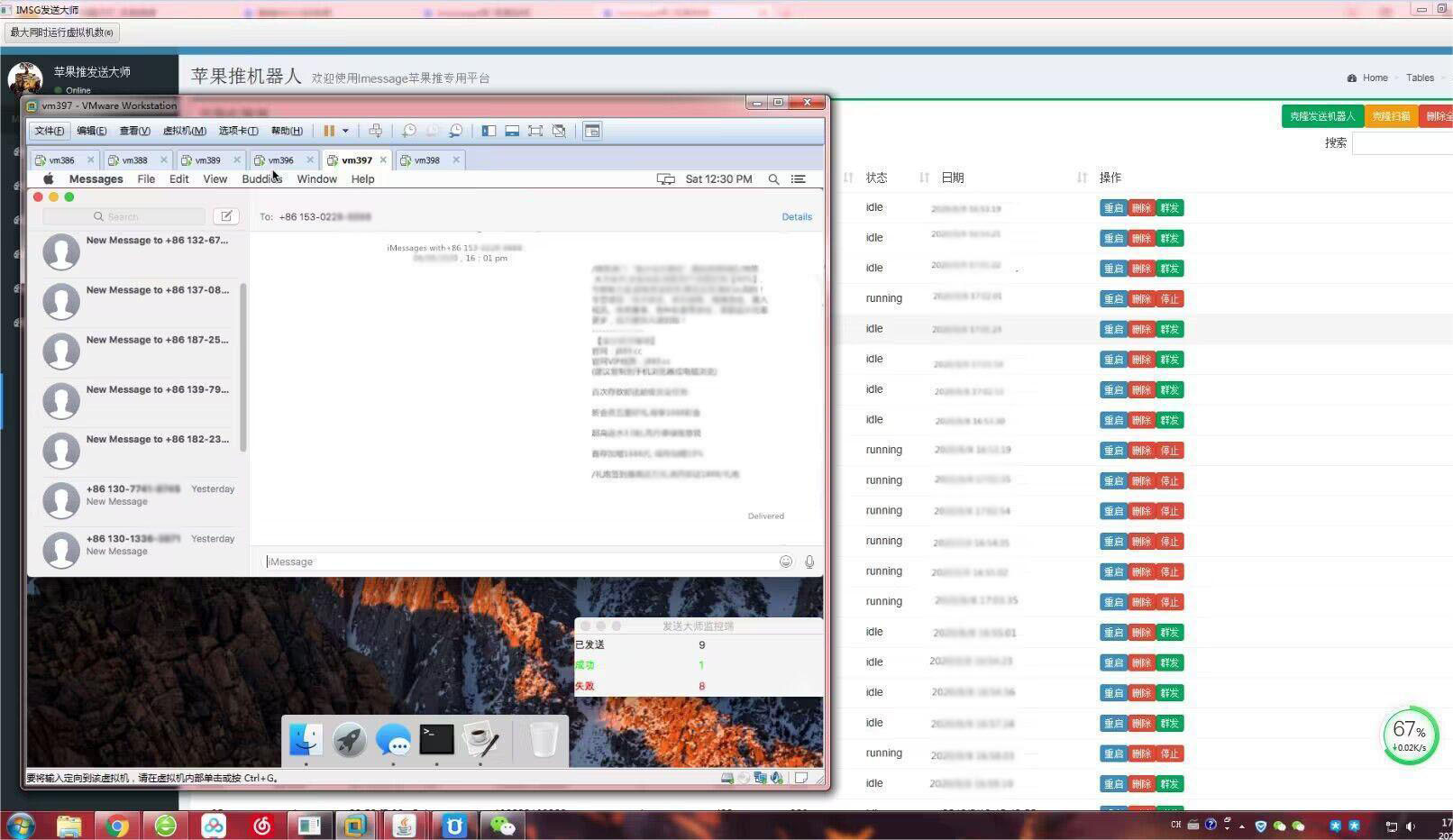
三、AMD或者英特尔架构的电脑上安装的黑苹果系统(Mac os)或Vmware下的黑苹果系统imessages群发短信注意事项:
1.黑苹果Mac Os系统注入三码或五码,App Store iMessages 和FaceTime 可用
/* 如果登陆app store过程一直在转圈的情况,或imessages一直无法激活的原因是:app store 会检查机器的smbios 信息,如果不是 mac 机器,就不让登录。*/
(1) Clover configurator 或OpenCore制作引导EFI文件后。正确的注入三码或五码。(黑苹果正确的注入了三码或五码,三码或五码不能胡乱套用,必须和机型ID匹配)
(2) 登录“偏好设置-icloud” 或直接登录imessages时正确输入app id账号信息。
(3)记录良好的 Apple ID:App Store 和 iMessage
没有黑历史;账号注册及使用时间越长越好;账号下绑定了多个苹果设备并且有 App Store 的消费记录就更好了。有了这种 Apple
ID,三码问题和各类苹果服务不能用的情况基本不会在你这里出现。
2.有偿提供黑苹果系统洗白苹果后全自动群发方案(Imessages数据检测脚本,全自动群发imessages脚本)
(1)苹果手机自动群发imessages、批量群控手机设备群发,部署方案以及苹果手机群发脚本或APP可参考博文:
(2)对于苹果系统发送多少被限制,被风控, APP ID被冻,设备串码(序列号,设备串码等)被apple拉黑,无法发送及送达,通过指定的工具正确的将三码或五码注入到系统来解封ID被封或无法发送等问题,有偿提供解决方案。
(3)电脑端Mac Os群发Imessages,全自动检测数据脚本,全自动群发脚本,PC端全套无限群发imessages系统,新老ID皆可激活使用imessages,有意联系: 