1 //html部分
  2 <template>
  3   <div style="background-color:#F6F6F6 ;height:100vh;">
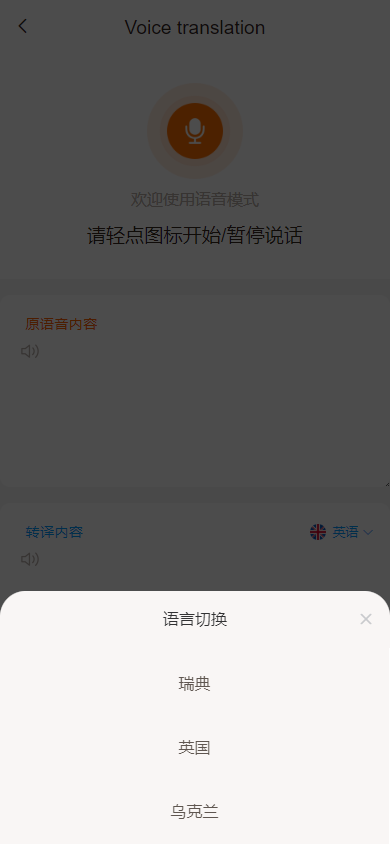
  4     <header><van-icon name="arrow-left" class="iconreturn" @click="$router.go(-1)" />{{ $t('function.votra') }}</header>
  5     <div class="speakbg">
  6       <img src="../../../assets/speak.png" class="imgk" @touchstart="beginspeak" @touchend="endspeak" id="imgs"
  7         ref="btnRef">
  8       <!-- <img src="../../../assets/speak.png" class="imgk" @click="endspeak" id="imgs" ref="btnRef"> -->
  9
 10       <p class="wkspeak">欢迎使用语音模式 </p>
 11       <P class="beginspeak" v-if="speakopen">请轻点图标开始/暂停说话</P>
 12       <P class="beginspeak" v-else>正在聆听中,请稍等</P>
 13
 14       <!-- <p class="release" @click="hearlongs">播放语音</p> -->
 15       <!-- <div id="my_camera"></div> -->
 16     </div>
 17     <div class="resultbg">
 18       <div class="result"><el-input type="textarea" class="textareaone" v-model="textone" resize="false" :readonly="true">
 19
 20         </el-input>
 21         <span class="result-titles">原语音内容</span>
 22         <el-button class="result-release" @click="releaseMusic" type="text"><img
 23             src='../../../assets/release.png'></el-button>
 24
 25       </div>
 26       <div class="results"><el-input type="textarea" class="textareaone" v-model="texttwo" resize="false"
 27           :readonly="true"></el-input>
 28         <span class="results-title">转译内容</span>
 29         <span class="results-lan" @click="openLanChoose"><img :src="imgs">{{ lan }}<i
 30             class="el-icon-arrow-down"></i></span>
 31         <el-button class="results-release" @click="releaseNewMusic" type="text"><img
 32             src='../../../assets/release.png'></el-button>
 33       </div>
 34     </div>
 35
 36     <van-action-sheet v-model="show" :actions="actions" @select="onSelect" title="语言切换" />
 37   </div>
 38 </template>
 39 <script >
 40 import Recorder from 'js-audio-recorder';
 41 import lanList from '../../../utils/laug'
 42 export default {
 43   props: {
 44   },
 45   data() {
 46     return {
 47       textone: '',
 48       texttwo: '',
 49       show: false,
 50       values: 'zh-cn',
 51       lan: '英语',
 52       speakopen: true,
 53       speaker: 'en-US-RogerNeural',
 54       actions: lanList.lanList.countryList,
 55       imgs: require('../../../assets/country/UK.png'),
 56       recorder: new Recorder({
 57         sampleBits: 16,                 // 采样位数,支持 8 或 16,默认是16
 58         sampleRate: 16000,              // 采样率,支持 11025、16000、22050、24000、44100、48000,根据浏览器默认值,我的chrome是48000
 59         numChannels: 1,                 // 声道,支持 1 或 2, 默认是1
 60         // compiling: false,(0.x版本中生效,1.x增加中)  // 是否边录边转换,默认是false
 61       })
 62     };
 63   },
 64   watch: {
 65
 66   },
 67   mounted() {
 68   console.log(this.actions)
 69
 70   },
 71   methods: {
 72     beginspeak() {
 73       this.textone = '';
 74       this.texttwo = '';
 75       Recorder.getPermission().then(
 76         () => {
 77           console.log("开始录音");
 78           this.speakopen = false;
 79           this.recorder.start(); // 开始录音
 80         },
 81         (error) => {
 82           this.$message({
 83             message: error.message,
 84             type: "info",
 85           });
 86           console.log(`${error.name} : ${error.message}`);
 87         }
 88       );
 89     },
 90     endspeak() {
 91       // 暂停录音
 92       this.speakopen = true;
 93       // 获取录音结果
 94       // this.recorderEx.getPlayTime();
 95       this.recorder.stop();
 96       const wavBlob = this.recorder.getWAVBlob() // blob格式
 97       // this.recorder.downloadWAV('翻译');
 98       const newbolb = new Blob([wavBlob], { type: 'audio/wav' })
 99       //获取当时时间戳作为文件名
100       const fileOfBlob = new File([newbolb], new Date().getTime() + '.wav')
101       console.log(fileOfBlob)
102       this.file = fileOfBlob;
103       this.lanChangeText();
104     },
105
106     onSelect(val) {
107       console.log(val, 'askdjsa');
108       this.lan = val.cname;
109       this.imgs = val.img;
110       this.values = val.type;
111       this.getVals(this.textone)
112       this.speaker = val.speaker;
113       //  this.getVal(val);
114     },
115     getWAVRecordAudioData() {
116       var wavBlob = this.recorder.getWAVBlob();
117     },
118     openLanChoose() {
119       this.actions.map((item,index)=>{
120       item.name = item.cname
121     })
122       this.show = true;
123     },
124     releaseMusic() {
125       this.recorder.play()
126     },
127     hearlongs() {
128       recorder.play()
129     },
130     releaseNewMusic() {
131       this.$axios({
132         url: this.loginbases + '/textToSpeek/222.mp3',
133         method: 'POST',
134         headers: {
135           'Content-Type': 'application/x-www-form-urlencoded'
136         },
137         responseType: 'arraybuffer',
138         data: {
139           voice: this.speaker,
140           rate: '+0%',
141           volume: '+10%',
142           text: this.texttwo
143         }
144       }).then((res) => {
145         console.log(res)
146         this.dataurl = this.getObjectURL(res.data, 'audio/mp3');
147         console.log(this.dataurl)
148         var player = new Audio(this.dataurl);
149         player.play()
150
151       })
152     },
153     // 将返回的流数据转换为url
154     getObjectURL(file, type) {
155       return window.URL.createObjectURL(new Blob([file], { type }))
156     },
157
158     //调用语音转换文字的功能
159     lanChangeText() {
160       this.$axios({
161         url: this.loginbases + '/audioToText',
162         method: 'POST',
163         headers: {
164           'Content-Type': 'multipart/form-data'
165         },
166         data: {
167           file: this.file
168         }
169       }).then((res) => {
170         console.log(res.data.data)
171         this.texttwo = res.data.data;
172         this.getVal(this.texttwo)
173
174       })
175
176     },
177     getVal(val) {
178       this.$axios({
179         url: this.loginbases + '/translation',
180         method: 'POST',
181         headers: {
182           'Content-Type': 'application/x-www-form-urlencoded'
183         },
184         data: {
185           text: val,
186           dest: this.values
187
188         }
189       }).then((res) => {
190         console.log(res)
191         if (res.data.code == 200) {
192
193           this.textone = res.data.data;
194         }
195       })
196
197
198     },
199     getVals(val) {
200       this.$axios({
201         url: this.loginbases + '/translation',
202         method: 'POST',
203         headers: {
204           'Content-Type': 'application/x-www-form-urlencoded'
205         },
206         data: {
207           text: val,
208           dest: this.values
209
210         }
211       }).then((res) => {
212         console.log(res)
213         if (res.data.code == 200) {
214
215           this.texttwo = res.data.data;
216         }
217       })
218
219
220     },
221
222
223
224   },
225   mounted() {
226
227
228   },
229
230 };
231
232 </script>
233 <style lang="scss" scoped>
234 .pic {
235   width: 200px;
236   height: 200px;
237 }
238
239 .van-action-sheet {
240   max-height: 30%;
241 }
242
243 .van-action-sheet__header {
244   font-size: 10px;
245   line-height: 3.6rem;
246 }
247
248 .van-action-sheet__header {
249   background: rgba(244,238,235,0.5);
250 }
251 .van-action-sheet__item{
252   background: rgba(244,238,235,0.5);
253   color: #5F5650;
254   font-weight: 400;
255 }
256 .van-action-sheet__item:hover{
257   background:rgba(183,173,168,0.15);
258   color: #2F2620;
259   font-weight: 500;
260 }
261 // .van-action-sheet
262 .van-action-sheet__item {
263   font-size: 10px;
264   line-height: 3rem;
265   padding: 5px 0;
266 }
267
268 .van-action-sheet__close {
269   font-size: 10px;
270   padding: 0 10px;
271 }
272
273 >>>.el-textarea__inner {
274   height: 120px;
275   background: #fff;
276   font-size: 10px;
277   border-radius: 6.4px;
278   border: none;
279   padding-top: 28px;
280   margin-top: 10px;
281   text-indent: 12px;
282
283 }
284
285 #my_camera {
286   height: 100vh;
287 }
288
289 .iconreturn {
290   position: absolute;
291   left: 8px;
292   top: 10px;
293 }
294
295 .speakbg {
296   background-color: #fff;
297   padding-bottom: 20px;
298 }
299
300 .imgk {
301   width: 60px;
302   height: 60px;
303   margin-top: 52px;
304
305   -webkit-touch-callout: none;
306   -webkit-user-select: none;
307   -khtml-user-select: none;
308   -moz-user-select: none;
309   -ms-user-select: none;
310   user-select: none;
311 }
312
313 .wkspeak {
314   margin-top: 3px;
315   color: #B7ADA8;
316 }
317
318 .results {
319   position: relative;
320
321   &-title {
322     position: absolute;
323     left: 16px;
324     top: 22px;
325     font-size: 9px;
326     color: #019EFF
327   }
328
329   &-release {
330     position: absolute;
331     top: 26px;
332     left: 12px;
333     font-size: 12px;
334     color: #019EFF
335   }
336
337   &-lan {
338     position: absolute;
339     right: 10px;
340     top: 25px;
341     display: flex;
342     color: #019EFF;
343     font-size: 8px;
344     line-height: 8px;
345
346     img {
347       width: 10px;
348       height: 10px;
349       padding: 0 4px;
350       line-height: 4px;
351       // position: absolute;
352       right: 35px;
353       margin-top: -2px;
354
355     }
356
357     i {
358       margin-left: 2px;
359     }
360   }
361 }
362
363 .result {
364   position: relative;
365
366   &-titles {
367     position: absolute;
368     left: 16px;
369     top: 22px;
370     color: #FF6201;
371     font-size: 9px;
372   }
373
374   &-release {
375     position: absolute;
376     top: 26px;
377     left: 12px;
378     font-size: 12px
379   }
380
381 }
382
383 .beginspeak {
384   color: #36291E;
385   font-size: 12px;
386   margin-top: 8px;
387 }
388 </style>