C++(1) gps转换为enu
步骤一:安装GeographicLib
首先,确保你的系统中已安装GeographicLib库。可以通过以下命令在Ubuntu中安装:
sudo apt-get install geographiclib-*   # 安装GeographicLib的库
sudo apt-get install libgeographic-*  # 安装GeographicLib的依赖库
步骤二:配置C++项目
在你的C++项目中,需要配置CMake以及链接GeographicLib库。

CMakeLists.txt
cmake_minimum_required(VERSION 3.5)

set(CMAKE_CXX_STANDARD 11)

# 设置项目名称和语言
project(my_test_project LANGUAGES CXX)

# 包含GeographicLib的头文件路径
include_directories("/usr/include/GeographicLib")

# 设置输出的可执行文件
add_executable(${PROJECT_NAME} main.cpp)

# 链接GeographicLib库(根据你的安装调整库名)
target_link_libraries(${PROJECT_NAME} Geographic)
步骤三:示例代码
以下是一个简单的示例代码,演示了如何使用GeographicLib将经纬度转换为局部直角坐标系:
main.cpp
GNSS务必是double类型 否则精度保存不到6位米
#include <iostream>
#include <GeographicLib/LocalCartesian.hpp>

int main() {
    // 当前点的经纬度和高度,作为局部坐标系的原点
    double origin_latitude = 29.116543;   // 纬度
    double origin_longitude = 111.506270; // 经度
    double origin_height = 0.0;           // 高度

    // 初始化 LocalCartesian 对象,并设置原点
    GeographicLib::LocalCartesian geoConverter;
    geoConverter.Reset(origin_latitude, origin_longitude, origin_height);

    // 要转换的另一个点的经纬度和高度
    double target_latitude = 29.106543;
    double target_longitude = 111.606270;
    double target_height = 0.0;

    // 转换为局部直角坐标系
    double x, y, z;
    geoConverter.Forward(target_latitude, target_longitude, target_height, x, y, z);

    // 输出转换后的局部坐标
    std::cout << "Local Cartesian coordinates: (" << x << ", " << y << ", " << z << ")" << std::endl;

    return 0;
}
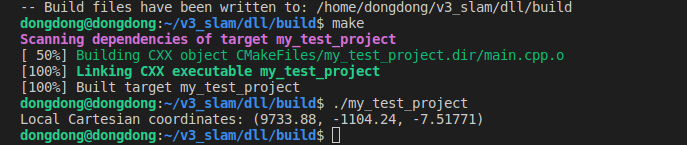
编译运行
综合版本
从yaml读取初始位置,转换enu保存ymal
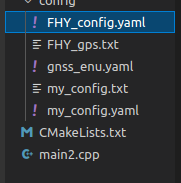
FHY_gps.txt
%YAML:1.0
---
#==============#
# Camera Model #
#==============#

Camera.name: EH2022left monocular
Camera.setup: monocular
Camera.model: perspective
Camera.fx: 1220
Camera.fy: 1220
Camera.cx: 960
Camera.cy: 540
Camera.k1: -0
Camera.k2: 0
Camera.p1: 0
Camera.p2: 0
Camera.k3: -0
Camera.k4: 0
Camera.fps: 10
Camera.cols: 1920
Camera.rows: 1080
Camera.color_order: RGB
Initial.lat: 34.2315085
Initial.lon: 108.9263953333333
Initial.alt: 372.933
Feature.max_num_keypoints: 3000
Feature.scale_factor: 1.2
Feature.num_levels: 8
PangolinViewer.keyframe_size: 0.07
PangolinViewer.keyframe_line_width: 2
PangolinViewer.graph_line_width: 1
PangolinViewer.point_size: 2
PangolinViewer.camera_size: 0.08
PangolinViewer.camera_line_width: 3
PangolinViewer.viewpoint_x: 0
PangolinViewer.viewpoint_y: -0.65
PangolinViewer.viewpoint_z: -1.9
PangolinViewer.viewpoint_f: 400
Marker.Num: 0
vAcc: 1.0
hAcc: 1.0
Fixed.altitude_flag: 0
Fixed.altitude: 400.0
Save.newmap: 1
Save.data: 1
op.is_Second_Optimize: 0
op.Second_Optimize_Th: 0
op.Remove_Kayframe_Th: 6.0
op.Global_Optimize_Th: 1.0
Loop_Th: 80.0
Relocalize_Th: 80.0
Relocalize_KF_Th: 3.0
V_Instant_Th: 200.0
Tracking_CF_Th: 10.0
main.cpp
#include <iostream>
#include <GeographicLib/LocalCartesian.hpp>


#include "opencv2/core.hpp"
#include <time.h>
using namespace cv;
using namespace std;


bool API_WriteFromYaml_name_value(String path_yaml,String name,String data){
    //创建文件
    FileStorage fs(path_yaml, FileStorage::WRITE);
    fs << name << data;
    fs.release();
    return 0;
}


//从指定文件读取 指定名字的数据
bool API_ReadFromYaml_name_data(string path_yaml,string name,double *data){


    /*
    写入(FileStorage::WRITE,覆盖写)

    追加(FileStorage::APPEND,追加写)

    读取(FileStorage::READ)
    */
    FileStorage fs2(path_yaml, FileStorage::READ);
    if (!fs2.isOpened()) {
        std::cerr << "Failed to open FileStorage" << std::endl;

        return 0;
    }

    //std::cerr << "打开成功" << path_yaml << std::endl;

    //注意数据格式转换 to_string()

    // second method: use FileNode::operator >>
    if (!fs2[name].isNone() && !fs2[name].empty()) {
          *data=(double)fs2[name] ;
    }
    else{ *data=-1; }

    fs2.release();

}


int main() {


    double origin_latitude = 0;   // 纬度
    double origin_longitude = 0; // 经度
    double origin_height = 0.0;  // 高度
    string path_yaml="../config/FHY_config.yaml";
    API_ReadFromYaml_name_data(path_yaml,"Initial.lat", &origin_latitude);// 读取一个数据
    API_ReadFromYaml_name_data(path_yaml,"Initial.lon", &origin_longitude);// 读取一个数据
    API_ReadFromYaml_name_data(path_yaml,"Initial.alt", &origin_height);// 读取一个数据
    cout<< "origin_latitude   "<< origin_latitude<<endl;
    cout<< "origin_longitude   "<< origin_longitude<<endl;
    cout<< "origin_height   "<< origin_height<<endl;

    //API_WriteFromYaml_name_value(path_yaml,"gps","2132312");// 写入一个数据


    // 初始化 LocalCartesian 对象,并设置原点
    GeographicLib::LocalCartesian geoConverter;
    geoConverter.Reset(origin_latitude, origin_longitude, origin_height);

    // 要转换的另一个点的经纬度和高度
    double target_latitude = origin_latitude;  //26.888
    double target_longitude = origin_longitude; //118.323
    double target_height = origin_height+100;

    // 转换为局部直角坐标系
    double x, y, z;
    geoConverter.Forward(target_latitude, target_longitude, target_height, x, y, z);

    // 输出转换后的局部坐标
    std::cout << "Local Cartesian coordinates: (" << x << ", " << y << ", " << z << ")" << std::endl;

    std::vector<double> gnss_enu = {x,y,z};
    string path_save_yaml="../config/gnss_enu.yaml";
    FileStorage fs(path_save_yaml, FileStorage::WRITE);
    fs << "gnss_enu" << gnss_enu;
    fs.release();


    return 0;
}
CMakeLists.txt
cmake_minimum_required(VERSION 3.5)

set(CMAKE_CXX_STANDARD 11)

# 设置项目名称和语言
project(my_test_project LANGUAGES CXX)

# 包含GeographicLib的头文件路径
include_directories("/usr/include/GeographicLib")


#设置opencv安装路径
#set(CMAKE_PREFIX_PATH "/home/r9000k/v1_software/opencv/opencv349/install")
#set(CMAKE_PREFIX_PATH "/home/r9000k/v1_software/opencv/opencv455/install")
#包含opencv头文件路径
find_package(OpenCV REQUIRED)
include_directories(${OpenCV_INCLUDE_DIRS})


# 设置输出的可执行文件
add_executable(${PROJECT_NAME} main2.cpp)

# 链接GeographicLib库(根据你的安装调整库名)
target_link_libraries(${PROJECT_NAME} Geographic ${OpenCV_LIBS})